

Apology and countermeasure for the problem of sending e-mail in the learningBOX
Apology and Causes
The problem occurred from approximately 8:00 p.m. on 2/27/2018 to 7:00 p.m. on 2/28/2018. We apologize for any inconvenience this may have caused to our users.
As for the cause, we use the mail server SES provided by AMAZON, and a temporary suspension action was taken due to a case of violation of the SES usage policy.
The reason for the conflict was that a large number of batch registrations of users with nonexistent e-mail addresses occurred, resulting in a very high percentage of bounce mail (error mail), and AMAZON received a warning.
As a temporary measure, we have notified users who are subject to the conflict not to use the e-mail invitation function.
As a countermeasure in the system function, we are planning to change the current requirement for an e-mail address to allow optional registration.
We sincerely apologize for any inconvenience caused. We hope that you will continue to use our services as always.
For lists that could not be sent
We will provide you with an Excel list of which users we were unable to send emails to for each user, which will be stored in our database.
There are currently five possible cases where mail could not be sent.
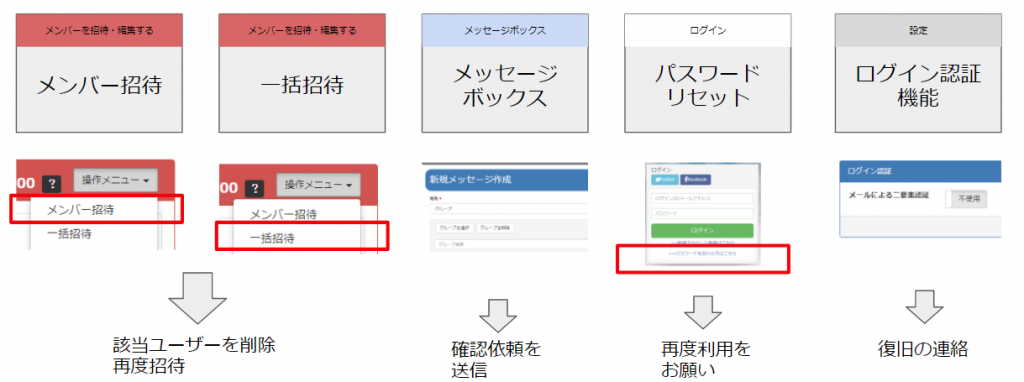
If you have already been invited to become a member but have not yet used the service
[Step 1
Delete Member
If the member has not yet been used, removing the member from the environment will not
I think that is not a problem. Please click on the member's name on the "Add/Edit Member" page and delete the member.
[Step 2
Add member again
Once the deletion is complete, please re-add the deleted member. The invitation email will be sent as usual.
If you have already been invited as a member and have already started using the service
You can use the same ID/PASS as it is.
We assume that you have notified us of your ID/PASS separately. Please feel free to use your ID/PASS as it is.
For sending a message
[Countermeasure Case 1
Send confirmation request
The message text is still in the system, so please send "Please log in and check your message" or send the same text again.
[Countermeasure Case 2
Send a separate email requesting confirmation of the message
Please send a confirmation request e-mail "Please confirm your message" etc. by another means (e-mail software), not in the system.
For password reset
If you receive a notice that you have not received it, etc., ask for the password reset operation again.
In the case of password reset, the user is unable to reset the password
We are sure that our company or the administrator has been contacted in some way.
If you contact us, please let us know that there was a glitch in the operator's system and that you are already able to use the system.
For login authentication function
Please contact us to let us know that the system has been restored. We would appreciate it if you could notify all system users of the restoration of the login function by using the message function, etc.
-
Notice of New Year's Holiday
-
Important] Notice of Fee Revision
-
[Urgent Notice] Notice of Server Connection Instability (August 23, 2019, 13:47)
-
6.19 - 6.21 Education IT Solution EXPO in Tokyo Big Sight
-
[Notice of support for Chrome version upgrade
-
Apology for the mail form problem
-
On Friday, December 28, 2018 from 9:00am to 1:00pm, we will be working on the phone lines at our headquarters. Thank you for your patience.
-
Notice of New Year's Holiday
-
We will exhibit at Kansai IT Solutions Expo in Index Osaka!
-
LearningBOX 2.5.0 is released.