SPF, DKIM, and DMARC | Ending Up in Gmail's Spam Folder? Countermeasures Against Impersonation—A Comprehensive Guide for Beginners on How They Work and How to Set Them Up


What if an important work-related message or a newsletter you put your heart into creating ended up in the recipient’s “Junk” folder?
In fact, this issue is almost always caused not by the content of the email itself, but by the sender domain authentication configured in the DNS (Domain Name System). The DNS is a system that links domains to servers on the Internet, and it also serves as the foundation for determining the reliability of emails.
In February 2024, Google significantly strengthened its sender guidelines. Businesses that send more than 5,000 emails per day are now required to implement all three of the following: SPF, DKIM, and DMARC.
Furthermore, starting in January 2025, NTT Docomo will begin gradually displaying “spoofed email warnings” on emails that do not have sender domain authentication enabled. We are now entering an era where emails with incorrectly configured DNS settings will not be delivered.
However, there are probably quite a few people who think, “SPF? DKIM? DMARC? What are those? I don’t really understand.” In this article, we’ll provide a thorough explanation of how these three technologies work, how they differ, and how to configure them in DNS—all presented in a way that’s easy to understand even for those with zero technical knowledge.
Why Is "Sender Domain Authentication" Necessary Now?

Damage caused by phishing emails is increasing year by year, leading to financial losses for companies, data breaches, and even damage to their brand reputation. Sender domain authentication technologies known as SPF, DKIM, and DMARC are used to counter these threats.
SPF (SPF) is a mechanism that verifies whether the sending server is legitimate.
DKIM is a technology that applies a digital signature to emails to verify whether they are "from a legitimate sender" and whether "the content has been tampered with."
DMARC is a policy that determines how to handle emails that fail authentication based on SPF and DKIM results.
By configuring these settings properly, you can significantly reduce the risk of phishing emails. Let’s take a look at why this is so important.
The Current State of Phishing Emails
In recent years, there has been a sharp increase in damage caused by “phishing emails” that impersonate real companies or individuals. There have been cases where emails posing as business partners have infected recipients’ devices with malware (a general term for software created for malicious purposes), leading to the leakage of personal information, as well as cases where victims have been defrauded of money through emails instructing them to transfer funds to fake bank accounts.
What makes phishing emails so sophisticated is that, from a technical standpoint, the “From” address can be freely altered. Attackers impersonate legitimate companies’ domains to send emails that appear completely legitimate at first glance. It is extremely difficult for people to spot these emails, which is precisely why incidents continue to occur.
Furthermore, phishing emails pose a direct risk of brand damage. If your company’s domain is misused to send large volumes of phishing emails, it could significantly erode recipients’ trust. Moreover, this could result in legitimate emails being filtered into the spam folder, potentially disrupting important communications with customers.
Impact of the Gmail Sender Guidelines
In February 2024, Google strengthened its "Guidelines for Email Senders." The guidelines are summarized as follows:
Required for all senders
Support for either SPF or DKIM
Mass mailers sending more than 5,000 emails per day
Support for all three: SPF, DKIM, and DMARC
If this issue remains unresolved, emails may fail to reach Gmail users. Furthermore, in practice, DKIM is becoming virtually mandatory even for senders who do not send large volumes of email. This is because emails without DKIM are highly likely to be flagged by Gmail’s spam filter.
[Reference] Gmail, “Guidelines for Email Senders"
NTT DOCOMO's "Phishing Email Warning"
Starting in January 2025, NTT Docomo has begun displaying "spoofed email warnings" for emails that do not support sender domain authentication. For businesses that send emails to individual customers, taking action to address this issue has become a matter of urgency.
[Reference] NTT Docomo, “Phishing Email Warning Message"
Back to ContentsHow Are Emails Sent? (The Basics)
To understand sender domain authentication, the first thing you need to know is the difference between the “Envelope From” and the “Header From.” The mechanism of email is easier to understand if you think of it as the relationship between an envelope and a letter.
Envelope Sender (Envelope "From")
This is the sender's information for delivery purposes. In postal terms, it's the name written on the envelope. It will not appear on the recipient's screen.
Sender of the email (From header)
This is the sender displayed on the screen. The "Sender Information" we see on the email inbox screen refers to this.
Impersonators exploit this vulnerability

Even if the sender on the envelope is different from the sender of the letter, the email will still be delivered. You can also change just the name that appears.
たとえば、「info@大手銀行.co.jp」と表示させながら、別の場所から送ることができます。
This is how phishing emails work.
SPF, DKIM, and DMARC are mechanisms designed to prevent this problem. For now, just remember that there are “two senders.”
Back to ContentsWhat is SPF? (A Mechanism for Verifying the Sender's IP Address)
SPF is the first step in preventing spoofing. It’s a system where you register the servers authorized to send emails in the DNS. When Gmail receives an email, it verifies whether the sender is legitimate.
First, let's start by understanding how this "sender verification" system works.
Basic Concepts of SPF
SPF (Sender Policy Framework) is a mechanism for pre-declaring in DNS which servers are authorized to send email from a given domain.
For example, you would pre-register information in the DNS such as, “Emails from example.com are sent only from the server with IP address 203.0.113.1 (*for illustrative purposes only).”
The recipient checks whether the IP address of the server that actually sent the email is included in the registered list. If the email was sent from an IP address not on the list, it can be identified as a "potentially spoofed email."
How SPF Works
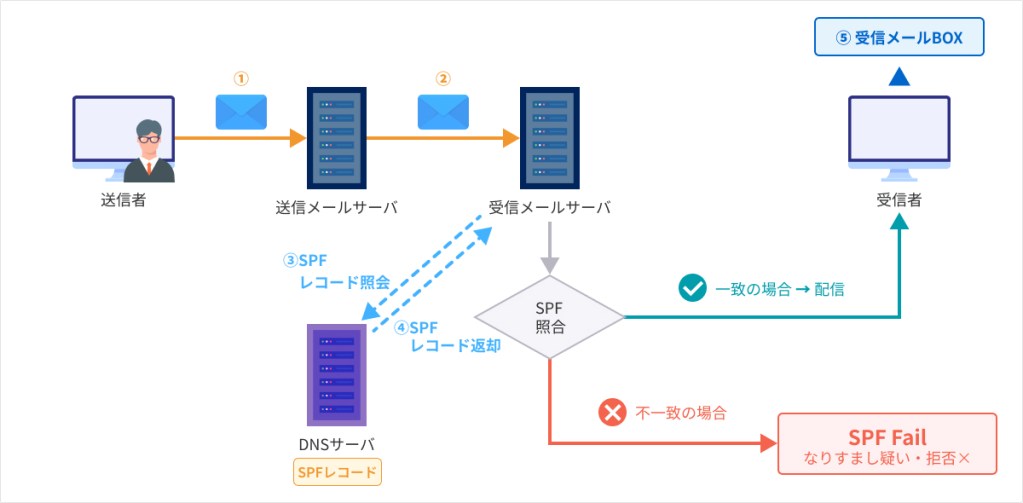
The SPF verification process is carried out according to the following steps.
- The sender sends an email
- The incoming mail server records the IP address of the server from which the email was received.
- Search DNS for the domain in the "From" field of the envelope (e.g., example.com)
- Verify that the SPF record in the DNS TXT record matches the actual sending IP address
- If there is a match, it is judged as "SPF Authentication Success (Pass)"; if there is no match, it is judged as "Failure (Fail/SoftFail)."
How to Read SPF Records (For Reference)
The actual SPF record is defined in a DNS TXT record as follows.
v=spf1 include:spf.google.com ip4:203.0.113.1 ~all
Meaning of Each Element
- v=spf1: SPF Version 1 declaration
- include:spf.google.com: Allow emails to be sent from Google's mail servers (when using external services such as Gmail)
- ip4:203.0.113.1: Allow traffic from this IP address
- ~all: Treat anything not listed above as a "SoftFail (warning)" (if set to -all, completely reject it)
The difference between ~all and -all lies in the strictness of the handling when an SPF check fails. While -all (HardFail) recommends complete rejection, it is often recommended to start with ~all to monitor the situation, as there is a risk that legitimate emails may be falsely flagged when relaying mail.
The Limitations of SPF
At this point, you might think, “If I configure SPF, I can prevent spoofing.”
However, SPF alone is not enough. In fact, SPF has a structural weakness that is simply unavoidable.
Do not validate the "From" header
SPF verifies the envelope "From" (the sender listed on the envelope). It does not verify the "From" header (the sender listed in the email client) displayed in email software.
In other words, SPF alone cannot prevent spoofing attacks in which the "From" header is forged while the "Envelope From" field remains set to a legitimate domain.
Cannot support forwarding
When an email is forwarded, the IP address of the forwarding server becomes the new “Sender IP.” However, since the forwarding server’s IP address is not registered in the SPF record, SPF authentication fails even though the email is legitimate.
DKIM, which we'll explain next, was introduced to address these weaknesses.
Back to ContentsWhat Is DKIM? (Digital Signature for Tamper Prevention)
If SPF is a mechanism for verifying the “sending server,” the next step is to have a mechanism for verifying whether “the email itself is authentic.” That’s where DKIM comes in.
A Basic Overview of DKIM
If SPF is a “list of authorized servers,” then DKIM is a “seal of authenticity.” The concept behind DKIM is similar to affixing a company seal to an important document.
When the sender applies an "electronic signature" to an email and the recipient verifies that signature, they can confirm that "this email was created by the genuine sender and has not been tampered with in transit."
How DKIM Works
DKIM is a mechanism that applies a "digital signature" to emails. While SPF verifies the sender's IP address, DKIM verifies whether "the email was sent by a legitimate sender (not a spoofed one)" and whether "the email's content has not been tampered with." DKIM works by using digital signatures based on public-key cryptography.
The sender's processing is performed according to the following steps.
- Calculate a hash value from the contents of an email (headers and body)
- Encrypt the hash value using the private key to create a "signature"
- Add the signature to the email as a DKIM-Signature header and send it
*A hash value is a fixed-length string created by applying a special calculation (a hash function) to data; it is generated through a one-way (irreversible) transformation that cannot be reversed.
Processing on the receiving end is performed according to the following steps.
- Retrieve the signed domain (d=) and selector (s=) from the DKIM-Signature header
- Retrieve the public key from DNS
- Decrypt the signature using the public key to extract the hash value
- Compare it with the hash value of the received email body
*d= (signing domain) refers to the domain name used to sign the email. It means, "This domain is responsible for the email."
*Note: "s" (selector) is a name (identifier) used to locate a public key. It is used to allow multiple keys to be used within a single domain.

If there is a match, the system will display "DKIM authentication successful," confirming that the email has not been tampered with and was created by the genuine sender.
Contents of the DKIM-Signature (for reference)
The DKIM-Signature that is actually added to an email header has the following structure:
DKIM-Signature: v=1; a=rsa-sha256; c=relaxed/relaxed;
d=example.com; s=google; …omitted…
bh = hash value; b = signature data
Main Parameters
- d= (Domain): The domain that signed the message. An important value used for DMARC alignment checks.
- s= (selector): A key used to look up public keys in DNS
- a = (Algorithm): Signature algorithm (RSA-SHA-256 is commonly used)
What is a selector?
A selector is an identifier used to distinguish between multiple DKIM key pairs within a single domain.
For example, if d=example.com and s=google, the receiving server retrieves the public key by looking up the DNS record google._domainkey.example.com.
This allows you to manage each email service using a separate selector, even if you use multiple services.

The Limitations of DKIM
People often assume that if they have SPF and DKIM configured, their anti-spoofing measures are foolproof. However, DKIM also has its weaknesses.
Replay Attack
It cannot prevent "replay attacks," in which a malicious third party intercepts an email with a valid DKIM signature and forwards it to a different recipient without modification.
Cannot be controlled by policy on its own
DKIM verifies whether an email is authentic, but it does not include a feature to define a policy for "how to handle authentication failures." DMARC handles the response to such failures.
DKIM is a mechanism for verifying authenticity. However, it does not specify how to handle emails that fail authentication. That role is fulfilled by DMARC, which we’ll explain next.
Back to ContentsWhat Is DMARC? (The Command Center That Makes the Final Decision)

With SPF and DKIM, you can now verify the "sender" and check for "tampering." So, what happens to an email if either of these checks fails? DMARC is what makes the final determination.
The Role of DMARC
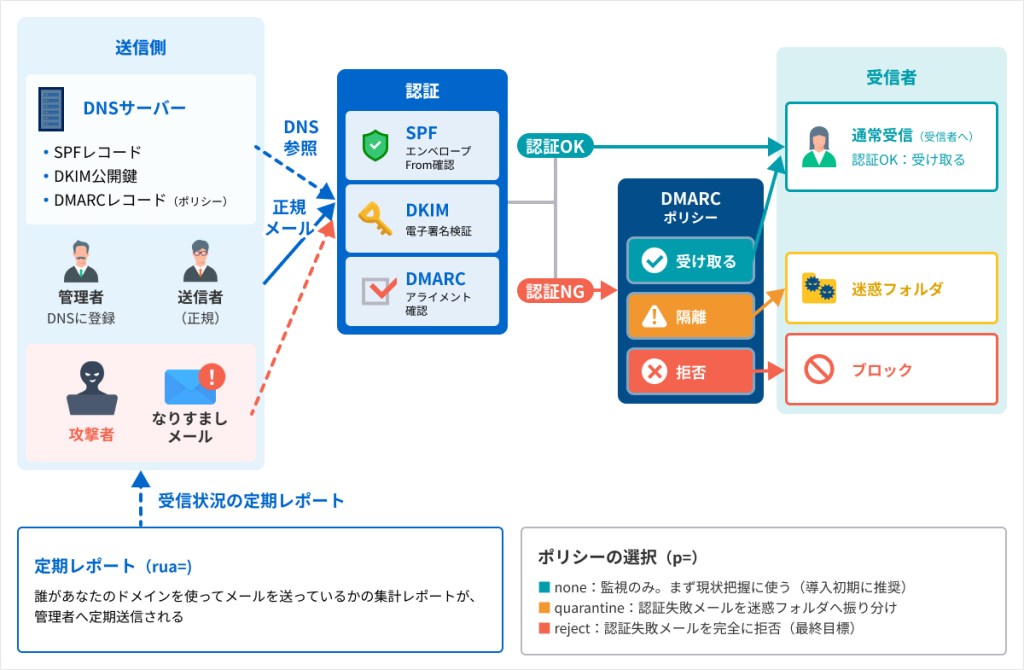
DMARC (Domain-based Message Authentication, Reporting, and Conformance) acts as a command center that receives the "results" from SPF and DKIM and determines how to handle authentication failures. DMARC has the following three roles:
Final Decision
We use a combination of SPF and DKIM authentication results and alignment (described below) to comprehensively assess the authenticity of an email.
Policy Statement
Specifies how the receiving server should handle authentication failures.
Report Received
You can receive summary reports showing who is sending emails from which domains.
DMARC Policy
A DMARC record is a "rule for handling email" configured in DNS. It is displayed as follows.
v=DMARC1; p=none;
The “p” in a DMARC record stands for "policy" and specifies how to handle emails that fail authentication.
Three-Tier Policy
With DMARC, you can configure three levels of policy.
| Policy | Meaning | Recommended Uses |
|---|---|---|
| none | Monitoring only. Does not affect email processing. | Initial Survey and Monitoring Period Following Implementation |
| quarantine | Move authentication failure emails to the spam folder | Intermediate Stage |
| reject | Completely Block Authentication Failure Emails | Full-scale operation |
Reasons for a Phased Rollout
You should not set DMARC to “reject” right away. There are two reasons for this. First, if you set it to “reject” without fully understanding all legitimate email delivery channels, even legitimate emails sent from newsletter services, internal systems, and external applications will be rejected.
Next, if you set the system to "reject" without having fully configured SPF or DKIM, a large number of legitimate emails may be rejected.
Recommended Steps
- Start monitoring with p=none (to track the transmission path using DMARC reports)
- Once SPF and DKIM are configured for all routes, transition to p=quarantine.
- If there are no issues, set p to "reject."
An important concept called “alignment” is involved in DMARC evaluation. Next, let’s take a closer look at how it works.
Back to ContentsWhat Is DMARC "Alignment"?

So far, we’ve looked at how SPF, DKIM, and DMARC work. However, there are times when “authentication succeeds but DMARC fails.” The cause of this is an alignment mismatch.
Why Is Alignment Important?
Alignment is a mechanism that verifies whether the domain used for authentication matches the "From" address displayed on the screen. DMARC performs this check for both SPF and DKIM.
SPF Alignment
SPF verifies the domain in the "Envelope From" field. DMARC checks whether the domain that passed SPF authentication matches the domain in the displayed "From" header.
DKIM Alignment
DKIM verifies the "d=domain" included in the signature. DMARC checks whether the DKIM signature was successful and whether the "d=domain" matches the domain in the "From" header.
The Difference Between "Relaxed" and "Strict"
"Relaxed" and "Strict" are settings that determine the strictness of alignment (domain match) checks. They are specified in the DMARC record.
"Relaxed" refers to a lenient check that allows subdomains, while "Strict" refers to a strict check that allows only exact matches. Unless there is a specific reason, "Relaxed" is usually sufficient.
DMARC Works as Long as "Either One Is OK"
The key point is that DMARC is considered a "PASS" (successful) if either SPF alignment or DKIM alignment passes.
This means that even in cases where SPF authentication fails due to email forwarding, DMARC will still be valid as long as DKIM alignment passes. That is why it is important to “configure both SPF and DKIM.”
FAQ

Here, we'll answer some frequently asked questions.
Q. Why does it end up in the spam folder?
A. If SPF or DKIM is not configured or is configured incorrectly, the recipient’s mail server will deem the sender “untrusted” and route the email to the spam folder. Gmail, in particular, takes a strict approach to emails that are not DKIM-signed.
Q. Can you prevent someone from impersonating your display name?
A. SPF, DKIM, and DMARC cannot prevent “display name” spoofing. For example, as in “Taro Yamada attacker@evil.com,” even if the actual sender is evil.com, the display name in the email client can be spoofed to appear as “Taro Yamada.” Implementing BIMI (Brand Indicators for Message Identification) is an effective measure against display name spoofing.
Q. Why does SPF authentication fail when emails are forwarded?
A. When an email is forwarded, the forwarding server becomes the new “sender IP address.” However, since the forwarding server’s IP address is not registered in the original sender’s SPF record, SPF authentication fails. To work around this, there is a mechanism called “SRS (Sender Rewriting Scheme),” which rewrites the envelope “From” field during forwarding to ensure SPF authentication passes. DKIM is resistant to forwarding because the signature remains valid as long as the email body and headers are not altered during the process.
Summary
In this article, we explained how “sender domain authentication” works and why it can cause emails to end up in the spam folder.
SPF (Sender Policy Framework): A mechanism that uses DNS to declare the sender's IP address and detect spoofed emails. While configuration is relatively simple, it has limitations: it does not verify the "From" header, and there are cases where emails bypass authentication due to forwarding.
DKIM (DomainKeys Identified Mail): Uses digital signatures to verify the authenticity of emails and ensure they have not been tampered with. It is effective even when emails are forwarded and can verify the "From" domain in the header.
DMARC (Domain-based Message Authentication, Reporting, and Conformance): This is a mechanism that uses SPF and DKIM results to declare how to handle authentication failures (none/quarantine/reject) and receive reports. It is considered valid if either SPF or DKIM alignment passes.
These three elements work together as a set. None of them is sufficient on its own; only when combined do they form a robust sender domain authentication system.
To start, please try configuring SPF and DKIM and begin monitoring DMARC with p=none.
Check the list of features and price list of learningBOX now!
▼You may also like: