Considering Switching from Moodle? LMS Comparison for Universities [2026 Edition]


Key Takeaways
- Differences between Moodle, learningBOX, and Cornerstone, and how to choose the right one.
- Criteria for deciding to switch when Moodle operations reach their limits.
- Essential checklists for migrating higher-education LMSs.
- A quick self-diagnostic checklist to evaluate your institution's current status.
Are version updates and maintenance burdens for Moodle becoming heavier each year? For university staff feeling challenged by Moodle operations, this article explains key points to consider when evaluating a transition to a cloud-based LMS.
In recent years, the push for educational DX (Digital Transformation) in higher education has continued to accelerate. With the normalization of online classes, rising demand for CBT (Computer Based Testing), and requests for learning outcomes visualization, the role required of an LMS (Learning Management System) is continually expanding.
Conversely, for universities that have operated Moodle on on-premises servers for many years, the burden of version upgrades and system maintenance has become increasingly apparent. As a result, an increasing number of universities are considering migrating to cloud-based LMS platforms for standard course management.
This article provides a comprehensive guide covering three major LMS platforms with a track record in university settings—Moodle, Cornerstone, and learningBOX—detailing their respective strengths and challenges, selection criteria, migration decision points, and a self-diagnostic checklist for your institution.
Explore classroom success stories
Overview of University LMS Options

Multiple LMS options are available for higher education settings, each with distinct strengths and characteristics. Let's start by organizing the overall landscape.
Commonly Adopted University LMS Platforms
Currently, six main LMS platforms are widely implemented across universities in Japan and internationally. Because their delivery models and primary user bases vary, it is essential to evaluate them in light of your institution's scale and operational policies.
Moodle
The most widely used open-source LMS across universities and higher education institutions worldwide. It boasts an extensive adoption record across public and private universities in Japan. It is typically deployed on on-premises servers or hosted cloud environments.
■Moodle Official Website
Blackboard
Blackboard, provided by Anthology (formerly Blackboard Inc.), is an LMS with a long-standing history and global track record, utilized by higher education institutions worldwide. It is characterized by its robust infrastructure and advanced learning analytics tailored for large-scale institutions.
■Blackboard Official Website
manaba
A Japanese LMS provided by Asahi Net, Inc. According to the official manaba website, one in four Japanese university students uses this platform. Built on its proven deployment record in Japanese universities, it offers features and support tailored to Japanese university operations, including courses, enrollment, and student support.
*User metrics are based on published information from the official manaba website.
■manaba Official Website
Canvas LMS
An LMS provided by US-based Instructure, holding a significant market share in overseas higher education institutions. Highly rated for its modern, intuitive UI and extensive APIs, its adoption is growing among international universities and international schools in Japan.
■Canvas LMS Official Website
Cornerstone
A cloud-based LMS provided by US-based Cornerstone OnDemand, boasting strengths in learning path design and skill gap diagnostics. In university settings, it is primarily used for administrative and faculty training, as well as adult continuing education and reskilling programs.
■Cornerstone Official Website
learningBOX
A Japanese cloud-based LMS that balances ease of use with accessible initial and ongoing costs. Its defining feature is intuitive operation without requiring technical expertise, earning high praise for its flexibility across K-12, higher education, vocational schools, and corporate training.
■learningBOX Official Website
This article focuses in detail on Moodle, learningBOX (frequently shortlisted by Japanese universities), and Cornerstone (utilized in remedial and continuing education). For individual comparative articles on Blackboard, manaba, and Canvas LMS, please refer to the following resource:
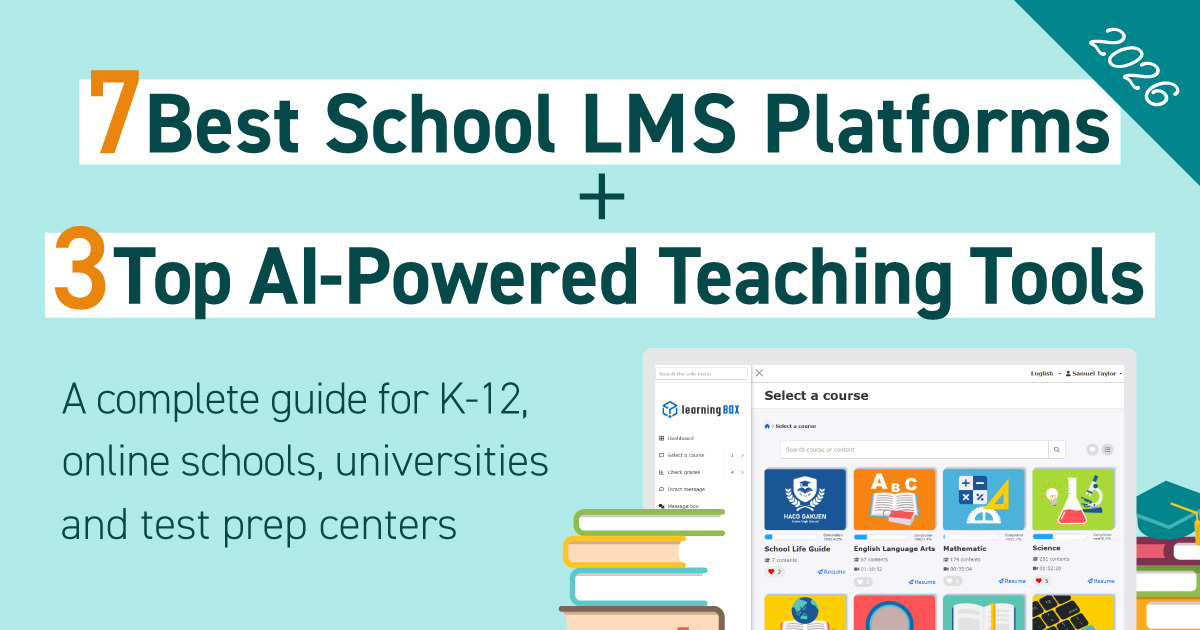
⇒[Updated for 2026] 7 Top LMS Options for Schools + 3 Top AI-Powered Learning Resources
We'll propose a plan tailored to your needs.
Why Higher Education Institutions Require an LMS
Behind the indispensable need for LMS adoption in universities lie structural changes in the educational environment. The primary requirements are summarized below:
- Normalization of Online Classes
Since the COVID-19 pandemic, on-demand streaming and hybrid classes have taken root, making a unified infrastructure for content delivery, assignment management, and grade management essential.
- Rigor in Grade Management and Credit Awarding
Because grades directly impact degree certification, accuracy and auditability of evaluation data are mandatory. Accumulating learning portfolios will become increasingly important.
- Concurrent Access Resilience for Thousands to Tens of Thousands of Users
Infrastructure performance must withstand traffic spikes during course registration and exam periods. Scalability is a crucial selection criterion.
- LTI/SSO Integration
Interoperability is required, including single sign-on (SSO) via GakuNin or SAML, and external content integration via LTI.
- Accreditation and Quality Assurance Compliance
Systematic accumulation and analysis of learning data are vital for visualizing learning outcomes and assuring educational program quality. This is becoming a mandatory operational requirement for university management.
Moodle's Strengths and Common Challenges in Higher Education

While Moodle is globally adopted as an open-source LMS, operational realities introduce specific points for consideration and maintenance. This section examines both its strengths and challenges.
Strengths of Moodle
Moodle's long-standing worldwide support among universities stems from its flexibility and deep community roots. Specific strengths include:
Open Source (License-Free)
The software itself is free to use, making it attractive for lowering license fees. This lowers implementation barriers for budget-constrained institutions.
High Customizability and Plugin Ecosystem
By combining thousands of plugins published by global developers, institutions can tailor the platform to granular, proprietary requirements—including specialized research lab setups.
Global Track Record and Multilingual Support
Supporting over 100 languages, it is well-suited for international students and joint courses with overseas partner universities.
Extensive Domestic and International University Communities
Active domestic communities like MoodleMoot Japan facilitate rich sharing of operational know-how and case studies.
Common Moodle Operational Challenges in Universities
While Moodle is an LMS renowned for its exceptional extensibility and customizability, its operational model may require universities to handle environment maintenance and system updates internally. Particularly in environments relying on on-premises hosting or heavy custom modifications, several key challenges require careful consideration.
Server Maintenance and Operational Burden
Operating Moodle in an on-premises environment necessitates the ongoing maintenance and management of servers, networks, storage, and backup systems. Additionally, facility expenses such as data center hosting fees, electricity, and air conditioning can accrue rapidly. Depending on the university's staffing structure, this can significantly increase the operational workload on the IT department.
Workload for Version Upgrades
Moodle regularly releases updates that include functional enhancements and critical security patches. Executing a version upgrade requires a series of tasks, including functionality testing in staging environments, plugin compatibility verification, user notifications, and final deployment to production.
Finding the optimal window for these updates requires strategic timing, especially during active academic terms, course registration, or exam periods.
Risks of Person-Dependent Plugin Management
Moodle’s strength lies in its extensive plugin ecosystem; however, as the number of installed plugins grows, tracking the purpose, configuration, and update status of each tool becomes increasingly complex.
If documentation is lacking, crucial operational know-how risks being lost when key staff members transfer or resign. Periodically auditing plugin lists, settings, and update procedures is essential to mitigate this risk.
User Support for UI and Usability
Despite Moodle's rich feature set, variations in user intent and interface configurations often mean instructors and students require time and support to become proficient. First-time faculty members, in particular, frequently require structured support frameworks, including user manuals, onboarding sessions, and a dedicated help desk.
Standardizing navigation by refining screen layouts and course templates can substantially reduce the burden on users.
Establishing an Incident Response System
When system outages, traffic surges, or integration glitches occur, IT teams must quickly isolate the root cause and execute recovery protocols. Defining escalation protocols in advance whether resolving issues in-house or with external vendors, including after-hours and weekend support is vital.
Because technical failures directly impact lectures, examinations, and assignment submissions, robust operational design with reliable backups and failover mechanisms is mandatory.
Factoring all these expenses together, total operational costs can easily reach several million yen annually, even for small to mid-sized institutions.
To accurately assess an LMS's financial impact, universities must look beyond software license fees and evaluate the Total Cost of Ownership (TCO), incorporating server maintenance, outsourced vendor support, internal labor, and upgrade effort.
Universities Best Suited / Not Suited for Moodle
Moodle’s suitability depends heavily on an institution's specific requirements and internal capacity. Use the comparison table below to determine which profile aligns with your institution.
| Universities Best Suited | Universities Not Suited |
|---|---|
| Well-staffed, dedicated IT departments | Lean IT teams with staff managing multiple roles |
| Highly unique requirements demanding flexible custom code | Desire to operate entirely within standard out-of-the-box functionality |
| Experimental or research-oriented usage in graduate programs | Utilization focused primarily on straightforward CBT and core e-learning |
| Strong commitment to contributing to the open-source community | Clear mandate to minimize operational overhead as much as possible |
| Long-term strategic policy favoring in-house technical development | High priority placed on direct external vendor support |
Positioning of Cornerstone | Application in Continuing Education and Reskilling for Adults

Cornerstone is a cloud-based LMS provided by US-based Cornerstone OnDemand, holding a commanding global market share in corporate talent development and human capital management. In university settings, rather than serving as the core LMS for standard undergraduate courses, it is primarily deployed as an operational foundation for adult continuing education (recurrent education) and executive reskilling programs.
Compatibility with Adult and Recurrent Education
Cornerstone aligns exceptionally well with adult education programs due to its comprehensive capabilities in skill gap diagnostics, automated learning path assignments, and centralized progress tracking.
Its core architecture, diagnosing specific skill deficiencies and assigning tailored learning plans, is ideal for managing non-traditional students with diverse backgrounds and corporate-partnered reskilling initiatives.
Managed Separately from LMS for Standard Courses
Cornerstone is fundamentally architected for enterprise talent development, continuing education, and adult learning. Consequently, its feature set and operational workflows differ substantially from an LMS designed for standard university course administration.
Institutions prioritizing academic course management, degree credit evaluation, syllabus integration, and Student Information System (SIS) synchronization must rigorously audit functional compatibility in advance. Furthermore, because implementation and licensing costs vary significantly based on user volume and contract terms, careful budget alignment is essential.
Initiating deployment within targeted units—such as reskilling divisions, adult education centers, or internal staff training—provides a cleaner path for operational design.
Back to ContentsCloud-Based LMS as an Option | Features of learningBOX

Adoption of learningBOX as a cloud-based LMS for universities continues to expand rapidly. Its ability to deliver a cost-effective, streamlined operational framework makes it an appealing choice for institutions seeking to alleviate IT department workloads.
Key Features of learningBOX
learningBOX is a Japanese cloud-based LMS widely adopted across academic institutions and corporations. It is highly regarded for delivering advanced Computer-Based Testing (CBT) capabilities while keeping university administrative overhead to a minimum.
Cloud-Based (No Server Management Required)
By eliminating the need for on-premises server hosting, institutions bypass hardware procurement, maintenance, and lifecycle replacement cycles. Consequently, IT departments can drastically reduce the labor associated with managing physical infrastructure.
Rich Variety of Question Formats
Instructors can construct practice exercises and exams by combining 14 distinct question formats, including multiple-choice and true/false options. Multimedia assets such as images, audio, and video can be seamlessly embedded into prompts, answer choices, and explanations. Features like question shuffling and custom time limits also make it ideal for semester finals, national certification prep, and entrance exam training.
⇒ Case Studies:A medical university reduced student retention and dropout rates while increasing national exam pass rates using learningBOX
Robust CBT Features
Equipped with sophisticated proctoring mechanisms such as AI facial recognition for identity verification, full-screen locking, and browser tab movement tracking—the platform maintains high integrity for official university examinations. Exam histories, pass/fail results, and detailed answer analytics are all managed within a single centralized system.
⇒Streamline exam operations through secure online testing and evaluation.
Simple and Intuitive UI
Engineered so faculty members can intuitively build course materials and evaluate grades without specialized technical training. The clean, user-friendly interface significantly lowers onboarding friction and minimizes ongoing training demands.
Domestic Support Structure
With dedicated phone, email, and chat support provided entirely in Japanese, operational inquiries and technical issues are resolved promptly. Institutions can operate smoothly without navigating the time-zone delays typical of overseas vendor support.
Pricing and Enterprise Options
learningBOX offers a versatile pricing structure designed to accommodate everything from small pilot projects to campus-wide university deployments. The ability to test features through a free trial before selecting a tier based on student volume minimizes implementation risk.
Low-Cost Pricing Structure
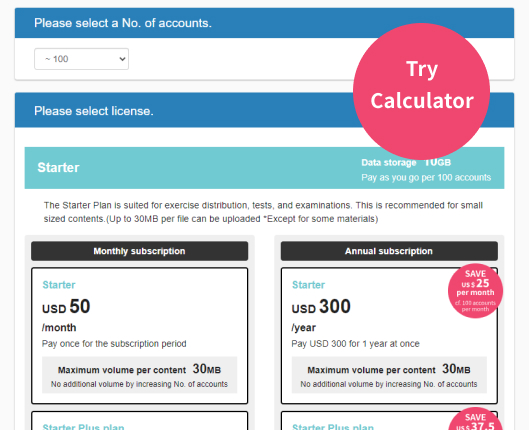
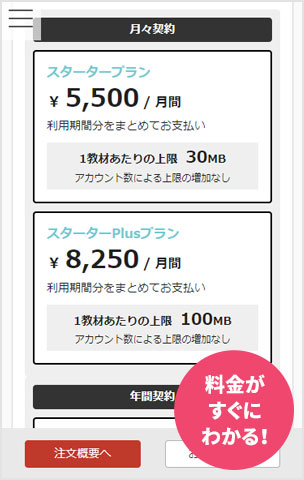
The platform features industry-leading pricing, starting with a free trial for up to 10 accounts and paid plans from just 5,500 JPY per month (tax included) for 100 accounts. This enables universities to initiate small-scale rollouts while maintaining total financial control.
*Available features for AI Assist and proctoring vary by plan tier.
⇒Pricing & Plans
Single Sign-On via SAML/SCIM Support
learningBOX integrates smoothly with existing core administrative architectures. Operations are easily streamlined through automated grade and user data synchronization, alongside single sign-on (SSO) via SAML or SCIM protocols.
⇒Integration with External Systems
Enterprise Options Accommodating Large-Scale Implementations
For universities with large student populations facing concurrent traffic surges during exam periods, or those with custom security mandates like WAF or Deep Security, learningBOX offers Enterprise Options with dedicated server builds.
Maintenance windows can be custom-scheduled to avoid critical academic windows, such as finals or course registration. Furthermore, custom feature requests tailored to unique university workflows can be fully accommodated upon consultation.
⇒Enterprise Option
Download detailed documentation on case studies, features, and pricing
Differences Between learningBOX and Moodle
A comparison between learningBOX and Moodle highlights fundamental differences in design philosophy. While Moodle relies on extensive custom development, learningBOX is engineered explicitly to minimize operational overhead. Key distinctions of learningBOX compared to Moodle include:
Self-Contained with Standard Features
learningBOX includes a comprehensive suite of essential features right out of the box, eliminating the hassle of plugin management. System updates are applied automatically on the vendor side, removing the burden of manual compatibility testing.
Zero Server Operational Burden
As a fully hosted cloud solution, infrastructure management including server provisioning, maintenance, monitoring, and disaster recovery, is handled entirely by the vendor. This enables IT departments to eliminate physical infrastructure management and redirect resources toward core strategic initiatives (excluding custom Enterprise environments).
Attentive Support by a Domestic Vendor
From initial evaluation and onboarding setup to routine day-to-day inquiries, institutions receive fast, comprehensive support in Japanese.
UI Facilitating Faculty Self-Sufficiency
Thanks to an intuitive interface design, instructors can easily navigate the platform without heavy reliance on user manuals. This drastically reduces training requirements and support tickets, ensuring smooth, rapid adoption across departments.
Back to ContentsComparative Matrix of 3 University LMS Platforms
Below is a comparative breakdown of Moodle, Cornerstone, and learningBOX across key metrics valued in higher education settings. Evaluate these options against your institution's strategic priorities.
| Item | Moodle | Cornerstone | learningBOX |
|---|---|---|---|
| Deployment Models | On-premises / Cloud-based | Cloud-based | Cloud-based |
| Customizability | High | Medium | Medium |
| Operational Burden | High | Medium | Low |
| Customer Support | Community-focused | Global Vendor | Domestic Vendor
(Japanese & English) |
| CBT Features | Supported (Basic quiz focus) | Limited (Few university exam track records) | Standard Support
(Advanced proctoring) |
| SSO and LTI Integration | Supported | Supported | Supported |
| Price Tier | License-free (Hosting & maintenance extra) | High (Enterprise focus) | Low (Free trial available) |
| Target Size | Large-scale | Global / Large-scale | Small to Large-scale (Enterprise options available) |
| Ideal Applications | Research labs & complex custom requirements | Adult continuing education & reskilling | Class prep/review, assignments, CBT, remedial & cert prep |
Each platform offers distinct competitive advantages. Moodle is best suited for research-driven institutions seeking total custom development control; Cornerstone excels at systematically managing adult continuing education and corporate reskilling programs; and learningBOX is the ideal choice for universities aiming to deliver secure CBT and streamlined course management while keeping server maintenance overhead to a minimum.
*This comparison was compiled by the learningBOX editorial team based on publicly available information as of late September 2026. This article was produced by learningBOX, Inc., and includes its own product in the evaluation. Features, pricing, and scope of service may vary based on contract plans, options, user volume, environment, and software versions. Please verify exact details directly with each service provider.
No credit card required—try it for free with up to 10 people
Key Scenarios for Considering a Moodle Replacement

While Moodle remains a versatile and open-source Learning Management System (LMS), changing organizational needs, technical debt, and modern user expectations often necessitate transitioning to a modern alternative.
Moodle Operations Checklist (Simple Assessment for Universities)
For universities experiencing growing friction or maintenance burdens with Moodle, migrating to a cloud-based LMS represents a highly viable path forward. This section outlines key indicator scenarios and provides a quick self-diagnostic checklist to guide your decision.
Operational Framework
□ Version upgrades demand substantial staff hours every time.
□ Plugin management has become heavily dependent on specific individuals.
□ Internal IT personnel are understaffed or stretched thin.
□ Incident response relies almost entirely on overburdened internal resources.
Faculty & Student Feedback
□ Users report that the interface requires a steep learning curve.
□ Navigating the system is difficult without consulting extensive manuals.
□ Operational rules and system usage vary wildly among instructors.
Cost Aspects
□ Server maintenance expenses are steadily increasing.
□ Dependence on external system integrators is high and costly.
□ Long-term operational and maintenance costs are difficult to project.
Future Readiness
□ The institution is planning a strategic transition to the cloud.
□ Management aims to establish a simplified, low-maintenance IT framework.
□ The university wants to expand CBT and professional certification testing.
Diagnostic Benchmark:
- 0–2 items: Current Moodle operations remain sustainable. Continue regular monitoring and routine maintenance.
- 3–5 items: Time to evaluate operational improvements. Begin researching cloud LMS alternatives and feature sets.
- 6 or more items: Strongly consider transitioning to a cloud-based LMS. We recommend initiating vendor consultations and pilot trials.
*This checklist serves as a general guideline. Final decisions should holistically account for your institution's mid-term strategic goals, budgetary conditions, and faculty/student feedback.
Specific Scenarios to Consider Migration
When evaluating a transition away from Moodle, decisions should be aligned with your current operational pain points and future educational strategy. If your university encounters any of the following scenarios, it may be time to transition to a cloud-based LMS platform.
Assessing the Need for Data Migration (Courses, Grades, User Info)
If years of legacy course content, historical grades, and user records accumulated inside Moodle have created significant administrative strain, it serves as a clear indicator to consider a system refresh. For specific migration workflows, refer to the "Data Migration (Courses, Grades, User Info)" section under "Key Checkpoints During LMS Migration" below.
Facing Usability and Adoption Challenges
If feedback highlights that faculty struggle with Moodle's interface or desire a more streamlined process for uploading course materials, it may be time to reassess operational efficiency. Beyond enhancing internal training, migrating to an LMS built with an intuitive, self-explanatory UI is a highly effective strategy.
Routine Operations Stall During Every Version Upgrade
If multi-annual version updates, security patches, and plugin compatibility checks continuously disrupt IT department workflows, your operational model demands review. Specifically, if deploying updates to production consistently causes downtime or delays, adopting a fully managed SaaS platform can eliminate this burden.
Expanding into CBT and Professional Certification Exams
If your university plans to digitize semester finals, conduct national certification training, or expand online quizzes, upgrading to an LMS with built-in CBT proctoring offers significant ROI. Depending on your operational scale, this transition can deliver high cost-efficiency and improved academic integrity.
Restructuring IT Department Resources
As university management optimizes administrative staffing, IT team structures are frequently re-evaluated. When maintaining, monitoring, and updating an on-premises Moodle deployment becomes unsustainable within limited staffing constraints, shifting to a cloud-based LMS represents a smart strategic alternative.
Back to ContentsKey Checkpoints During LMS Migration
To ensure a seamless transition from Moodle, address these critical planning factors prior to migration:
Data Migration (Courses, Grades, User Info)
Determine early in the planning phase which legacy Moodle courses, historical grade records, and user accounts must be transferred to the new LMS. Establishing a clear policy on whether to migrate all legacy data or archive historical records for a fresh start is essential.
Timing Design for Academic Term Switchover
Schedule the system cutover during academic breaks, ideally aligned with the fiscal or academic year-end. Transitioning mid-semester creates unnecessary confusion and should be strictly avoided. Work backward from your target go-live date to establish a 6-to-12-month preparation timeline.
Faculty Training & Onboarding Plan
Executing a structured onboarding program for all faculty members is the single most important factor for driving adoption. Combining multiple training channels such as live group workshops, video walkthroughs, and dedicated help desk support, ensures a smooth transition.
Rebuilding Integrations with Existing Systems
API integrations with existing core infrastructure—such as Student Information Systems (SIS), HR databases, GakuNin, and SSO gateways—must be re-established on the new LMS. Auditing integration requirements and conducting thorough sandbox testing are critical early-stage tasks.
Securing a Parallel Operation Window
Running Moodle and the new LMS in parallel for a designated period ensures uninterrupted access to historical data while mitigating operational risk. Be sure to budget for dual licensing fees during this transitional phase.
How to Successfully Re-evaluate and Migrate University LMSs
Selecting or migrating a university LMS is a pivotal decision that shapes your institutional educational DX strategy for years to come. Below is a summary of the core principles and key strengths of learningBOX.
Important Perspectives in University LMS Selection
Institutions should evaluate prospective LMS platforms against three primary criteria:
- Evaluate by Total Cost of Ownership (TCO)
Project a 5-year TCO model that accounts for license fees, server hosting, internal labor, training, and emergency response costs. Even with open-source platforms carrying zero license fees, total ownership costs can escalate rapidly due to infrastructure maintenance and custom development.
- Prioritize Faculty and Student Usability
An LMS offers no value if faculty and students find it too complex to use. Verify UI simplicity, onboarding efficiency, and vendor support quality through hands-on sandbox trials.
- Plan for Future CBT, Certification, and Integration Needs
Anticipate how your academic programs will evolve over the next 3 to 5 years, selecting a flexible platform capable of scaling to meet demands for secure CBT, learning analytics, and third-party integrations.
Reasons Why learningBOX Is Chosen by Universities
learningBOX continues to expand its footprint across higher education by directly addressing demands for reduced server management, enhanced CBT proctoring, and low operational costs:
- Zero Server Management Minimizes IT Overhead
By completely eliminating physical infrastructure management, lean IT teams can maintain stable operations effortlessly. Vendor-side automated updates and security patches drastically reduce ongoing maintenance, while Enterprise Options offer dedicated server builds for large-scale deployments.
- Diverse Question Formats and Secure CBT Meet Academic Needs
With 14 versatile question types, the platform supports everything from semester finals and professional certification prep to pre-admission training and remedial coursework—making it a premier choice for institutions expanding digital testing.
- Responsive Local Support and Accessible Pricing
Universities can start risk-free with a 10-user free tier, transition smoothly to low-cost paid plans (from 5,500 JPY/month for 100 accounts), and rely on fast, dedicated support delivered entirely in Japanese.
For case studies, detailed feature specifications, or migration support, explore the links below:
Explore Case Studies / Try Demo Account
Consult with migration specialists (Free)
FAQ
Q. What is the biggest difference between Moodle and learningBOX?
A. The biggest difference is operational burden. While Moodle offers open-source flexibility for custom code, it forces universities to manage server hosting, version upgrades, and plugin maintenance internally; learningBOX is a fully managed cloud solution that eliminates infrastructure management and maintenance overhead entirely.
Q. When should a university seriously consider migrating away from Moodle?
A. Migration should be evaluated if: (1) Version upgrades regularly stall routine IT operations, (2) Internal IT staffing is insufficient to maintain hosting, (3) The institution wants to expand into secure CBT or certification testing, or (4) Server infrastructure is aging out alongside a shift toward cloud-first policies.
Q. Can learningBOX effectively support large-scale university deployments?
A. Yes. In addition to standard cloud plans, learningBOX provides Enterprise Options with dedicated server builds designed to handle peak concurrent access during exam periods, along with custom security configurations like WAF or Deep Security.
Q. Can Cornerstone serve as a direct replacement for Moodle?
A. It depends heavily on the intended application; while Cornerstone can serve non-traditional programs, standard undergraduate course administration, degree credit auditing, and SIS integrations require careful functional validation. Conversely, for targeted use cases—such as adult continuing education, executive reskilling, or staff training—Cornerstone is a highly effective candidate.
Q. What are the primary risks of continuing to operate Moodle in a university setting?
A. The main risks include: (1) High ongoing operational labor for version upgrades and plugin maintenance, (2) Hidden TCO costs encompassing server hosting, hardware, and specialized technical labor, and (3) The continuous demand for internal training, documentation, and help desk support for faculty navigation.
▼You may also like: