SCORM Wrapper / SCORM Wrapper
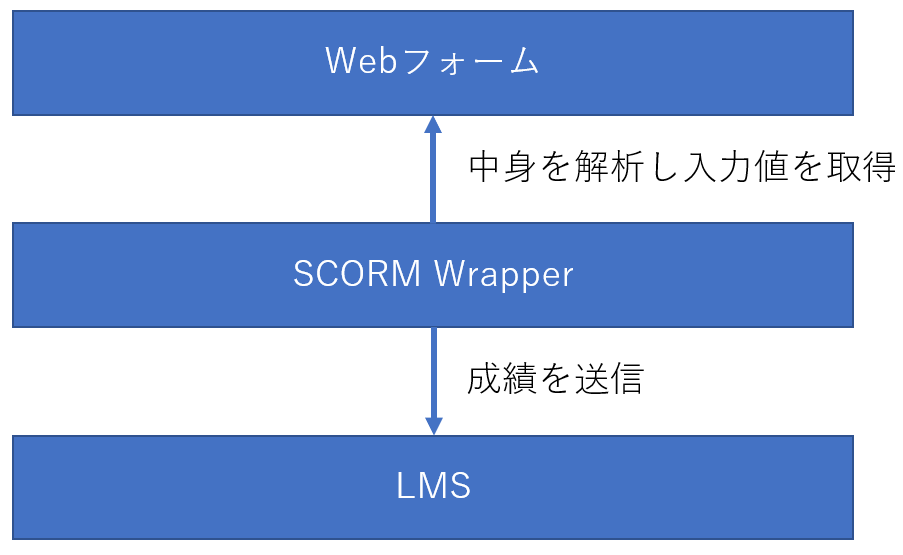
I am Nishimura and I started to create QuizGenerator in 2011. I am not able to update it, but there was a time when I was a certified SCORM Assessor, so I kind of understand SCORM. QuizGenerator is useful, but it has its limitations. QuizGenerator is a SCORM-compliant e-learning tool that allows you to create a variety of exercises, tests, and quizzes without having to worry about SCORM, but it still has its limitations. If you are a strong web programmer, you can implement SCORM relatively easily by referring to the article "Let's make SCORM materials". However, if you are a web programmer, it is relatively easy to implement SCORM. However, if you can do web design, but not programming, or if you can program a little, but learning SCORM is too much of a hassle, it may be too much of a burden for you. For those people, we recommend the SCORM Wrapper. The SCORM Wrapper makes it easy to create SCORM-compliant teaching materials. I have never heard of SCORM Wrapper. You're probably right. The name of our development code, or rather the name of our internal system, is SCORM Wrapper, and there is no mention of it in the learningBOX or on the instructional page. The reason why it is not mentioned is that the name "SCORM Wrapper" is not easy to convey to customers for marketing reasons. From a developer's point of view, the SCORM Wrapper is a tool to wrap web forms and bring SCORM APIs to life, so it is nothing more than a SCORM Wrapper. However, since we are not proposing any use beyond the questionnaire at present, it has been spoiled as a questionnaire. In any case, the survey material is the SCORM Wrapper, which means that it can be used to create more than a survey. The SCORM Wrapper is, simply put, a dream tool for making web forms compatible with SCORM. Schematically, the SCORM Wrapper analyzes the contents of a web form, finds the INPUT tags, SELECT tags, TEXTAREA tags, etc., and submits the results according to the SCORM standard. Elements that the SCORM Wrapper will send SCORM Wrapper will send the value of the following HTML elements, both inside and outside of a FORM, if they have the name attribute specified. value of the following HTML elements with the name attribute, both inside and outside of FORM. input[type=text] input[type=number] input[type=password] input[type=date] input[type=month] input[type=email] input[type=hidden] input[ type=radio type=radio] input[type=check] textarea select Send grades by name attribute Grades are sent according to the name attribute. For example, if there is a tag , the value entered there will be sent with the name q1. In practice, the value of the name attribute is setValue for cmi.interactions.n.id. Behavior with special values in name If you put a special value in name, it has a special meaning. Names ending in _result If a name ending in _result is given, it is sent as the result of the item without the _result. For example, if there is a field named "answer1" and you have a response entered there, the field named "answer1_result" will be treated as a result for answer1. The result can be set to "correct", "strong", "unanticipated", "neutral", or "decimal", and corresponds to cmi.interactions.n.result as a SCORM element. __score__ A value representing the score. in SCORM 1.2, the rule is to specify an integer from 0-100, but learningBOX also accepts values greater than 100. Decimals are not allowed. __lesson_status__ Indicates pass/fail and progress. Please set the appropriate value from the following four values. If not set, completed will be sent. incomplete: in progress completed: completed (default value) passed: passed failed: failed __duration__ Indicates the duration of the study. If this element is not present, the value measured by SCORMWrapper will be sent. If you think the time measured by SCORMWrapper is not accurate enough, pass the elapsed time in integer seconds to __duration__. The time from the moment the material is loaded to the moment the grades are sent is measured. If you have a start button in the material and want to measure the exact time between pressing it and answering the last question, you can implement a time measurement function and record the exact value by putting the measurement result in __duration__. __suspend_data__ Element to save the values at the end of the study and reuse them the next time they are loaded. In a forthcoming update, all fields will be able to retain values across sessions, but the data storage feature of __suspend_data__ and the data storage feature implemented for all fields will be exclusive. If __suspend_data__ is used, the save function for other fields is not expected to be available. Submit Button The submit button should be . id="submit" is very important. SCORMWrapper will recognize any button with this ID as a submit button. Example of teaching material (1) -- Secumane 50 questions I made the questions for the Information Security Management Examination, 2009. However, please do not take this too seriously, as it was written in dirty code using jQuery about two years ago. Even though it is a dirty code, it is easy to make a SCORM-compliant 4-choice question with such a simple code. Just put the choices in the q001~q050 radios, the right/wrong in the q001_result~q050_result hidden fields, the score in the __score__, the pass/fail in the __lesson_status__, and the rest is SCORM Wrapper will send the data according to the SCORM standard. The correct answer data is in lines 30 to 34, and the choices are in lines 15 to 18, but the number of items can be increased or decreased, and the choices can be changed to 1, 2, or 3. It should work fine if you increase or decrease the number of items, or change the choices to 1, 2, 3, etc. You may also create other subjects in this way and use them in your company! (If there are many requests, we will make it easy to create them within learningBOX! (Personally, I would like to make an improved version of this, so I would be happy to receive feedback on how I can easily create teaching materials similar to this one) Code (available on Gist) Learning screen The learning screen looks like this. Each radio button is assigned a name from q001 to q004, and the values a, b, c, and e are set to a, b, c, and e, respectively. When the submit button is pressed, the submit() function is called to execute the grading, and then the results are sent. Result display screen The result display screen is shown below. Pass/fail and score are passed using the __lesson_status__ and __score__ fields, respectively. The time required was sent automatically by SCORMWrapper. For each question, how it was answered and the correct or incorrect answer are also recorded. Three types of learningBOX materials are actually built on top of SCORMWrapper: questionnaires, web pages, and bug-eating. Questionnaire This is the use that SCORMWrapper was designed for from the beginning: You can easily create a questionnaire using SCORMWrapper. Certainly, it is easier than implementing SCORM yourself. But we couldn't easily get to the point where it was easy for everyone, so we developed the survey creation form as a function to create a web form. By the way, when you download the questionnaire you created within learningBOX, a ZIP file will fall out, which contains two files: form.html and config.json. The former is the survey form itself, and the latter is metadata representing the structure of the survey form. With the latter data, the downloaded questionnaire can be re-edited on learningBOX even after it has been re-uploaded. Conversely, if config.json is removed, learningBOX will not edit form.html. If you want to rewrite form.html to make it look better, for example, we recommend uploading it with config.json removed. Web page Web page type teaching materials are implemented on SCORMWrapper. SCORMWrapper's functions are used for sending study time and lesson_status. The "Worm-eaten Notebook" is also implemented on top of SCORMWrapper. SCORMWrapper is used to send study_time and lesson_status. This is where Mr. M implemented it, but in writing this article, I checked the implementation for the first time. How to use the SCORM Wrapper Currently, there is no SCORM Wrapper in learningBOX. If you have carefully read the text so far, you may have noticed that you can use the SCORM Wrapper by uploading it as a survey material. Click on the following link to open the zip file and upload the sg.html file as the survey materials! Secumane Past Questionnaire Materials: sg.zip Upload Location Summary I have written about the SCORM Wrapper, and the potential of the SCORM Wrapper is amazing. On the other hand, we have not been able to communicate enough about the SCORM Wrapper or propose applications for it, so we cannot say that its utilization has not progressed sufficiently. We hope that this article has given you a sense of what the SCORM Wrapper is and what it can be used for. SCORMWrapper is a system that allows you to create SCORM educational materials just by writing web forms.



 Choose the Right System to Train Global Talent - 3 key factors for SMEs
 The Ultimate Guide for Selecting the Right Multilingual Trainng Management System
 Human Resource Development Grant for e-Training
 Memorization Strategies
 How to Create Your Own Aptitude Test





