Admin Blog

76 articles
Harassment training via e-learning.

Using e-learning to combat power harassment

Hello! This is Shiraki from Human Resources!! My air conditioner recently broke down, so I’ve been braving the cold... Please be careful of sudden breakdowns, everyone!! In this article, I’ll be writing about “power harassment”—a topic that’s been widely covered in the news and newspapers—as well as the benefits of implementing e-learning training to prevent it. Thank you for reading. Table of Contents: 1. “Power Harassment” Is on the Rise 2. What Is “Power Harassment” Anyway? 3. Does Your Company or Organization Conduct Training to Prevent Power Harassment? 4. If You Neglect Power Harassment Training, You Face These Risks... 5. Using E-Learning Can Raise Knowledge of Harassment to a Consistent Standard 6. Summary: “Power Harassment” Is on the Rise The number of inquiries regarding power harassment at consultation desks set up by prefectural labor bureaus has been increasing year by year. Furthermore, alongside the rise in power harassment consultations, there has also been an increase in cases where employees have developed mental disorders—such as depression—due to workplace bullying or violence and have received workers’ compensation benefits. Reference Materials (The Rise of Power Harassment) Actual Cases That Have Occurred: Power Harassment Incidents in 2019 • Toyota Employee Commits Suicide Due to Power Harassment; Develops Adjustment Disorder; Recognized as a Work-Related Injury (November 19, 2019) ・“That’s why you’re no good…” Director of Education caught gambling at mahjong in official residence (November 18, 2019) ・Director of Education receives pay cut for “power harassment” (November 15, 2019) ・Harassed by a colleague… Kawagoe City Council member demands action (November 7, 2019) Reference Materials (Harassment-Related News) Individual labor disputes are also on the rise. Power harassment tops the list of topics most frequently raised in employee consultations. Summary of Harassment: “Power harassment” is the most common form of harassment. According to a survey by Nippon Life Insurance, one in two people reported that harassment was occurring in their immediate surroundings. According to the Ministry of Health, Labor and Welfare’s survey on “The Status of Power Harassment in Companies” (Heisei 28), 49.8% of responding companies had received at least one consultation regarding power harassment in the past three years, and 36. 3% of all responding companies had actually experienced cases that constituted power harassment. What exactly is power harassment? The Ministry of Health, Labor and Welfare defines workplace power harassment as “acts committed against a colleague in the same workplace that, based on a position of advantage within the workplace—such as one’s job status or interpersonal relationships—go beyond the appropriate scope of work and cause mental or physical distress or deteriorate the workplace environment.” “Superiority within the workplace” includes not only job status but also various forms of superiority, such as interpersonal relationships, experience, and specialized knowledge. In other words, power harassment is recognized not only when it occurs between supervisors and subordinates but also between senior and junior employees, among colleagues, and even when it is directed from a subordinate toward a supervisor. Even if you thought you understood the concept in general terms, when you actually look into it, you’ll find that many aspects—such as the ambiguity of the definition and the fine line between acceptable and unacceptable behavior—cannot be determined by individual judgment alone. It was quite challenging to fully grasp the concept of “power harassment.” This time, we’ve created a quiz on power harassment using our company’s e-learning platform. How well do you understand power harassment? The quiz consists of five questions in total. Explanations are included, so please take this opportunity to try the quiz! The Benefits of Using e-Learning! By turning the content into a quiz, you can identify gaps in knowledge, assess understanding levels, and pinpoint discrepancies in perception regarding harassment. Visualizing learners’ performance data allows you to analyze the level of knowledge and understanding of harassment within your company. Since you can set the passing score for the quiz as you see fit, raising the bar can help elevate the overall knowledge level across the company. Does your company or organization conduct training on measures against power harassment? Survey results show that over 80% of companies recognize the importance of anti-harassment measures. Although 80% of companies are aware of the issue, only slightly more than 50% are actually taking action. Furthermore, there are variations in these figures depending on company size. Just under 90% of companies with 1,000 or more employees are taking action, but this percentage decreases as the number of employees decreases, falling to just under 30% for companies with fewer than 100 employees. While large companies are implementing robust measures, the reality for small and medium-sized enterprises (SMEs) is that, even though they recognize the problem, the staff members responsible often juggle multiple duties, making it difficult for them to take concrete action. Failing to conduct training on power harassment prevention carries the following risks... Social Risks, Including Compensation Claims: There have been cases where companies were ordered to pay tens of millions of yen in damages in lawsuits related to harassment. The risk of ignoring harassment can lead to serious consequences, such as damage to the company’s reputation, triggered by compensation claims. Decline in Operational Efficiency and Productivity: Declining employee motivation, a deteriorating workplace atmosphere, and mental health issues caused by bullying and harassment within the company lead to a decline in operational efficiency and productivity. Brain Drain: A negative workplace atmosphere and declining performance resulting from harassment drive top talent to leave for other companies. It is clear that harassment prevention training is crucial for a company’s growth and development. However, most people are likely unsure about what specific training or education to provide. Online searches only yield fragmented information. Bringing in an instructor takes both time and money… And there’s often no time to provide careful, individualized guidance to each employee… That’s exactly when you need it! Using e-learning allows you to raise knowledge of harassment to a consistent standard. Features of learningBOX: • Even those who aren’t comfortable with computers can start e-learning the very day they register. • The interface is intuitive—no need to pore over manuals to figure it out. • A wealth of content features to support training and education. • You can even create materials specifically designed for memorization using “flashcards” and “fill-in-the-blank worksheets”! ・“Quizzes” are recommended for assessing understanding and knowledge retention! There are a whopping 12 different question formats. ・Member registration and management can be configured on an individual or group basis. ・Using the “Record” feature, you can easily convert learner performance data into numerical values and visualize their progress with graphs! *Detailed instructions on how to use learningBOX are available here. With learningBOX, you can have learners take course-based training. Learners can steadily progress through the material at their own pace, fitting it into their busy schedules. By structuring the content as a course, learners follow a set sequence, and those who do not meet the passing criteria cannot proceed. Administrators can easily set passing scores and adjust the difficulty level of the materials. Once learners pass all course modules, you can issue a certificate of completion. Summary: In this article, we’ve highlighted the issue of power harassment. While an increasing number of companies are prioritizing harassment prevention, very few are actually implementing concrete measures. Our e-learning system can help you tackle the harassment prevention challenges you’re facing. We encourage you to take this opportunity to consider learningBOX. Thank you for reading this article.

How to support learners' metacognition through e-learning

Hello, my name is Morishita from the Development Department. I’m a rookie programmer who joined the company two months ago. To get right to the point, are you familiar with “metacognition”? “Metacognitive ability” is currently gaining attention as an effective way to improve work performance. What exactly is this ability, and why does it enhance work performance? In order to carry out work efficiently, there are elements required beyond just technical skills. One of these is “metacognition.” In this article, I’ll introduce the relationship between “metacognition” and “e-learning.” Table of Contents: 1. What Is Metacognition? 2. Why Is Metacognition Gaining Attention in the Field of Learning? 3. The Relationship Between e-Learning and Metacognition 4. learningBOX is packed with features that promote metacognition! 5. Summary What Is Metacognition? “Metacognition” refers to the ability to take a step back and understand, from a higher vantage point, one’s own thoughts—such as what one is currently thinking—and one’s own actions—such as what one is currently doing— —the “ability to objectively evaluate oneself.” Since the concept was proposed by J.H. Flavell in the 1970s, it has been widely recognized in fields such as psychology, neuroscience, and education. If students can appropriately evaluate their own learning activities, they can continue to learn effectively. This is often explained by the concept of “metacognition.” Recently, a joint study by Benesse Holdings and the University of Tokyo (March 2019 press release) was conducted, and surprisingly, the study reported that high school students whose grades improved possessed—or had come to possess—“metacognition,” the ability to objectively assess their own learning. Did you know that “metacognition” is linked to improved academic performance? Furthermore, according to these studies, being aware of “what you don’t understand” and “why you are working on a task” are said to be extremely important factors in ensuring that learning progresses smoothly. Furthermore, regarding self-assessment in learning as a “metacognitive activity,” Mr. Endo of Fukui University (2018) states the following: As part of metacognitive monitoring, people confirm and examine their own cognitive processes; then, based on the results of this monitoring, they improve and adjust their cognitive activities through metacognitive control. This metacognitive activity forms the core of self-assessment. Edited by Koji Tanaka, Written by Takahiro Endo (2018). *An Easy-to-Understand Guide to Educational Assessment, 2nd Edition*, Minerva Shobo (V-5. Children’s Self-Assessment, p. 61). Model of Metacognitive Activity: It’s as if another version of yourself is observing (monitoring) you from a higher vantage point and correcting (controlling) your thoughts and actions. This also applies to everyday life, when we try to view ourselves objectively and control our words and actions. Why is metacognition gaining attention in the field of learning? To begin with, humans... • Few people can objectively view and evaluate themselves from a bird’s-eye perspective (it is very difficult) • The same is true for “studying and learning.” • This is because people are unable to “objectively” evaluate their learning goals and progress ⇒ That is why “metacognition” is gaining attention. While you’re in school, your teachers evaluate you. Once you enter the workforce, “senior colleagues” guide you on the knowledge and skills necessary for the job, as well as the rules of professional conduct. In large companies, there may be “OJT supervisors” or a “mentor system.” However, it’s rare to have someone constantly by your side to evaluate your learning progress. Especially when tasks are complex, you need to repeatedly assess and adjust your work methods yourself to determine whether they’re truly appropriate. Improving Metacognition Has a Significant Impact on Learning Outcomes Here are some examples of how metacognition influences learning outcomes. Case 1: “Three-Year Follow-Up Study of High School Students: ‘Metacognition’ Leads to Improved Grades” Using three years of follow-up data (703 students) on high school students who graduated in March 2018, researchers examined changes in each individual student. They found that high school students whose grades improved not only possessed (or had developed) intrinsic motivation to learn and future goals but also possessed "metacognition" ("metacognitive strategies"). This trend was particularly pronounced among students who were admitted to highly selective universities, and the results suggest that the presence of "metacognition" is effective in achieving high academic outcomes, such as improved grades and university admission. (Reference: Benesse Educational Research Institute) Case 2: Metacognition is involved in the environment and interventions necessary for children’s developmental process. Among students in their second and third years of high school whose grades changed to “consistently high” or “improved,” were found to have a higher proportion who utilized study methods (metacognitive strategies) such as “reworking questions they got wrong on tests” and “studying while checking what they don’t understand.” Furthermore, among students whose grades “improved,” a higher proportion began to utilize these study methods. (Reference: “Metacognition” Is Effective in Improving Grades) Review of Metacognitive Abilities POINT By enhancing metacognitive functions, students acquire the “ability to analyze what they understand” and develop the capacity to “evaluate and provide feedback on the steps and processes necessary for problem-solving.” Proper monitoring and control can be expected to enhance learning effectiveness. If learning goals are vague, it’s difficult to know how to study effectively. Furthermore, factors such as a lack of clearly defined scope or tackling material that is too difficult from the start can lead to frustration. Have you ever found yourself thinking, “I thought I’d studied quite a bit, but I didn’t retain as much as I expected…”? This may be because you aren’t able to thoroughly evaluate and understand your own learning progress. The Relationship Between e-Learning and Metacognition ☑ POINT: Using e-learning can help enhance the metacognitive skills necessary for learning. ・E-learning systems can quantify and visualize performance data and learning progress. ・“Learning courses” can be freely customized to match the learner’s level and goals. ・Using the progress tracking feature, which allows for detailed analysis of performance, you can instantly identify an individual’s learning style (e.g., last-minute crammers, those with established study habits, or those who get ahead early). ➡ By understanding your own learning style and approach, you can “further enhance your metacognitive skills”!! It is difficult to continue learning while maintaining a consistently high level of metacognition. By serving as a component of metacognitive activities, e-learning helps improve learners’ metacognitive abilities, which is expected to lead to effective learning outcomes. learningBOX is packed with features designed to promote this kind of metacognition! Using learningBOX’s performance management feature, you can easily check learners’ progress information. By quantifying and graphing learning status and performance data, you can support accurate monitoring of learners. Individual performance information can also be checked immediately. In this article, we’ll use the “Information Security Training” course—which is used in Tatsuno Information Systems’ training programs—as an example. By actively incorporating e-learning into learning activities, you can accurately visualize the status of each learning session. This not only stabilizes the accuracy of monitoring but also reduces the burden on learners themselves. It creates the leeway for them to focus on appropriate follow-up adjustments and higher-level monitoring (their own detailed thought processes), thereby supporting the improvement of learners’ metacognition. Recommended Features of learningBOX: Learners can easily check their grades and learning progress on their smartphones! → The grade management feature allows you to visualize learning progress. Learners’ grades and learning progress can be utilized as reference material for course creation! → You can easily create courses and set up groups tailored to learners’ levels. The question creation feature for checking comprehension in tests and exams is amazing! → Even those who aren’t comfortable using a computer can create quizzes and exam questions the very day they read the manual. In addition to grade management, learningBOX offers many content features to support and monitor learners’ education! Details on features and setup methods are available on this user guide page. If you want to promote metacognition, be sure to register as an owner on learningBOX today! Summary: In this article, we introduced the metacognitive skills necessary for efficiently carrying out work tasks. To achieve effective learning outcomes, appropriate self-assessment is essential. Metacognitive activities—which are at the core of self-assessment—require “control” (improvement and adjustment) based on the results of “monitoring” (checking and reviewing). E-learning visualizes (converts into data) learning progress and supports accurate monitoring of learners.

Security Training Using e-Learning to Prevent Information Leakage

Prevent Data Leaks!! "Security Training Using e-Learning" This is Kinoshita 👓 from the CS Implementation Support Team. It’s been a while since my last blog post. There’s only a little time left in 2019. With the change in the era name, I imagine this has been a very hectic year for many of you. For our company, the first year of Reiwa brought many major events, such as our move to a new office and participation in trade shows in Tokyo and Osaka. We truly appreciate all your support during that time. I’d like to take this opportunity to express my gratitude once again. Now, let’s dive right into this article! “Are your company’s security knowledge, measures, and training fully up to par?” In this article, “I’ll introduce security training that uses e-learning to cover key points for handling customer information and protecting your company’s customer data from data breaches!!” I hope you’ll enjoy this post as well. Table of Contents: 1. Damages for Personal Information Leaks 2. The Importance of Security Training 3. Demand and Expectations for e-Learning 4. Creating Security Training with learningBOX 5. Summary Damages Resulting from Personal Information Leaks These figures represent the estimated damages resulting from personal information leak incidents that occurred during the year 2018. In terms of the number of people affected per data breach incident, the information and communications industry ranks highest (1st place: 1,712,580 people). (Source: Japan Network Security Association, a specified nonprofit organization) The Importance of Security Training Top cause ➡ Loss or Misplacement: 26.2%; 2nd Place ➡ Operational Error: 24.6%; 3rd Place ➡ Unauthorized Access: 20.3%. “Loss or Misplacement” “Operational errors,” and “Unauthorized access” are the top three causes, accounting for approximately 70.1% of the total. As can be seen from the breakdown by cause, human error—such as oversight or low security awareness—is a contributing factor, making it essential to raise security awareness among all employees, including company executives. (Source: Japan Network Security Association, a Specified Nonprofit Corporation) Data breaches can cause immeasurable damage to customers and business partners. Economic losses, damage to the company’s reputation, fines and penalties… just thinking about it is terrifying.   Demand and Expectations for e-Learning Training and learning through e-learning are attracting increasing attention as their scope of application continues to expand, encompassing areas such as “educational big data,” “EdTech,” “work-style reform,” “next-generation group training,” and “advanced educational initiatives.” It is viewed as a promising learning format, and the number of companies adopting it is increasing year by year. Among these, an increasing number of companies are focusing on in-house training and education in areas such as compliance, information security, and corporate training.   Benefits of e-Learning: e-Learning is extremely convenient because individuals can study as needed and review difficult concepts repeatedly. Perhaps its greatest advantage is the ability to easily prepare, review, and revisit material at a time that suits the learner. As each employee’s business skills improve, this contributes to the overall growth and development of both employees and the company, directly leading to improved operational efficiency.   Conducting Security Training Using learningBOX At Tatsuno Information Systems, we conduct “security training” for our employees in this manner. Our learningBOX platform makes it easy to create and deliver security training. In this article, we’ll introduce a security training program using content provided free of charge by the IPA (Information-technology Promotion Agency). IPA (Information-technology Promotion Agency) As a policy-implementing agency playing a key role in IT initiatives, the IPA works to realize a “reliable IT society” by ensuring the safety and reliability of information society systems, which are becoming increasingly complex and vast. To this end, the IPA implements measures in areas such as information security, enhancing software reliability, and developing IT talent. (Source: IPA (Information-technology Promotion Agency)) Security Training Process Click here to view security training using learningBOX. Please watch the video. With learningBOX, you can conduct security training as a structured course. By organizing it as a course, you can issue certificates only to those who complete the required learning steps and achieve the passing score. We also recommend the following features and settings: • Assign training by group or department. • Import learners’ scores in bulk via CSV. • You can also limit the number of times a course can be taken. • Learner performance data is automatically graded. *Detailed instructions on learningBOX settings and usage are available on the learningBOX User Guide page. Summary: Raising awareness among all employees is crucial for security education. Simply handing out thick manuals or communicating policies that are merely for show will not improve employee awareness. A system for ensuring security compliance is essential, and e-learning is one such tool. By using e-learning, you can analyze, quantify, and evaluate learners’ understanding in greater detail. We hope our e-learning system (learningBOX) will be of assistance in your company’s security measures. Thank you for reading this article.

What is e-portfolio?

What Is an e-Portfolio? Hello to everyone reading this blog! I’m Tanimoto from the development team! 👟 I’ll jump right in—do any of you know what an “e-portfolio” is? When you hear the word “portfolio,” you might think, “That’s something used in the world of investing and finance,” or “it’s like a collection of designs I’ve created,” so even though we use the same word “portfolio,” I think everyone has a different image in mind. By the time you finish reading this article, you might feel like you’ve got a good grasp of what an e-portfolio is! So let’s take a look at e-portfolios together! Here’s the table of contents: 1. What is a portfolio? 2. e-Portfolio 3. What Are the Benefits of Using an e-Portfolio? 4. Summary What Is a Portfolio? According to Oxford Learner’s Dictionaries, it is “a thin, flat case used for carrying documents, drawings, etc.” In other words, it refers to a case for carrying paper and other items. Source: Oxford Learner’s Dictionaries Originally used to hold sheets of paper, the term came to be used in the design field to refer to a person’s past works or portfolio after artists and others began using them to carry their own artwork. In the financial sector, the term “portfolio” came into use because securities were often stored in paper clips in the past. Furthermore, in the field of education, “portfolio assessment” is a type of performance evaluation; however, the term “portfolio” originally referred to the paper clips—that is, files or scrapbooks—used by professionals such as painters, architects, and journalists to promote themselves to employers. For example, a painter might include their representative works, flyers from solo exhibitions, and reviews published in newspapers. By looking at this, the painter’s skill, artistic style, and even their social standing become immediately apparent. In portfolio assessment, learners (children, pupils, or students) systematically compile their own work, records of self-assessment, and records of the teacher’s guidance and evaluation, and they periodically edit these materials or use the portfolio to engage in dialogue. This encourages learners to self-assess their own learning processes, while also enabling teachers to evaluate both the learners’ learning activities and their own teaching practices. Source: Minutes of the 7th Meeting of the Special Subcommittee on High School–University Transition (Ministry of Education, Culture, Sports, Science and Technology). Now that we’ve looked at portfolios used in these three fields, you should have a clearer picture of what the term “portfolio” means. Let’s now turn to the main topic of this session: e-portfolios! e-Portfolio: Now we finally come to the main topic—the e-portfolio. In Japan, e-portfolios are utilized by the General Incorporated Association for Educational Information Management, which has been authorized by the Ministry of Education, Culture, Sports, Science and Technology (MEXT) to operate “JAPAN e-Portfolio.” Through this system, students can record their high school experiences—including classes, school events, club activities, qualifications and certifications earned, and achievements from extracurricular activities—to reflect on these experiences and connect them to future learning and achievements. Additionally, the accumulated “learning data” can be used for university applications and other purposes. Source: “What is ‘JAPAN e-Portfolio’?” This means saving and utilizing data on the types of learning a student has engaged in—including learning through school events and club activities, as well as learning through qualifications and certifications they have earned on their own. “JAPAN e-Portfolio” aims to utilize this accumulated data in the college admissions process. Please click here for detailed information, such as which universities support this system. In other words, an e-portfolio is a portfolio where data is stored using the internet. So, why store it online? It’s because there are advantages to using the internet. Next, let’s look at the benefits of managing a portfolio online! What are the benefits of using an e-portfolio? Let’s take a look at the benefits of using an e-portfolio. Benefit 1: Reduces costs and space requirements Benefit 2: Allows access to the portfolio anytime, anywhere Benefit 3: Enables data utilization (for university admissions and by teachers) Regarding Benefit 1—reducing costs and space requirements—storing student grades on paper requires space for storage and incurs the cost of the paper itself. Storing this information digitally makes it possible to reduce both space and paper costs. Benefit 2—being able to access your portfolio anytime, anywhere—is closely related to Benefit 1. When grades and achievements are stored on paper, viewing them requires either going to the location where the paper is kept or having it sent to you. In contrast, when records are stored digitally, both students reviewing their own data and teachers accessing student data can do so anytime and anywhere. Benefit 3—the ability to utilize the data (e.g., for college admissions)—is already being put to use in the JAPAN e-Portfolio service mentioned above for college entrance exams. In this way, a person’s grades and achievements can be leveraged by taking advantage of the location-independent access described in Benefit 2. Summary: What did you think? If you’ve read this far, you should now have a good understanding of what an e-portfolio is. I believe the scope of e-portfolio applications will continue to expand in the future. As a provider of learningBOX—an LMS (Learning Management System)—our company certainly can’t afford to fall behind! We will continue to develop our platform to ensure your satisfaction, so we appreciate your continued support! Reference pages on e-portfolios can be found here. Source: JAPAN e-Portfolio (accessed October 9, 2019). Source: Ministry of Education, Culture, Sports, Science and Technology (accessed October 9, 2019).
elearning_Tatsuno Information System

How to use e-learning to effectively improve math grades

How to Effectively Improve Your Math Grades Using e-Learning Hello, everyone! I’m Kobashi from the Development Team. I loved math through middle school, but high school math wasn’t really my thing (;'∀') 🐧 Do you like math? As for me, I especially enjoyed geometry problems and functions up through middle school. In this article, titled "A Must-Read for Students Who Struggle with Math and Teachers Who Teach It!", I’ll introduce methods for effectively learning math using e-learning. I hope you’ll enjoy this post. Table of Contents 1. What Is e-Learning? 2. Creating Math Problems with learningBOX 3. Course-Based Learning with learningBOX 4. Summary What Is e-Learning? It is a form of learning that utilizes the internet. It is a learning system that allows you to improve your skills at your own pace, regardless of location, time, or subject matter, by utilizing electronic devices such as computers and mobile devices, as well as IT networks. E-learning is a learning method that is attracting attention and generating high expectations in various fields, including personal career development, learning for hobbies, preparation for certification exams, and understanding training content. It is used not only for personal use but also as training material for in-house corporate training, and its scope of application is rapidly expanding. Creating Math Problems with learningBOX With learningBOX, you can easily create and register problems. You can create them using the problem creation form, text files, or Excel files. ▼If you’re not confident in creating problems, we recommend using the “Quiz/Test” option in the problem creation form ▼ If you have a large number of questions or need to work quickly, we recommend using a text file. ▼ If you want to upload them all at once using a format you’re familiar with, we recommend using Excel. You can choose between “Master Mode” and “Normal Mode” for creating and practicing problems. Features of Master Mode: Master Mode is a mode designed for “repeated practice.” Repeated practice helps reinforce memory. We’ve created math practice problems using Master Mode. Be sure to give them a try! We’ve designed them with a wide variety of question formats—including multiple-choice, true/false, multiple-select, essay, fill-in-the-blank, and reordering questions—that are only possible with learningBOX! ☆ Using the optional features, you can create even more customized questions! ★ ・You can configure various settings, such as changing the title or introductory message, and limiting the number of questions. ・You can also hide learners’ scores and answers, as well as set passing scores and time limits. ・For previewing, reviewing, and revising, we recommend randomizing the questions and answer choices. ・For questions that are difficult to understand, you can embed “images, videos, explanations, and report features.” ➡ All of the above optional settings can be configured online via your computer. You can view these options here. Course Learning with learningBOX Here’s a look at the learningBOX screen when logged in from a PC. (Click the image to enlarge.) learningBOX manages learning materials by folder. You can organize questions by folder, group them by subject, or categorize learning materials however you prefer. The learning materials you create can also be set up as course content. Certificates can be issued to successful students, and the survey feature allows you to address study-related concerns and challenges—which are often hard to voice—directly online!! You can set any image of your choice as the cover (thumbnail image) for folders and the learning materials you create. This time, we’ve set a math-related image ( *´艸`)! Setting illustrations or images changes the visual appearance, allowing learners to immediately see what content is contained in each folder. ▼ You can easily assign learning materials to each group via the Content Management Dashboard. ➡As shown here, you can divide students into groups by grade level and distribute learning materials accordingly. learningBOX allows you to assign learning materials to each group. You can configure the distribution and assignment of learning materials for each group. Detailed instructions on how to create and register groups are available in the “Group Registration” section. Limiting the Number of Attempts: You can set a limit on the number of times a lesson can be taken, restricting access to a specific number of attempts. You can also set a time interval between sessions. The interval between sessions can be set in one-hour increments, up to a maximum of 720 hours, determining how long a user must wait before retaking a session. For details, please see “Session Restrictions” here. You can also track learners’ progress! ▼ View your own scores by list or by question ▼ Filter and display scores by learning material folder or by specific materials within a folder ▼ View scores by question type ▼ Filter and display results by group or by individual within a group ▼ Filter and display results by a specific time period ▼ Display results by learning status *Details are provided in the Results Management section. Highly recommended for creating graphs!! Math Learning Support Tool “GeoGebra” So far, I’ve explained how to study math using learningBOX, but when I look back on my own math education, I found that as I advanced through the grades, the material became significantly more difficult—with “complex expressions and functions, algebra, geometry, and calculus”—making it increasingly hard to visualize these concepts. I used to sigh often, thinking, “If only the equations in this problem were represented as graphs or diagrams, I’d understand them much better…” However, these days, there are convenient apps available specifically for math education! Believe it or not, they actually let you visualize the concepts! Furthermore, you can utilize the data you create to generate problems in learningBOX. With this tool, you can easily create graphs. This app is a learning support tool for mathematics that covers all mathematical fields from middle school through college. It’s free to use for educational and learning purposes. Not only is it useful for creating teaching materials and problems for class, but it also seems likely to deepen students’ understanding of the subject. Graphics created in Geogebra can be exported in PNG, PDF, EPS, SVG, or EMF formats via the “Export Image” menu. For this example, I exported the image in PNG format. Even when I resized the image, the curves didn’t become blurry or jagged. You can also export videos as GIF animations. This is extremely useful for graphing tools. If you’re interested, please check this out as well. Summary: In this article, titled “How to Effectively Improve Math Grades Using e-Learning,” we introduced methods for creating problems and learning courses using learningBOX. With learningBOX, even those who don’t know how to program or aren’t comfortable using computers can start e-learning. There are still many content features we weren’t able to cover in this article. The “Fill-in-the-Blank Notes” feature, designed specifically for memorization, is also very useful. Thank you for reading this article.
learningBOX_english learning

Learning English with an e-learning system

I’m Kitakoka 🍎 from the Marketing Department! In September, we participated in the “Education IT Solutions Expo.” It was our first time attending, so I was very nervous, but it turned out to be an incredibly valuable opportunity to directly experience our customers’ feedback and concerns firsthand. To everyone who visited our booth, thank you so much for your support. I’d like to take this opportunity to express my gratitude once again. Thank you very much. We take the concerns and requests you shared very seriously, and we’ll continue to work hard so that we can play a part in creating an “e-learning system that anyone can easily get started with”!! At the expo, we received many comments such as, “What can you do with an e-learning system?” and “We’d like to implement this in schools and tutoring centers!!” In this article, we’ll use English learning with our e-learning system (learningBOX) as an example. We hope you’ll enjoy reading this article. Table of Contents: 1. What Is E-Learning? 2. E-Learning Systems 3. Creating English Learning Materials Using learningBOX’s Content Creation Features 4. Summary What Is e-Learning? e-Learning is a form of learning that utilizes the internet. It is a learning system that allows users to improve their skills at their own pace, regardless of location, time, or subject matter, by using electronic devices such as computers and mobile devices, as well as IT networks. e-Learning Learning System This is an e-learning creation system (Learning Management System, or LMS). It is a system that enables the delivery and management of education—such as face-to-face instruction, paper-based exams, and group training sessions—via the web, thereby complementing the learning process. “learningBOX,” our e-learning system, has been used by approximately 2,300 companies to build online learning environments. It is primarily used by school teachers and corporate training coordinators. Creating English Learning Materials Using learningBOX’s Content Creation Features learningBOX includes features for creating various types of e-learning content. You can easily upload videos and PDFs to use as learning materials, and the system includes features for creating quizzes and tests to assess understanding, as well as certificates awarded upon course completion and learning aids such as flashcards and fill-in-the-blank worksheets. Let’s try creating English learning materials using these features of learningBOX. Easily Learn English Vocabulary with Flashcards learningBOX’s flashcards are learning materials that can be easily registered and created from traditional text files, Excel files, or online creation forms. ➡ Detailed instructions are available on the “How to Use Flashcards” page. Fill-in-the-Blank Notes Are Also Recommended for Memorization Fill-in-the-Blank Notes let you easily create memorization exercises in paragraph format. Additionally, by checking off the blanks you’ve memorized, you can view your completion rate. This feature is highly recommended for English memorization practice. *Detailed instructions on how to use the Fill-in-the-Blank Notebook are available on the Fill-in-the-Blank Notebook How-to page. Make sure to thoroughly review the English vocabulary you’ve memorized using the Typing Exercises!! Typing Exercises are learning materials created via learningBOX’s content management feature that involve “typing text using a keyboard.” Our typing exercises support both English and Romaji! You can even learn English while having fun!! You can try typing English vocabulary below, so please give it a shot and aim to pass!! *Detailed instructions on how to create typing exercises are available on the “How to Use Typing Exercises” page. *Please use the sample below on a PC. It is not available on smartphones or tablets. Quizzes (Master Mode/Normal Mode) There are 12 different question formats!! You can include not only text but also images and audio within the questions. You can also divide the questions into several sections (groups) and set the system to present a specified number of questions from each section. By configuring option values, you can customize settings—such as “images, videos, URL links, and explanations”—to suit your specific needs. Please check this list of option items when configuring settings. Master Mode Normal Mode You can view the sample questions created in this article here. ・Quiz created in Master Mode → Click here to test it Click here to test it Click here to test it

Notes on creating quizzes in the question creation form

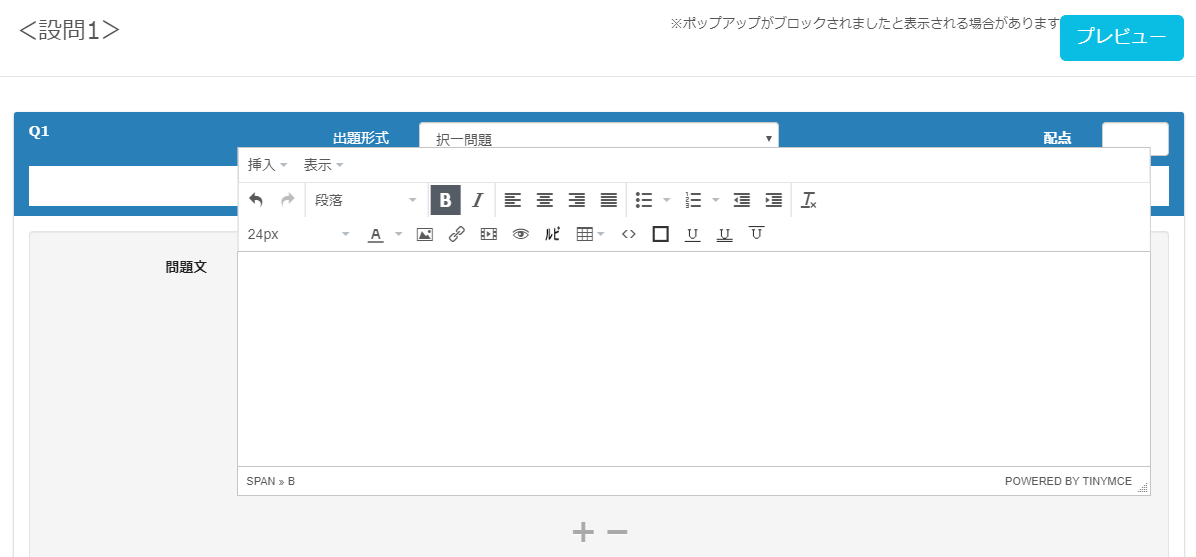
Hello, this is Nagai 🎮 from the Quality Control Department—I still can’t put my fan away because the weather keeps swinging between hot and cold. October has come around in the blink of an eye! In this article, I’ll share some tips and troubleshooting steps for anyone looking to create quizzes for e-learning using our question creation form. To everyone who’s had trouble getting questions to display properly while using our QuizGenerator or learningBOX, or who’s been wondering, "How do I fix this??"—even a minor input error can be resolved immediately if you know the solution! So, please enjoy this article. Table of Contents: 1. What Does "Don’t Be Fooled by Appearances" Mean? 2. Solutions 3. Summary What Does “Don’t Be Fooled by Appearances” Mean? First, take a look at the image below. Text has been entered in the “Question Text” field. At first glance, it appears to simply say, “Don’t be fooled by appearances.” However, when you check the actual source code… *This is just one example; in some cases, it can be even more complex. There may be various specifications, such as font settings, paragraphs, and headings. ➡ “This is what it means to be fooled by appearances.” When do you encounter this kind of phenomenon? This can occur when you use the “Copy & Paste” function—which you usually use without a second thought—while creating quizzes. Copying and pasting text entered in the question creation form or text found online to create questions is quick and easy, but “it also imports unnecessary information such as extra line breaks, spaces, special fonts, and device-dependent characters.” In some cases, this not only causes the display on the player’s screen to break but can also result in multiple questions being merged into a single one. If a question isn’t displaying as intended, these are likely the causes. 💦 Solution: This issue occurs when using the question creation form, so you’ll need to check the source code to verify. "The simplest way to avoid this is to use plain text." To be precise, you should use standard text. Standard text does not allow the use of HTML tags; only raw text data is entered. You can either format it here and create the question directly in text format, or copy and paste it into the question creation form. Once you’ve gone through the standard text step, you’re free to use it however you like. Summary: When creating questions using the question creation form, the display may not match your intended results. Some of you may feel that while it seems convenient, there are unexpected pitfalls. However, HTML tags exist to ensure questions are displayed neatly. The display issues you’re seeing are simply the result of not handling those tags correctly. HTML tags aren’t actually that difficult to understand. While some people may feel intimidated just by seeing the English terms, I hope you’ll give them a try, even if just a little. Furthermore, by applying HTML tags and other techniques, you can create interesting questions like these. In this article, I’ve shared some tips for those who want to create quizzes for e-learning. Our e-learning system, learningBOX, offers a wide variety of quiz formats and customization options. We’re also happy to assist with any questions you may have regarding quiz creation. Please feel free to contact us. Thank you for reading this article.
STEM

What is STEM education?

Nice to meet you. I’m Yokoyama 🐈 from the development team. Have you heard of the term “STEM education”? It’s an educational model that originated in the United States in the 2000s. In this article, I’ll introduce STEM education, which is gaining attention around the world. Table of Contents: 1. What Is STEM Education? 2. STEM Education Abroad 3. STEM Education in Japan 4. Summary What Is STEM Education? STEM stands for Science, Technology, Engineering, Mathematics, and was proposed by the U.S. National Science Foundation in the 2000s. STEM education was originally launched with the goal of increasing enrollment in science and engineering fields to enhance international competitiveness through science and technology. Today, the concept has expanded and diversified to include various related ideas, such as STEAM education—which incorporates Art to emphasize creativity and sensitivity in preparation for a super-smart society—and STREAM education, which adds Robotics. It goes beyond mere education in science and engineering to emphasize practical skills, shift from subject-specific to interdisciplinary education, and actively incorporate experiential, creative, and new technologies. Emphasis on racial integration and diversity: ensuring equitable educational opportunities; prioritizing the value of K–12 (elementary and secondary education for students up to age 12); and focusing on the training of STEM teachers—among other initiatives—it is being implemented worldwide as a comprehensive educational approach closely linked to society and creativity.   STEM Education Abroad: Although STEM education originated in the United States, countries around the world are now actively pursuing it as a national policy. Country Background Specific Initiatives United States Government-led promotion of IT talent development, EdTech adoption, and STEM education. As automation driven by robotics and AI advances, the middle class faces a crisis. Charter schools aiming to break away from traditional education have emerged. Schools utilizing EdTech services such as adaptive learning, MOOCs, LMS, and other EdTech services Schools utilizing the flexible charter school system to foster soft skills (non-cognitive abilities, GRIT, etc.) through enhanced, interdisciplinary, project-based learning China By 2025, there will be a severe shortage of talent in areas critical to future economic development Premier Li Keqiang advocates “Mass Entrepreneurship and Innovation for All” (Mass Entrepreneurship and Innovation). China’s STEM Education 2029 Innovation Action Plan; Shanghai “STEM+” Education Research Center. Israel: Due to its historical and military background, there is a widespread recognition that cultivating science and technology talent is essential for the country’s continued development. STEM education is introduced from an early age. In particular, at science and technology kindergartens operated in partnership with high-tech companies, children can learn about robotics, computers, space, and more. Within STEM education, the country places special emphasis on programming and cybersecurity. Singapore has traditionally prioritized the development of an elite class to lead the nation. It focuses particularly on cultivating talent for key industries such as IoT, robotics, AI, biotechnology. Recently, the country has introduced “humanities education” to cultivate non-cognitive skills. To strengthen the nation’s AI workforce, it offers AI education programs with generous support for young professionals. Integrated programs combining secondary education and university preparatory education, along with the use of EdTech to enable personalized learning and the cross-disciplinary understanding and application of knowledge, appear to be global trends.   STEM Education in Japan: Initiatives for STEM education in Japan appear to be led primarily by the Ministry of Internal Affairs and Communications, the Ministry of Education, Culture, Sports, Science and Technology, and the Ministry of Economy, Trade and Industry. The Ministry of Education, Culture, Sports, Science and Technology (MEXT) has been operating the Super Science High School program since 2002. To cultivate future international talent in science and technology, MEXT designates high schools and other institutions that implement advanced science and mathematics education as “Super Science High Schools,” and has been supporting the development and implementation of curricula that deviate from the official curriculum guidelines, the promotion of research projects, and experiential and problem-solving learning through observation and experimentation. Source: Ministry of Education, Culture, Sports, Science and Technology / Super Science High Schools Furthermore, since the fiscal year 2020, it appears that various measures are being implemented toward the full-scale implementation of programming education in elementary schools. The Ministry of Economy, Trade and Industry has established three pillars for educational reform: “STEAM-based Learning,” “Independent and Individually Optimized Learning,” and “Building a New Learning Infrastructure.” STEAM-Based Learning: Moving toward an interdisciplinary approach that integrates the humanities and sciences, where “knowing” and “creating” form a cycle, centered on the unique sense of excitement each individual feels. Autonomous and Individually Optimized Learning: Enabling students to choose their own learning methods based on their unique cognitive characteristics and academic achievement levels. Building New Learning Infrastructure: Moving toward learner-centered, digital-first schools that integrate seamlessly with society. Just as in other countries, Japan appears to be leveraging EdTech to achieve personalized learning and the cross-disciplinary understanding and application of knowledge. Summary: STEM education is not limited to science and engineering fields; it is a comprehensive educational approach aimed at “creating AI, apply it, and create new value” as we move toward a “super-smart society.” Originating in the United States, STEM education is now being actively pursued as a national policy by countries around the world. Utilizing EdTech to enable personalized learning and the cross-disciplinary understanding and application of knowledge. Perhaps in the not-too-distant future, it will become commonplace for every student to use their own computer or tablet for e-learning! We are also working diligently to develop our e-learning system, “learningBOX,” with a focus on STEM education, so we appreciate your continued support! 😀 Click here for reference pages on STEM education. Source: Reference Materials on the Current State of Education in Other Countries (Ministry of Economy, Trade and Industry) (Accessed September 5, 2019). Source: Human Resource Development for Society 5.0 ~ Society Changes, Learning Changes ~ (Accessed September 5, 2019).

Practice typing with e-learning training!

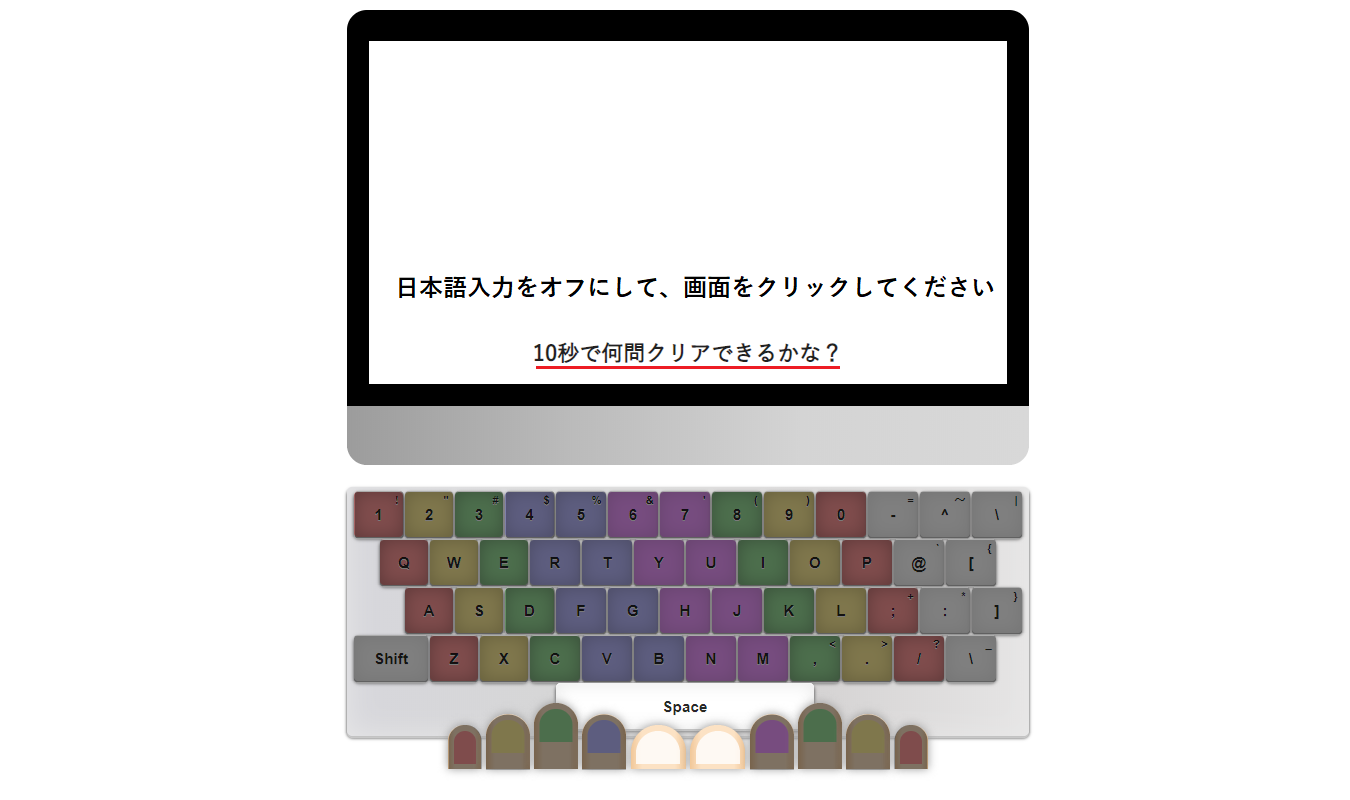
Practice Typing Through E-Learning Training! Long-sleeved cardigans have become a must-have, replacing sun umbrellas. Hello! Nice to meet you—I’m Kuroda from the Quality Control Department. This is my first time writing an article. The topic for this post is "Featured Typing Course Materials"!! Are you familiar with the “Typing Course Materials” included in learningBOX’s content features? In addition to flashcards and question creation, learningBOX also offers “Typing Course Materials” that allow you to practice typing as part of e-learning training. In this article, I’ll introduce the “Typing Course,” including how to create it, how to use it, and how to put it to practical use. I hope you’ll enjoy this article. Table of Contents: 1. What Is the Typing Course? 2. How to Create a Typing Course 3. Let’s Try Entering Text Using the Typing Course 4. How to Use It Within Your Company 5. Summary Typing Materials are learning resources for “entering text using a keyboard” that can be created using learningBOX’s content management feature. How to Create Typing Materials Log in to learningBOX, go to Content Management, Typing Materials > “Create Typing Materials.” Enter the [Title, Text, and Pronunciation] in the typing exercise creation form. If everything is correct, click “Save and Publish” in the upper-right corner. A form will appear; follow the input fields to set the “Text” (the problem text) and “Pronunciation” (the characters to be entered). You can use hiragana, katakana, and numbers in the “Pronunciation” field. Please note that kanji, English, symbols (such as “” and “.”), and other characters cannot be used. *For detailed settings regarding typing exercises, please refer to the “How to Use Typing Exercises” page. Let’s Try Text Input Using the Typing Exercise! For those of you who are good at typing!! We’ve prepared a typing exercise created by our quality control team. Please give it a try to test your skills!! Difficulty Level: ★★★☆☆ ・Sentences of about 10 to 20 characters will be presented. Be prepared—the sentences are designed to catch you off guard! ・Passing score: 40 points ・How many characters can you type without any mistakes? ・This is a challenging typing exercise that even our staff struggled to pass!! ・Click the PC monitor image below, and a message saying “Press the space bar when you’re ready” will appear—start from there! Let’s type!! Please use the sample below on a PC. It is not available on smartphones or tablets. Good job! So, how many points did you score on the exercise above? Did the “Daruma-chan” pass icon appear? I created this myself—did you find it fun? It would make me happy if you thought, “That was fun!” or “I want to try it again!” How We Use It Internally At our company, we distribute e-learning courses using typing tutorials as a recreational activity for our employees. The system works so that once you pass a level, you can move on to the next one, and when you pass them all, you receive a certificate of completion! By designing courses with learningBOX, you can progress through any learning material—not just the typing course—in a predetermined order. I’m happy to say I earned my certificate! I worked hard every day and passed! The Benefits and Expectations of the Typing Course I know many of you might be a bit shy to admit it, but I think there are quite a few people who struggle with typing. ・You want to type quickly and accurately, but you end up looking at the keyboard while typing. ・It takes a long time to write documents. ・You struggle with palatalized consonants, geminated consonants, nasal sounds, and long vowels. Everyone has their own struggles, I’m sure. Benefits of Improving Your Typing Skills ・You can reduce the time spent on administrative tasks by increasing your typing speed and reducing typos and omissions. ・Work efficiency improves. ・You can immediately notice typing errors. ・ You’ll feel less intimidated by computers and be able to tackle your work with confidence. Typing may seem like a simple task at first glance—just “hitting the keys.” However, our brains are constantly working to accurately interpret the meaning and content of words and instantly process them. Typing quickly and accurately based on that processed information is a more complex task than you might think. To perform this task efficiently, quickly, and accurately, daily repetitive practice is the fastest way to improve your typing skills. Summary: What did you think of the “Typing Course,” which allows you to practice typing as part of an e-learning training program? By actually trying it out, we hope you were able to experience the fun of typing for yourself. While your typing speed and accuracy won’t improve dramatically in just a day or two, mastering the skill of accurate typing will equip you with essential workplace skills, such as streamlining administrative tasks. To corporate training managers reading this article: If any of the following apply to your organization, please take this opportunity to consider implementing learningBOX! ・Employee-written documents contain many typos and missing characters ・Recent new hires are skilled at using smartphones but are slow at typing on a PC ・It takes a long time to check for errors in contract documents created by subordinates Please give learningBOX a try—it’s an e-learning typing practice tool that engages both your mind and body. Thank you for reading this article.

SCORM Wrapper / SCORM Wrapper

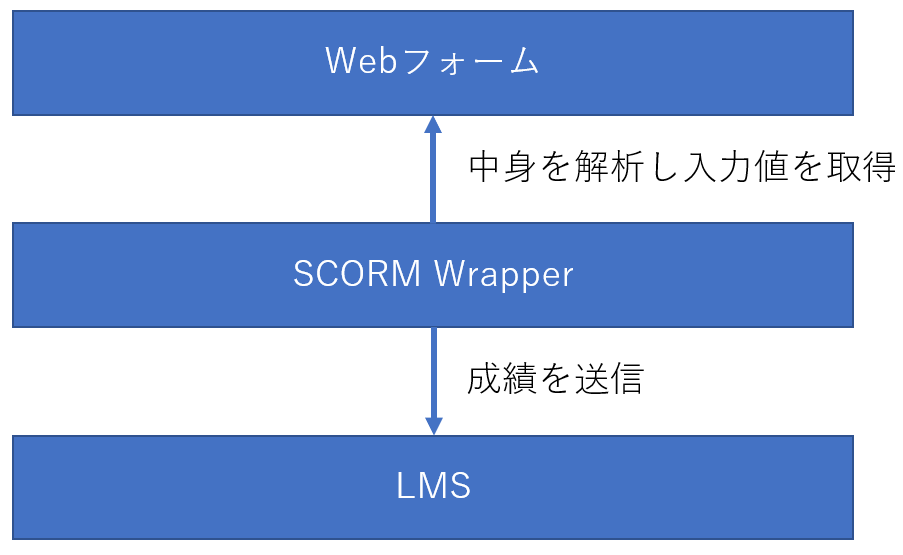
I am Nishimura and I started to create QuizGenerator in 2011. I am not able to update it, but there was a time when I was a certified SCORM Assessor, so I kind of understand SCORM. QuizGenerator is useful, but it has its limitations. QuizGenerator is a SCORM-compliant e-learning tool that allows you to create a variety of exercises, tests, and quizzes without having to worry about SCORM, but it still has its limitations. If you are a strong web programmer, you can implement SCORM relatively easily by referring to the article "Let's make SCORM materials". However, if you are a web programmer, it is relatively easy to implement SCORM. However, if you can do web design, but not programming, or if you can program a little, but learning SCORM is too much of a hassle, it may be too much of a burden for you. For those people, we recommend the SCORM Wrapper. The SCORM Wrapper makes it easy to create SCORM-compliant teaching materials. I have never heard of SCORM Wrapper. You're probably right. The name of our development code, or rather the name of our internal system, is SCORM Wrapper, and there is no mention of it in the learningBOX or on the instructional page. The reason why it is not mentioned is that the name "SCORM Wrapper" is not easy to convey to customers for marketing reasons. From a developer's point of view, the SCORM Wrapper is a tool to wrap web forms and bring SCORM APIs to life, so it is nothing more than a SCORM Wrapper. However, since we are not proposing any use beyond the questionnaire at present, it has been spoiled as a questionnaire. In any case, the survey material is the SCORM Wrapper, which means that it can be used to create more than a survey. The SCORM Wrapper is, simply put, a dream tool for making web forms compatible with SCORM. Schematically, the SCORM Wrapper analyzes the contents of a web form, finds the INPUT tags, SELECT tags, TEXTAREA tags, etc., and submits the results according to the SCORM standard. Elements that the SCORM Wrapper will send SCORM Wrapper will send the value of the following HTML elements, both inside and outside of a FORM, if they have the name attribute specified. value of the following HTML elements with the name attribute, both inside and outside of FORM. input[type=text] input[type=number] input[type=password] input[type=date] input[type=month] input[type=email] input[type=hidden] input[ type=radio type=radio] input[type=check] textarea select Send grades by name attribute Grades are sent according to the name attribute. For example, if there is a tag , the value entered there will be sent with the name q1. In practice, the value of the name attribute is setValue for cmi.interactions.n.id. Behavior with special values in name If you put a special value in name, it has a special meaning. Names ending in _result If a name ending in _result is given, it is sent as the result of the item without the _result. For example, if there is a field named "answer1" and you have a response entered there, the field named "answer1_result" will be treated as a result for answer1. The result can be set to "correct", "strong", "unanticipated", "neutral", or "decimal", and corresponds to cmi.interactions.n.result as a SCORM element. __score__ A value representing the score. in SCORM 1.2, the rule is to specify an integer from 0-100, but learningBOX also accepts values greater than 100. Decimals are not allowed. __lesson_status__ Indicates pass/fail and progress. Please set the appropriate value from the following four values. If not set, completed will be sent. incomplete: in progress completed: completed (default value) passed: passed failed: failed __duration__ Indicates the duration of the study. If this element is not present, the value measured by SCORMWrapper will be sent. If you think the time measured by SCORMWrapper is not accurate enough, pass the elapsed time in integer seconds to __duration__. The time from the moment the material is loaded to the moment the grades are sent is measured. If you have a start button in the material and want to measure the exact time between pressing it and answering the last question, you can implement a time measurement function and record the exact value by putting the measurement result in __duration__. __suspend_data__ Element to save the values at the end of the study and reuse them the next time they are loaded. In a forthcoming update, all fields will be able to retain values across sessions, but the data storage feature of __suspend_data__ and the data storage feature implemented for all fields will be exclusive. If __suspend_data__ is used, the save function for other fields is not expected to be available. Submit Button The submit button should be . id="submit" is very important. SCORMWrapper will recognize any button with this ID as a submit button. Example of teaching material (1) -- Secumane 50 questions I made the questions for the Information Security Management Examination, 2009. However, please do not take this too seriously, as it was written in dirty code using jQuery about two years ago. Even though it is a dirty code, it is easy to make a SCORM-compliant 4-choice question with such a simple code. Just put the choices in the q001~q050 radios, the right/wrong in the q001_result~q050_result hidden fields, the score in the __score__, the pass/fail in the __lesson_status__, and the rest is SCORM Wrapper will send the data according to the SCORM standard. The correct answer data is in lines 30 to 34, and the choices are in lines 15 to 18, but the number of items can be increased or decreased, and the choices can be changed to 1, 2, or 3. It should work fine if you increase or decrease the number of items, or change the choices to 1, 2, 3, etc. You may also create other subjects in this way and use them in your company! (If there are many requests, we will make it easy to create them within learningBOX! (Personally, I would like to make an improved version of this, so I would be happy to receive feedback on how I can easily create teaching materials similar to this one) Code (available on Gist) Learning screen The learning screen looks like this. Each radio button is assigned a name from q001 to q004, and the values a, b, c, and e are set to a, b, c, and e, respectively. When the submit button is pressed, the submit() function is called to execute the grading, and then the results are sent. Result display screen The result display screen is shown below. Pass/fail and score are passed using the __lesson_status__ and __score__ fields, respectively. The time required was sent automatically by SCORMWrapper. For each question, how it was answered and the correct or incorrect answer are also recorded. Three types of learningBOX materials are actually built on top of SCORMWrapper: questionnaires, web pages, and bug-eating. Questionnaire This is the use that SCORMWrapper was designed for from the beginning: You can easily create a questionnaire using SCORMWrapper. Certainly, it is easier than implementing SCORM yourself. But we couldn't easily get to the point where it was easy for everyone, so we developed the survey creation form as a function to create a web form. By the way, when you download the questionnaire you created within learningBOX, a ZIP file will fall out, which contains two files: form.html and config.json. The former is the survey form itself, and the latter is metadata representing the structure of the survey form. With the latter data, the downloaded questionnaire can be re-edited on learningBOX even after it has been re-uploaded. Conversely, if config.json is removed, learningBOX will not edit form.html. If you want to rewrite form.html to make it look better, for example, we recommend uploading it with config.json removed. Web page Web page type teaching materials are implemented on SCORMWrapper. SCORMWrapper's functions are used for sending study time and lesson_status. The "Worm-eaten Notebook" is also implemented on top of SCORMWrapper. SCORMWrapper is used to send study_time and lesson_status. This is where Mr. M implemented it, but in writing this article, I checked the implementation for the first time. How to use the SCORM Wrapper Currently, there is no SCORM Wrapper in learningBOX. If you have carefully read the text so far, you may have noticed that you can use the SCORM Wrapper by uploading it as a survey material. Click on the following link to open the zip file and upload the sg.html file as the survey materials! Secumane Past Questionnaire Materials: sg.zip Upload Location Summary I have written about the SCORM Wrapper, and the potential of the SCORM Wrapper is amazing. On the other hand, we have not been able to communicate enough about the SCORM Wrapper or propose applications for it, so we cannot say that its utilization has not progressed sufficiently. We hope that this article has given you a sense of what the SCORM Wrapper is and what it can be used for. SCORMWrapper is a system that allows you to create SCORM educational materials just by writing web forms.

Find more about learningBOX