[Advance Notice] Notice of Specification Changes Accompanying the Release of Version 7.0



Thank you for your continued support of our services.
In conjunction with the release of Version 7.0, scheduled for September 16, 2026, we will be making changes to the specifications of certain features.
We would like to inform you of the changes as follows:
[Change #1]
Add a setting to allow sending emails with "Grade Management Permissions (View)"
■ Affected Features
Score Management Notificationand Learning Progress Notification
■Eligible Participants
Users with grade management permissions (view-only)
■ Details of Changes
Until now, users with "Grade Management Permissions (View)" could only send "Learning Progress Notifications" from the Group Medical Record screen; they could not send "Grade Management Notifications" from the Grade Management screen.
Starting with the release of Version 7.0, the sending of email notifications related to grades (grade management notifications and learning progress notifications) will be subject to administrator approval.
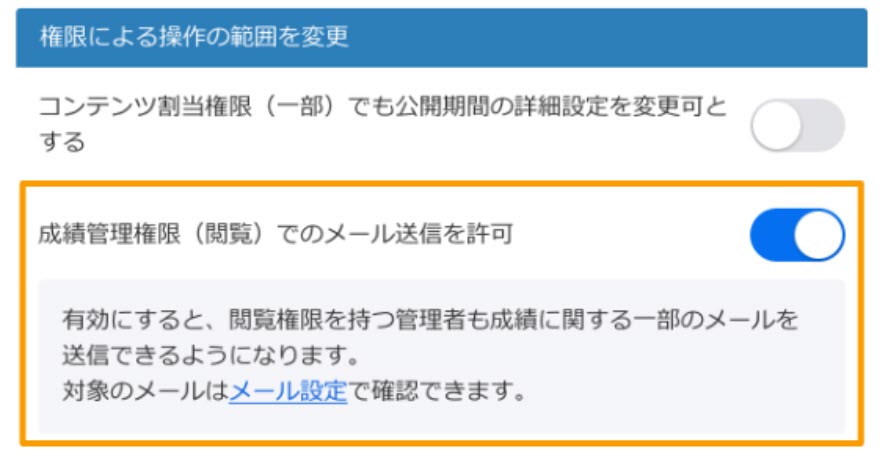
*Features scheduled for release in Version 7.0
Comparison before and after change
| Permission Settings | Score Management Notification | Learning Progress Notification | |
| Before change | Cannot Send | Can be sent | |
| After change | Off ※Default setting | Cannot Send | Cannot Send |
| On | Can be sent | Can be sent |
■ Action Request
After the release of Version 7.0, this permission will be turned off by default. Therefore, if users with the "Grade Management Permission (View)" are currently sending learning progress notifications, they will no longer be able to do so without further action.
If you need to continue receiving these notifications, please go to the settings screen after the release of Version 7.0 and set the permission to "On." Once set to "On," notifications related to grades (grade management notifications and learning progress notifications) will be sent.
[Change #2]
Messaging FeatureChange to the Frequency of Email Notifications (On-Demand Notifications)
■ Affected Features
message receipt notification
■ Details of Changes
We will be changing the notification email system from the current setup—where unread messages are aggregated and sent once a day—to a system where a notification email is sent each time a message is sent.
Comparison before and after change
| Before change | We send a notification email once a day (around 12:00 JST) to users who have unread messages. |
| After change | We will send a notification email each time a message is sent. |
■Important Notes and Requests for Customers (Regarding the Period During Which Notification Emails Were Not Sent)
Due to migration procedures related to this specification change, notification emails will not be sent for messages sent during the following period.
Timeframe: Approximately 12:00 p.m. on September 15, 2026, through approximately 6:30 a.m. on September 16, 2026 (until the Ver. 7.0 update is complete)
Unread notification emails will not be sent for messages sent during the period mentioned above. We apologize for the inconvenience and ask that you please check the system's messaging feature directly.
We apologize for any inconvenience this may cause our customers and appreciate your understanding and cooperation.
[Change #3]
Changes to the Rich Text Editor
■ Affected Features
Rich Text Editor
■ Details of Changes
We will be replacing the editor (TinyMCE) used on all text input and editing screens throughout the system with the new editor (Froala).
Applies to: Screens for creating, editing, and submitting quizzes, tests, reports, web pages, flashcards, and other learning materials, as well as all major functions
Comparison before and after change
Before the change: Old editor (tinyMCE)
(Example) Quiz and Test Material Editing Screen

After the change: New Editor (Froala)
(Example) Quiz and Test Material Editing Screen

■Impact
(1) Screen Design and Usability
Due to the switch to a new editor, the UI design on the screen, the layout of the toolbar icons, and some aspects of the user experience will change.
② Displaying Existing Content
If you continue to use the existing content as is after the update, there will be no changes to what is displayed.
However, if you edit and save content created in the old editor after the update, the internal HTML will be converted to the new editor's format, so the display layout may change slightly.
■ Action Request
Since the layout of the toolbar and other elements on the admin screen will change, please consider updating your internal manuals and guidelines as needed. Also, please consider creating a backup before editing any important content. After the update, please check to ensure there are no issues with the display or layout.
We apologize for any inconvenience this may cause our customers and appreciate your understanding and cooperation.