【Important】Regarding an OS Detection Issue on Android Tablets (Chrome 143 or Later)



Thank you for your continued patronage.
Currently,Chrome on Android tablets (version 143 or later)When using,The operating system is "Linux"There may be cases where a malfunction occurs that causes it to be determined as such.
■Target
Android tablet
Google Chrome 143 or later
<Impact ①>
■ Affected Features
Page setup after login
■Issue Details
During the OS and browser compatibility check performed at login (a feature that verifies the device, OS, and browser version when a user attempts to log in, and controls whether to allow or deny login based on predefined conditions), the above-mentioned devices may be unintentionally classified as "non-compatible devices" during this determination.
As a result, a screen indicating that the device is not compatible will be displayed before login.
■Scope of Impact Based on Administrator Settings
The impact of this issue on users varies depending on the administrator's configuration settings.
This setting is located in the "Supported OS/Browsers" tab of the "System Settings" > "Post-Login Page Settings" screen in the side menu.
- Page setup after login
The setting to allow or deny login is on the screen below.
※By default, "Allow login" is enabled.
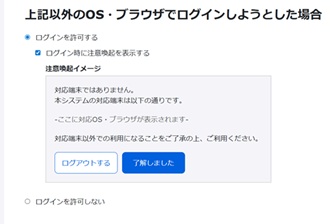
① When the "Allow Login" setting is enabled
Before logging in, a screen indicating that your device is not supported will appear. However, you can still log in by clicking the "Login" button on the screen.
▼Screen image (at login)
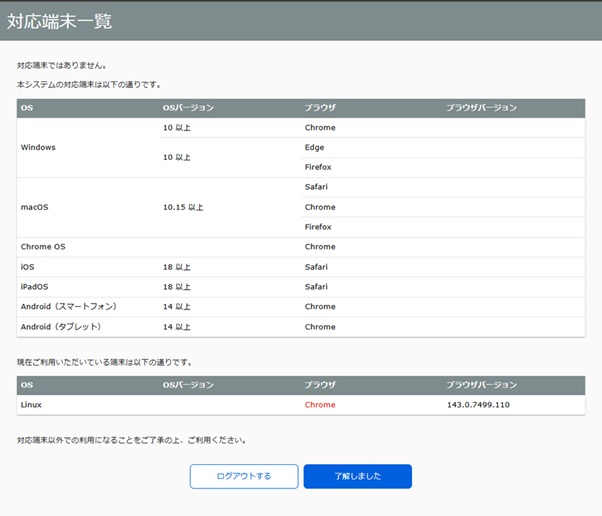
② When "Do not allow login" is set
Before logging in, a screen indicating that the device is not supported will appear, preventing login (the system will not allow login).
▼Screen image (at login)
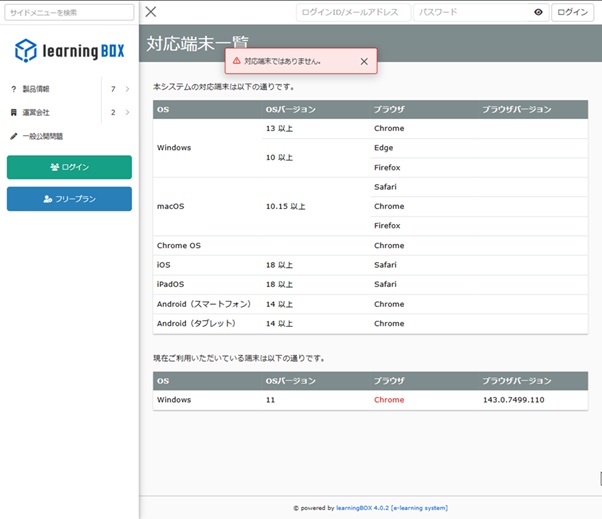
■ Action Request
② When "Do not allow login" is setand Android tabletThere may be cases where you are unable to log in using [this service].
I apologize, but if necessary, please ""Allow Login" settingWe would appreciate it if you could consider making the changes.
<Impact ②>
■ Affected Features
OS Requirements for Course Enrollment
■Issue Details
The OS restriction feature during content learning (which checks the device's OS when a user attempts to learn and controls whether to "allow access" or "deny access" if it does not meet pre-set conditions) may unintentionally classify the above target devices as "non-compatible devices" during evaluation.
■Scope of Impact Based on Administrator Settings
If you intentionally modify the default value, the following effects will occur.
Example: Cases where the above target devices cannot be used for the course unintentionally
| OS | Restriction Method |
|---|---|
| If you attempt to take the course on an operating system other than those listed above | Do not permit enrollment |
■ Action Request
If you have modified settings such as "When attempting to take the course on an OS other than those listed above" from their default values, we kindly ask that you consider changing the settings as necessary.
We are currently investigating the cause and implementing corrective measures, but resolving the issue is expected to take some time.
We will provide further updates as soon as there are any changes to the progress or response plan.
We sincerely apologize for any inconvenience caused to our valued customers.