Column

Notes on creating quizzes in the question creation form

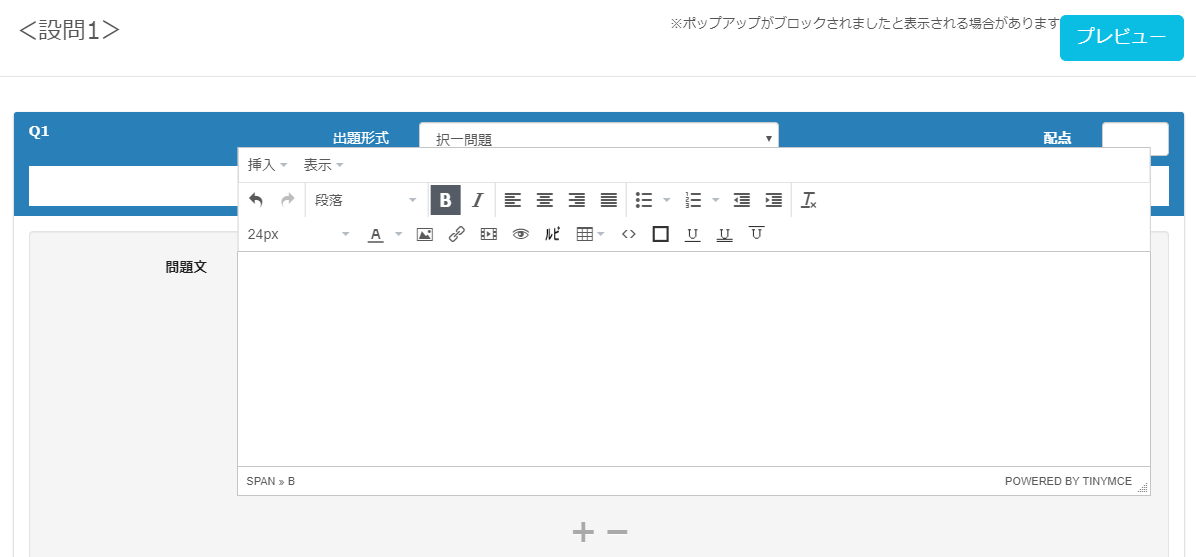
Hello, this is Nagai 🎮 from the Quality Control Department—I still can’t put my fan away because the weather keeps swinging between hot and cold. October has come around in the blink of an eye! In this article, I’ll share some tips and troubleshooting steps for anyone looking to create quizzes for e-learning using our question creation form. To everyone who’s had trouble getting questions to display properly while using our QuizGenerator or learningBOX, or who’s been wondering, "How do I fix this??"—even a minor input error can be resolved immediately if you know the solution! So, please enjoy this article. Table of Contents: 1. What Does "Don’t Be Fooled by Appearances" Mean? 2. Solutions 3. Summary What Does “Don’t Be Fooled by Appearances” Mean? First, take a look at the image below. Text has been entered in the “Question Text” field. At first glance, it appears to simply say, “Don’t be fooled by appearances.” However, when you check the actual source code… *This is just one example; in some cases, it can be even more complex. There may be various specifications, such as font settings, paragraphs, and headings. ➡ “This is what it means to be fooled by appearances.” When do you encounter this kind of phenomenon? This can occur when you use the “Copy & Paste” function—which you usually use without a second thought—while creating quizzes. Copying and pasting text entered in the question creation form or text found online to create questions is quick and easy, but “it also imports unnecessary information such as extra line breaks, spaces, special fonts, and device-dependent characters.” In some cases, this not only causes the display on the player’s screen to break but can also result in multiple questions being merged into a single one. If a question isn’t displaying as intended, these are likely the causes. 💦 Solution: This issue occurs when using the question creation form, so you’ll need to check the source code to verify. "The simplest way to avoid this is to use plain text." To be precise, you should use standard text. Standard text does not allow the use of HTML tags; only raw text data is entered. You can either format it here and create the question directly in text format, or copy and paste it into the question creation form. Once you’ve gone through the standard text step, you’re free to use it however you like. Summary: When creating questions using the question creation form, the display may not match your intended results. Some of you may feel that while it seems convenient, there are unexpected pitfalls. However, HTML tags exist to ensure questions are displayed neatly. The display issues you’re seeing are simply the result of not handling those tags correctly. HTML tags aren’t actually that difficult to understand. While some people may feel intimidated just by seeing the English terms, I hope you’ll give them a try, even if just a little. Furthermore, by applying HTML tags and other techniques, you can create interesting questions like these. In this article, I’ve shared some tips for those who want to create quizzes for e-learning. Our e-learning system, learningBOX, offers a wide variety of quiz formats and customization options. We’re also happy to assist with any questions you may have regarding quiz creation. Please feel free to contact us. Thank you for reading this article.
STEM

What is STEM education?

Nice to meet you. I’m Yokoyama 🐈 from the development team. Have you heard of the term “STEM education”? It’s an educational model that originated in the United States in the 2000s. In this article, I’ll introduce STEM education, which is gaining attention around the world. Table of Contents: 1. What Is STEM Education? 2. STEM Education Abroad 3. STEM Education in Japan 4. Summary What Is STEM Education? STEM stands for Science, Technology, Engineering, Mathematics, and was proposed by the U.S. National Science Foundation in the 2000s. STEM education was originally launched with the goal of increasing enrollment in science and engineering fields to enhance international competitiveness through science and technology. Today, the concept has expanded and diversified to include various related ideas, such as STEAM education—which incorporates Art to emphasize creativity and sensitivity in preparation for a super-smart society—and STREAM education, which adds Robotics. It goes beyond mere education in science and engineering to emphasize practical skills, shift from subject-specific to interdisciplinary education, and actively incorporate experiential, creative, and new technologies. Emphasis on racial integration and diversity: ensuring equitable educational opportunities; prioritizing the value of K–12 (elementary and secondary education for students up to age 12); and focusing on the training of STEM teachers—among other initiatives—it is being implemented worldwide as a comprehensive educational approach closely linked to society and creativity.   STEM Education Abroad: Although STEM education originated in the United States, countries around the world are now actively pursuing it as a national policy. Country Background Specific Initiatives United States Government-led promotion of IT talent development, EdTech adoption, and STEM education. As automation driven by robotics and AI advances, the middle class faces a crisis. Charter schools aiming to break away from traditional education have emerged. Schools utilizing EdTech services such as adaptive learning, MOOCs, LMS, and other EdTech services Schools utilizing the flexible charter school system to foster soft skills (non-cognitive abilities, GRIT, etc.) through enhanced, interdisciplinary, project-based learning China By 2025, there will be a severe shortage of talent in areas critical to future economic development Premier Li Keqiang advocates “Mass Entrepreneurship and Innovation for All” (Mass Entrepreneurship and Innovation). China’s STEM Education 2029 Innovation Action Plan; Shanghai “STEM+” Education Research Center. Israel: Due to its historical and military background, there is a widespread recognition that cultivating science and technology talent is essential for the country’s continued development. STEM education is introduced from an early age. In particular, at science and technology kindergartens operated in partnership with high-tech companies, children can learn about robotics, computers, space, and more. Within STEM education, the country places special emphasis on programming and cybersecurity. Singapore has traditionally prioritized the development of an elite class to lead the nation. It focuses particularly on cultivating talent for key industries such as IoT, robotics, AI, biotechnology. Recently, the country has introduced “humanities education” to cultivate non-cognitive skills. To strengthen the nation’s AI workforce, it offers AI education programs with generous support for young professionals. Integrated programs combining secondary education and university preparatory education, along with the use of EdTech to enable personalized learning and the cross-disciplinary understanding and application of knowledge, appear to be global trends.   STEM Education in Japan: Initiatives for STEM education in Japan appear to be led primarily by the Ministry of Internal Affairs and Communications, the Ministry of Education, Culture, Sports, Science and Technology, and the Ministry of Economy, Trade and Industry. The Ministry of Education, Culture, Sports, Science and Technology (MEXT) has been operating the Super Science High School program since 2002. To cultivate future international talent in science and technology, MEXT designates high schools and other institutions that implement advanced science and mathematics education as “Super Science High Schools,” and has been supporting the development and implementation of curricula that deviate from the official curriculum guidelines, the promotion of research projects, and experiential and problem-solving learning through observation and experimentation. Source: Ministry of Education, Culture, Sports, Science and Technology / Super Science High Schools Furthermore, since the fiscal year 2020, it appears that various measures are being implemented toward the full-scale implementation of programming education in elementary schools. The Ministry of Economy, Trade and Industry has established three pillars for educational reform: “STEAM-based Learning,” “Independent and Individually Optimized Learning,” and “Building a New Learning Infrastructure.” STEAM-Based Learning: Moving toward an interdisciplinary approach that integrates the humanities and sciences, where “knowing” and “creating” form a cycle, centered on the unique sense of excitement each individual feels. Autonomous and Individually Optimized Learning: Enabling students to choose their own learning methods based on their unique cognitive characteristics and academic achievement levels. Building New Learning Infrastructure: Moving toward learner-centered, digital-first schools that integrate seamlessly with society. Just as in other countries, Japan appears to be leveraging EdTech to achieve personalized learning and the cross-disciplinary understanding and application of knowledge. Summary: STEM education is not limited to science and engineering fields; it is a comprehensive educational approach aimed at “creating AI, apply it, and create new value” as we move toward a “super-smart society.” Originating in the United States, STEM education is now being actively pursued as a national policy by countries around the world. Utilizing EdTech to enable personalized learning and the cross-disciplinary understanding and application of knowledge. Perhaps in the not-too-distant future, it will become commonplace for every student to use their own computer or tablet for e-learning! We are also working diligently to develop our e-learning system, “learningBOX,” with a focus on STEM education, so we appreciate your continued support! 😀 Click here for reference pages on STEM education. Source: Reference Materials on the Current State of Education in Other Countries (Ministry of Economy, Trade and Industry) (Accessed September 5, 2019). Source: Human Resource Development for Society 5.0 ~ Society Changes, Learning Changes ~ (Accessed September 5, 2019).

Practice typing with e-learning training!

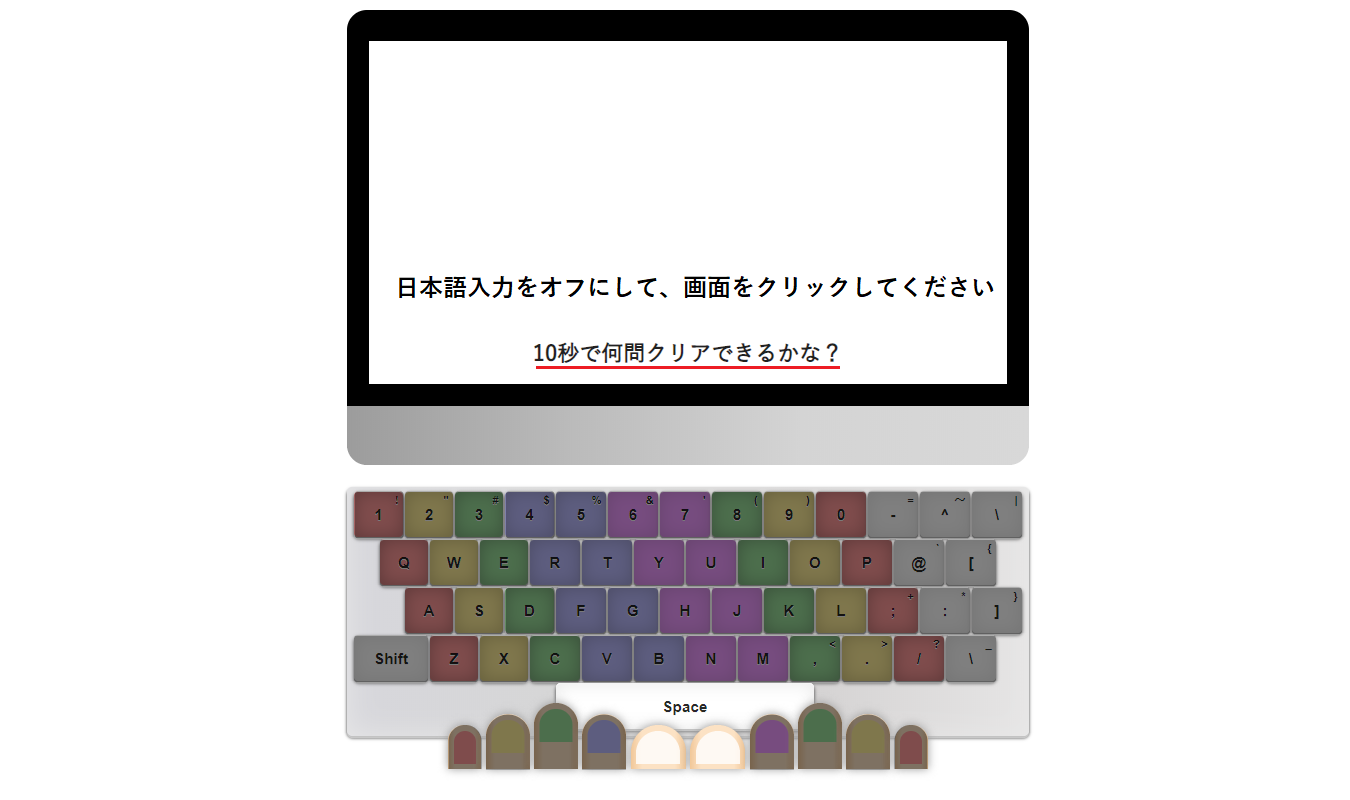
Practice Typing Through E-Learning Training! Long-sleeved cardigans have become a must-have, replacing sun umbrellas. Hello! Nice to meet you—I’m Kuroda from the Quality Control Department. This is my first time writing an article. The topic for this post is "Featured Typing Course Materials"!! Are you familiar with the “Typing Course Materials” included in learningBOX’s content features? In addition to flashcards and question creation, learningBOX also offers “Typing Course Materials” that allow you to practice typing as part of e-learning training. In this article, I’ll introduce the “Typing Course,” including how to create it, how to use it, and how to put it to practical use. I hope you’ll enjoy this article. Table of Contents: 1. What Is the Typing Course? 2. How to Create a Typing Course 3. Let’s Try Entering Text Using the Typing Course 4. How to Use It Within Your Company 5. Summary Typing Materials are learning resources for “entering text using a keyboard” that can be created using learningBOX’s content management feature. How to Create Typing Materials Log in to learningBOX, go to Content Management, Typing Materials > “Create Typing Materials.” Enter the [Title, Text, and Pronunciation] in the typing exercise creation form. If everything is correct, click “Save and Publish” in the upper-right corner. A form will appear; follow the input fields to set the “Text” (the problem text) and “Pronunciation” (the characters to be entered). You can use hiragana, katakana, and numbers in the “Pronunciation” field. Please note that kanji, English, symbols (such as “” and “.”), and other characters cannot be used. *For detailed settings regarding typing exercises, please refer to the “How to Use Typing Exercises” page. Let’s Try Text Input Using the Typing Exercise! For those of you who are good at typing!! We’ve prepared a typing exercise created by our quality control team. Please give it a try to test your skills!! Difficulty Level: ★★★☆☆ ・Sentences of about 10 to 20 characters will be presented. Be prepared—the sentences are designed to catch you off guard! ・Passing score: 40 points ・How many characters can you type without any mistakes? ・This is a challenging typing exercise that even our staff struggled to pass!! ・Click the PC monitor image below, and a message saying “Press the space bar when you’re ready” will appear—start from there! Let’s type!! Please use the sample below on a PC. It is not available on smartphones or tablets. Good job! So, how many points did you score on the exercise above? Did the “Daruma-chan” pass icon appear? I created this myself—did you find it fun? It would make me happy if you thought, “That was fun!” or “I want to try it again!” How We Use It Internally At our company, we distribute e-learning courses using typing tutorials as a recreational activity for our employees. The system works so that once you pass a level, you can move on to the next one, and when you pass them all, you receive a certificate of completion! By designing courses with learningBOX, you can progress through any learning material—not just the typing course—in a predetermined order. I’m happy to say I earned my certificate! I worked hard every day and passed! The Benefits and Expectations of the Typing Course I know many of you might be a bit shy to admit it, but I think there are quite a few people who struggle with typing. ・You want to type quickly and accurately, but you end up looking at the keyboard while typing. ・It takes a long time to write documents. ・You struggle with palatalized consonants, geminated consonants, nasal sounds, and long vowels. Everyone has their own struggles, I’m sure. Benefits of Improving Your Typing Skills ・You can reduce the time spent on administrative tasks by increasing your typing speed and reducing typos and omissions. ・Work efficiency improves. ・You can immediately notice typing errors. ・ You’ll feel less intimidated by computers and be able to tackle your work with confidence. Typing may seem like a simple task at first glance—just “hitting the keys.” However, our brains are constantly working to accurately interpret the meaning and content of words and instantly process them. Typing quickly and accurately based on that processed information is a more complex task than you might think. To perform this task efficiently, quickly, and accurately, daily repetitive practice is the fastest way to improve your typing skills. Summary: What did you think of the “Typing Course,” which allows you to practice typing as part of an e-learning training program? By actually trying it out, we hope you were able to experience the fun of typing for yourself. While your typing speed and accuracy won’t improve dramatically in just a day or two, mastering the skill of accurate typing will equip you with essential workplace skills, such as streamlining administrative tasks. To corporate training managers reading this article: If any of the following apply to your organization, please take this opportunity to consider implementing learningBOX! ・Employee-written documents contain many typos and missing characters ・Recent new hires are skilled at using smartphones but are slow at typing on a PC ・It takes a long time to check for errors in contract documents created by subordinates Please give learningBOX a try—it’s an e-learning typing practice tool that engages both your mind and body. Thank you for reading this article.

SCORM Wrapper / SCORM Wrapper

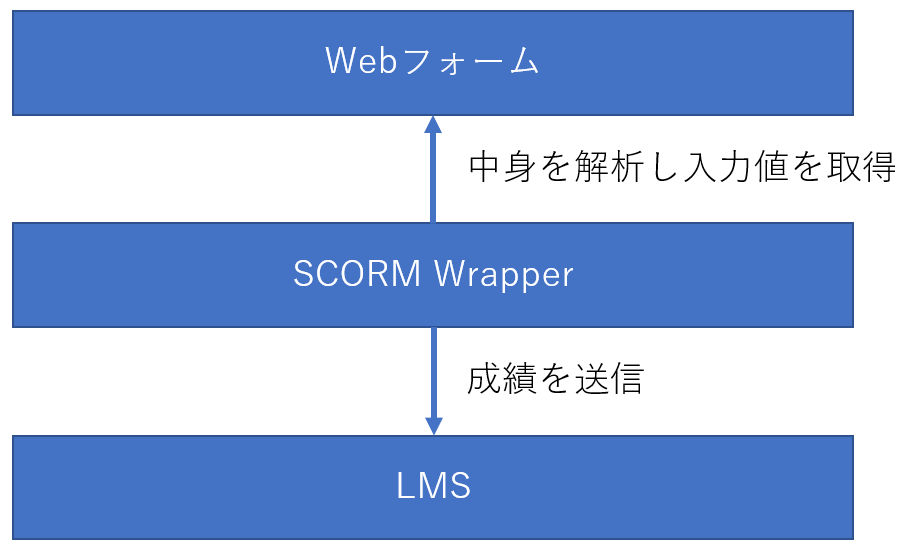
I am Nishimura and I started to create QuizGenerator in 2011. I am not able to update it, but there was a time when I was a certified SCORM Assessor, so I kind of understand SCORM. QuizGenerator is useful, but it has its limitations. QuizGenerator is a SCORM-compliant e-learning tool that allows you to create a variety of exercises, tests, and quizzes without having to worry about SCORM, but it still has its limitations. If you are a strong web programmer, you can implement SCORM relatively easily by referring to the article "Let's make SCORM materials". However, if you are a web programmer, it is relatively easy to implement SCORM. However, if you can do web design, but not programming, or if you can program a little, but learning SCORM is too much of a hassle, it may be too much of a burden for you. For those people, we recommend the SCORM Wrapper. The SCORM Wrapper makes it easy to create SCORM-compliant teaching materials. I have never heard of SCORM Wrapper. You're probably right. The name of our development code, or rather the name of our internal system, is SCORM Wrapper, and there is no mention of it in the learningBOX or on the instructional page. The reason why it is not mentioned is that the name "SCORM Wrapper" is not easy to convey to customers for marketing reasons. From a developer's point of view, the SCORM Wrapper is a tool to wrap web forms and bring SCORM APIs to life, so it is nothing more than a SCORM Wrapper. However, since we are not proposing any use beyond the questionnaire at present, it has been spoiled as a questionnaire. In any case, the survey material is the SCORM Wrapper, which means that it can be used to create more than a survey. The SCORM Wrapper is, simply put, a dream tool for making web forms compatible with SCORM. Schematically, the SCORM Wrapper analyzes the contents of a web form, finds the INPUT tags, SELECT tags, TEXTAREA tags, etc., and submits the results according to the SCORM standard. Elements that the SCORM Wrapper will send SCORM Wrapper will send the value of the following HTML elements, both inside and outside of a FORM, if they have the name attribute specified. value of the following HTML elements with the name attribute, both inside and outside of FORM. input[type=text] input[type=number] input[type=password] input[type=date] input[type=month] input[type=email] input[type=hidden] input[ type=radio type=radio] input[type=check] textarea select Send grades by name attribute Grades are sent according to the name attribute. For example, if there is a tag , the value entered there will be sent with the name q1. In practice, the value of the name attribute is setValue for cmi.interactions.n.id. Behavior with special values in name If you put a special value in name, it has a special meaning. Names ending in _result If a name ending in _result is given, it is sent as the result of the item without the _result. For example, if there is a field named "answer1" and you have a response entered there, the field named "answer1_result" will be treated as a result for answer1. The result can be set to "correct", "strong", "unanticipated", "neutral", or "decimal", and corresponds to cmi.interactions.n.result as a SCORM element. __score__ A value representing the score. in SCORM 1.2, the rule is to specify an integer from 0-100, but learningBOX also accepts values greater than 100. Decimals are not allowed. __lesson_status__ Indicates pass/fail and progress. Please set the appropriate value from the following four values. If not set, completed will be sent. incomplete: in progress completed: completed (default value) passed: passed failed: failed __duration__ Indicates the duration of the study. If this element is not present, the value measured by SCORMWrapper will be sent. If you think the time measured by SCORMWrapper is not accurate enough, pass the elapsed time in integer seconds to __duration__. The time from the moment the material is loaded to the moment the grades are sent is measured. If you have a start button in the material and want to measure the exact time between pressing it and answering the last question, you can implement a time measurement function and record the exact value by putting the measurement result in __duration__. __suspend_data__ Element to save the values at the end of the study and reuse them the next time they are loaded. In a forthcoming update, all fields will be able to retain values across sessions, but the data storage feature of __suspend_data__ and the data storage feature implemented for all fields will be exclusive. If __suspend_data__ is used, the save function for other fields is not expected to be available. Submit Button The submit button should be . id="submit" is very important. SCORMWrapper will recognize any button with this ID as a submit button. Example of teaching material (1) -- Secumane 50 questions I made the questions for the Information Security Management Examination, 2009. However, please do not take this too seriously, as it was written in dirty code using jQuery about two years ago. Even though it is a dirty code, it is easy to make a SCORM-compliant 4-choice question with such a simple code. Just put the choices in the q001~q050 radios, the right/wrong in the q001_result~q050_result hidden fields, the score in the __score__, the pass/fail in the __lesson_status__, and the rest is SCORM Wrapper will send the data according to the SCORM standard. The correct answer data is in lines 30 to 34, and the choices are in lines 15 to 18, but the number of items can be increased or decreased, and the choices can be changed to 1, 2, or 3. It should work fine if you increase or decrease the number of items, or change the choices to 1, 2, 3, etc. You may also create other subjects in this way and use them in your company! (If there are many requests, we will make it easy to create them within learningBOX! (Personally, I would like to make an improved version of this, so I would be happy to receive feedback on how I can easily create teaching materials similar to this one) Code (available on Gist) Learning screen The learning screen looks like this. Each radio button is assigned a name from q001 to q004, and the values a, b, c, and e are set to a, b, c, and e, respectively. When the submit button is pressed, the submit() function is called to execute the grading, and then the results are sent. Result display screen The result display screen is shown below. Pass/fail and score are passed using the __lesson_status__ and __score__ fields, respectively. The time required was sent automatically by SCORMWrapper. For each question, how it was answered and the correct or incorrect answer are also recorded. Three types of learningBOX materials are actually built on top of SCORMWrapper: questionnaires, web pages, and bug-eating. Questionnaire This is the use that SCORMWrapper was designed for from the beginning: You can easily create a questionnaire using SCORMWrapper. Certainly, it is easier than implementing SCORM yourself. But we couldn't easily get to the point where it was easy for everyone, so we developed the survey creation form as a function to create a web form. By the way, when you download the questionnaire you created within learningBOX, a ZIP file will fall out, which contains two files: form.html and config.json. The former is the survey form itself, and the latter is metadata representing the structure of the survey form. With the latter data, the downloaded questionnaire can be re-edited on learningBOX even after it has been re-uploaded. Conversely, if config.json is removed, learningBOX will not edit form.html. If you want to rewrite form.html to make it look better, for example, we recommend uploading it with config.json removed. Web page Web page type teaching materials are implemented on SCORMWrapper. SCORMWrapper's functions are used for sending study time and lesson_status. The "Worm-eaten Notebook" is also implemented on top of SCORMWrapper. SCORMWrapper is used to send study_time and lesson_status. This is where Mr. M implemented it, but in writing this article, I checked the implementation for the first time. How to use the SCORM Wrapper Currently, there is no SCORM Wrapper in learningBOX. If you have carefully read the text so far, you may have noticed that you can use the SCORM Wrapper by uploading it as a survey material. Click on the following link to open the zip file and upload the sg.html file as the survey materials! Secumane Past Questionnaire Materials: sg.zip Upload Location Summary I have written about the SCORM Wrapper, and the potential of the SCORM Wrapper is amazing. On the other hand, we have not been able to communicate enough about the SCORM Wrapper or propose applications for it, so we cannot say that its utilization has not progressed sufficiently. We hope that this article has given you a sense of what the SCORM Wrapper is and what it can be used for. SCORMWrapper is a system that allows you to create SCORM educational materials just by writing web forms.
learningBOX

Studying is a luxury!

Hello! This is Kadota from the System Development Department! Our office moved on September 2, 2019! Since then, I’ve started commuting by bike. For those of you who aren’t getting enough exercise, I highly recommend commuting by bike! Anyway, this time I’ve written an article on the grand theme of “learning.” Please be sure to check it out! Before getting into the blog, let me announce the upcoming trade show taking place this month from Wednesday, September 25 to Friday, September 27! We will be exhibiting at the Education IT Solutions (Kansai EDIX) trade show at Intex Osaka from Wednesday, September 25 to Friday, September 27, 2019! ▼Click here for details We’re currently making steady progress with our preparations! We plan to hold mini-seminars on the day of the event. It will also be an opportunity for our staff to demonstrate our products firsthand, so please come visit us! We’re also accepting requests for complimentary tickets, so if you’re interested, please check out the 3rd [Kansai] Education IT Solutions EXPO at Intex Osaka. Our entire staff looks forward to seeing you there! Now, back to the blog! Table of Contents: 1. Rethinking the Basics: What Is Studying? 2. Why Do We Study? 3. Is Studying a Luxury!? 4. There Are Countless Study Methods 5. Summary Rethinking the Basics: What Is Studying? "Studying is important." I don’t think anyone would disagree with that, would they? In this era of "100-year lifespans" and rapid change, we need to keep studying even as adults. So, what exactly is "studying"? I took a moment to think about it again. According to the "Kojien" (6th edition): ① To apply oneself diligently. ② To learn academic subjects or skills. To learn through various experiences. “To study math,” “Everything requires study.” ③ To sell goods at a low price. “I’ll give you a discount on the price.” Three meanings have been listed, but this time I’d like to discuss ① and ②. First, ① “To apply oneself with all one’s might.” Simply put, this means “to try one’s best.” Next, ② “To learn academic subjects or skills. To learn through various experiences.” “To study math,” “Everything requires study.” This brings to mind images like “going to school,” “taking lessons,” or “a new employee learning the ropes.” Both meanings feel just like how we use the word in everyday life. Why do we study? “Why do I have to study?” I’m sure everyone has thought this at least once. For children and students, common reasons include “so I won’t have trouble when I grow up,” “to get into a better school,” or “because I can’t get a job without studying.” For adults, reasons include “because it’s necessary for work” or “to get a certification.” There are also various other reasons, such as “to make my dreams come true” or “to enjoy my hobbies more.” Although the wording differs, the reasons listed above share a common thread. That is, “to grow beyond who I am now and lead a better, more enjoyable life.” When we’re children, our reasons are often dictated by adults rather than our own will. On the other hand, for adults who continue to study, aren’t their reasons mostly self-motivated? (It’s hard to keep studying just because someone tells you to, isn’t it?) There are also many seniors who maintain their curiosity and take on new challenges even as they age. When you think about it this way, self-motivated study has such positive and wonderful reasons behind it. Is Studying a Luxury!? This brings us back to the title: don’t you think being in a situation or environment where you can study is a tremendous privilege? To take an extreme example, in the midst of war or a natural disaster, studying is the last thing on anyone’s mind, isn’t it? Philosophy flourished in ancient Greece because the city of Athens held immense power in the region, and because it was peaceful and people had time to spare—in other words, they were idle. (You’ve heard of Plato, Socrates, and Aristotle, haven’t you?) Also, if a family is poor and struggling to put food on the table, it’s easy to imagine a situation where they’d say, “Forget school—get to work!” In Japan during the period of rapid economic growth right after the war, workers who had only graduated from junior high school were called “golden eggs,” and that was the norm. Since then, as Japan’s economy has grown, the rates of students advancing to high school and college have been steadily rising. Nowadays, you might think that “going to cram school” or “going on to high school” is a given, but of course, these things come with costs. Typically, students go to school using money their parents have worked hard to earn, but I don’t think it’s a small amount by any means. According to the 2016 Ministry of Education, Culture, Sports, Science and Technology Survey on Children’s Educational Expenses, “the annual cost of attending a public high school (full-time) is approximately 451,000 yen.” Given this, it’s fair to say that having the opportunity to study is a great privilege and a luxury. There are countless ways to study today. While studying is such a luxury, in modern times there are various methods available beyond just attending school. However, it’s tough for busy working adults to go to a classroom after work, isn’t it? So, isn’t there a better way? That’s where “e-learning” comes in. Thanks to the widespread use of computers, smartphones, and tablets, e-learning has become much more accessible than ever before. By making good use of e-learning, you can utilize small pockets of free time—such as short waits or commutes on the train—to study efficiently. And of course, our company’s learning management system, “learningBOX,” is one such e-learning solution. It’s perfect for individual use, of course, but it’s also ideal for corporate training or cram schools, allowing you to distribute materials and resources to large groups while managing students and their grades. Best of all, you can try “learningBOX” for free. We hope you’ll create an account to give it a try and use it to help with your studies and skill development. ▼Register here Summary We’ve taken a moment to reflect on the act of studying—what did you think? Being able to study is a blessing. We hope you’ll make full use of our e-learning system, “learningBOX,” and that it contributes to your personal growth, even in small ways. And to corporate training and HR managers, as well as education professionals, who believe, “We want our employees and staff to grow and lead better, happier lives!” “learningBOX” is offered at a price point that makes it easy to implement, even for companies that have previously felt e-learning systems were too expensive and difficult to adopt! We also offer a free plan with no time limit, so please take this opportunity to sign up. ▼Register here Thank you for reading to the end. [Exhibition Announcement] We will be exhibiting at the Education IT Solutions (Kansai EDIX) at Intex Osaka from Wednesday, September 25 to Friday, September 27, 2019! ▼Click here for details We are currently making steady progress with our preparations! We plan to hold mini-seminars and other events on the day of the exhibition. It will also be an opportunity for our staff to demonstrate the system in action, so please consider visiting us! We are also accepting requests for complimentary tickets, so if you’re interested, please check out the 3rd [Kansai] Education IT Solutions EXPO at Intex Osaka. Our entire team looks forward to seeing you there!

You can create a free trade show web survey!

Create Free Online Surveys for Trade Shows! Hello! This is Mei from the Shanghai Development Branch! 🐼 In this article, I’ll show you how to use learningBOX to create online surveys that you can use at trade shows. To turn your trade show participation into tangible results, does your company conduct surveys for visitors? And are you struggling with the time and effort required to create, print, distribute, revise, and tabulate paper surveys? In this article, I’ll show you how to create web surveys that are easy to build and tabulate using our learningBOX. Our goal with this post is to encourage you to sign up for a free learningBOX account—starting with the survey creation feature—and to encourage you to expand its use to your company’s internal training, utilizing learningBOX as a way to transition your training to e-learning! Table of Contents: 1. Let’s create a free administrator account 2. Let’s Create a Web Survey for Trade Shows 3. Let’s Conduct the Survey 3. Let’s Tabulate the Survey Results 4. Summary Let’s Create a Free Administrator Account To create a web survey, you need a learningBOX administrator account. If you don’t have an account yet, you can sign up for a free learningBOX account here.   Let’s create a web survey for trade shows Step 1: First, click “Content Management” in the side menu. Step 2: Click the “+” button to create a survey. Step 3: In the survey creation form, enter the title, description, and questions.   *With the learningBOX survey feature, you can choose from the following question types: ● Single-choice ● Multiple choice ● List selection ● Single-line text ● Multi-line text. Once you’ve created, saved, and published your survey following these steps, the setup is complete. Published content can be answered from the learning screen.   Let’s conduct a survey. Surveys can be answered on tablet devices such as iPads. On an iPad, the display will look like this. *If you collect personal information through a survey, please ensure full compliance with the Personal Information Protection Act. Let’s compile the survey results. ① From the “By Question” screen in the Grade Management section, click on the “Exhibition Web Survey” you just created.   ② Click “Create Response Summary CSV” on the survey question details screen to download the survey results in CSV format. ③ The CSV will be output as shown below. Summary We have introduced a simple method for creating web surveys using learningBOX. Using our learningBOX, you can create a survey in just a few simple steps. By utilizing web surveys, there is no need to print, distribute, or collect paper response forms. You can also expect to reduce costs associated with printing paper forms. Survey data not only helps improve your company’s services and products but also serves as a catalyst for product development and improvements based on customer feedback, leading to better customer service. Of course, we also encourage you to experience the core features of our e-learning system, such as registering learning materials, setting up courses, distributing courses, and managing grades. We hope that creating a web survey will inspire you to sign up for a free trial and utilize learningBOX for your company’s internal training as well. If you are interested, please feel free to sign up for a free trial of learningBOX. Thank you for reading this article.
LMS Open Source

What is open source moodle for e-learning?

What Is Moodle, the Open-Source e-Learning Platform? Hello everyone! This is Ueda from CS. August is flying by, and September is just around the corner. I really hope this heat wave passes quickly! Now, I’d like to briefly discuss the open-source e-learning platform Moodle. Before I begin, I’d like to explain what “open source” means. Open source refers to the philosophy of making the source code—the computer program written in a human-readable programming language—widely available to the public, allowing anyone to use it freely. It also refers to the software released under this philosophy. ➡Quoted from the IT Glossary: Pros and Cons of Moodle There are several open-source LMS options available, but in this post, I’ll compare the pros and cons of Moodle, which has a relatively large user base. The biggest advantage is that it’s free to use. This allows you to reduce implementation costs. It also offers a high degree of flexibility, allowing you to customize it to your specific needs. Furthermore, under the GPL license, users are free to download, modify, and even redistribute it!! As for the disadvantages, when setting up Moodle, using a shared hosting server may not guarantee a stable operating environment, and if you set up and operate your own server, technical knowledge of servers is required. Additionally, since the support system is not fully established, maintenance costs may rise if issues such as bugs occur. Many people also find creating course materials and configuring the system to be difficult. ▼Click here for more details on Moodle▼ E-Learning - About the open-source Moodle About our service, the LMS learningBOX Our service, learningBOX, is a cloud-based LMS. Unlike open-source LMSs like Moodle, it does not require you to build the system in-house. learningBOX is designed for ease of use, and one of its key strengths is that even first-time e-learning users can operate it with ease! You can use it for free with up to 10 accounts with no time limit, allowing you to try out nearly all features before a full-scale implementation. Additionally, plans for 11 to 100 accounts start at just 30,000 yen per year! ➡ Learn more about pricing plans It’s packed with features, making it easy to create and manage content, organize members into groups, and track grades. You can create and upload 12 different types of content, including quizzes, tests, flashcards, PDFs, videos, surveys, and reports. If you’re considering implementing an LMS, we highly recommend giving our free plan a try! Our customer support team is fully committed to assisting you before and after implementation!! Summary What did you think? There are various types of e-learning formats, and within each, there are many different systems. Each has its own advantages and disadvantages, and the best system for you will depend on your specific operational needs. We hope this serves as a helpful reference for those considering implementation. Please find the system that’s best for you! ♪ ▼Exhibition Announcement!▼ [September 25 (Wed) – September 27 (Fri), 2019] We will be exhibiting at the 3rd [Kansai] Education IT Solutions EXPO at Intex Osaka!

About the video capacity of the Standard Plan

About Video Storage Capacity in the Standard Plan This is Kinoshita from the CS Implementation Support Team. The long-awaited Obon holiday is almost here! Have you made your plans yet? There are so many fun things to do, like going to the beach, having barbecues, and watching fireworks displays! My plan for Obon is to study for the Basic Information Technology Engineer Examination for a set amount of time every morning. I’m determined to pass this time… Let’s keep moving forward toward our goals every day!! Today’s Topic: In this article, I’ve compiled answers to questions we frequently receive from customers regarding the video content capacity of the Standard Plan. One of the benefits of video learning materials is their ability to convey content and nuances that simply can’t be fully expressed through text alone. We recommend our Standard Plan to customers who want to make full use of video materials and are primarily considering video-based learning. However, there is one important point to note here. You cannot upload video materials without restrictions. So, exactly how much video data can you upload? Table of Contents 1. Frequently Asked Questions: How many videos can I upload? 2. FAQ: What is the upload limit per video? 3. What if...?: The video exceeds 500MB 4. Summary FAQ: How many videos can I upload? With the Standard Plan, a 100-account subscription provides a total storage capacity of 100GB. For those who might be confused by the sudden mention of "100GB," here is an explanation of video file sizes. For the Standard Plan ▼Upload limit for 500MB video lessons 1GB = approx. 1,000MB 100GB = approx. 100,000MB (Total) 100,000 MB ÷ 500 MB (limit per video) = 200 videos *If you are uploading only video lessons, you can upload up to 200 videos with a 100-account subscription. (However, the total capacity also includes accumulated data such as grade data in addition to the materials.) Frequently Asked Questions: What is the upload limit per video? So, how many minutes of video can you upload with a 500MB limit? To put it simply, since it varies depending on the video source material, we cannot answer exactly how many minutes of video you can upload!! While it’s true that playback time affects video file size, there’s another factor that has an even greater impact. The quality of the video—such as its picture and sound quality (bitrate)—has a significant influence. (→ What is bitrate?) Simply put, a video with a high bitrate = a video with high picture and sound quality → which means it will have a large file size. *If you need to upload a video that might be large (within the 500MB limit), you’ll need to split the original video into segments and upload them with shorter playback times per clip. But don’t worry—there are solutions! We’ll explain the steps below. What to do if...: The video file size exceeds 500MB Some customers may have questions such as, “What should I do if a course contains a video that exceeds the 500MB upload limit per course?” ▼There are two solutions to this problem. 1. Consider breaking it down into microlearning modules (though there may be cases where the original video content cannot be converted into microlearning) Microlearning refers to a style of learning where users can easily study short, bite-sized lessons on mobile devices. For example, let’s take a large-scale course like “Math” and break it down into smaller modules or chapters such as “Addition,” “Subtraction,” “Multiplication,” and “Division.” If you have a video titled “Math,” this means breaking it down into smaller, shorter learning modules—such as “Addition,” “Subtraction,” “Multiplication,” and “Division”—each lasting about 3 to 10 minutes. This approach helps reduce the video file size. Additionally, adopting a microlearning format offers three key benefits. If you’re interested, please also check out this article: Learning in Your Spare Time [Microlearning] 2. Compressing Videos Even videos that are one or two hours long can be compressed to under 500MB if done properly. Compression refers to adjusting the video to an appropriate quality level, as excessive quality unnecessarily increases file size. That’s why we’ve prepared a tool that anyone can use to compress videos easily. It requires no special settings and is ready to use immediately after download. For more details, please see here. The Easiest Way to Pre-compress Video Content Summary In this article, we’ve provided a brief overview of the number of videos you can upload and the file size limits under the Standard Plan. When using video tutorials, factors such as video and audio quality significantly impact file size. Please keep this in mind when uploading your video tutorials. Thank you for reading this article.
blog

How Much Does an LMS Cost?

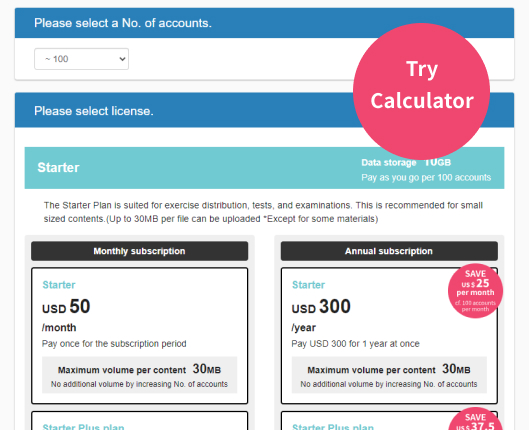
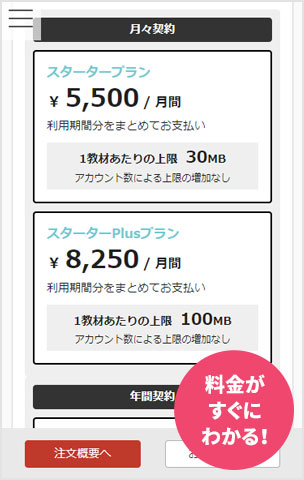
If you’re considering implementing or switching to an e-learning system, you’re probably not alone in feeling overwhelmed by the sheer number of options available and unsure of which one to choose. In recent years, many e-learning systems have emerged, each with different features and pricing structures. When comparing and evaluating these services, cost is naturally a major concern. In this article, we’ll cover the pricing of e-learning systems—the information HR and training managers are most interested in. We hope this serves as a helpful reference as you select an e-learning system. Table of Contents 01 Types and Costs of E-Learning Systems Types of E-Learning Systems E-Learning System Pricing 02 Key Points for Comparing E-Learning Systems Features Usability Support System Implementation Track Record 03 Price Comparison of Cloud-Based E-Learning Systems Types of E-Learning Services Price Comparison of the Top 5 Providers 04 If You Want to Try an E-Learning System , We Recommend learningBOX 05 Summary Types and Costs of E-Learning Systems While the term “e-learning system” covers a wide range of solutions, their delivery models and pricing structures vary significantly. Here, we’ll first examine the types of e-learning systems and their typical costs. Types of E-Learning Systems E-learning systems can be broadly categorized into two types. One is the “on-premises” type, which is built on the company’s own servers, and the other is the “cloud-based” type, which utilizes systems hosted on the service provider’s servers. Development and setup costs for on-premises systems are said to run into the millions of yen, and cloud-based systems have now become the mainstream. E-Learning System Pricing Here, let’s look at the costs of cloud-based e-learning systems. First, regarding initial costs, amounts ranging from 0 yen to around 200,000 yen are common. Recently, many services with zero initial costs have emerged, which is a point to consider when comparing options. The cost structure for e-learning systems is typically based on monthly or annual fees, depending on the service details and number of users offered by each provider. For example, the most common price range seems to be around 30,000 to 60,000 yen per month for up to 100 users, and around 50,000 to 80,000 yen per month for 200 users. Calculated per user, this comes out to 250 to 600 yen per month. Back to Table of Contents Key Points for Comparing e-Learning Systems While cost is important when comparing e-learning systems, there are several other points you should consider. Let’s go through them one by one. Features Depending on your implementation goals, if you plan to use the system for new employee training, you’ll need features such as progress tracking and communication tools like chat for easy Q&A. Additionally, if you plan to use it for compliance training, you should check whether it includes features like notification emails and surveys. By clearly defining your implementation goals, you can identify exactly which features your company needs. Usability If the system is complex or difficult to understand, it places a significant burden on both users and administrators, which can lead to decreased motivation. It is also important to ensure the system supports multiple devices so it can be used on tablets and smartphones. By choosing a user-friendly system that even those with limited IT literacy can use easily, you can lower the barriers to implementing an e-learning system. Support System It is crucial to ensure that adequate support is available should any questions or issues arise, from implementation through to operation. Be sure to verify what specific items are covered by the support, as well as the methods of contact, such as phone or email. Implementation Track Record: When comparing options, you may want to refer to metrics such as the “number of client companies” or “number of users” published by each provider. Some providers showcase actual implementation case studies; reviewing examples from companies in the same industry or facing similar challenges can help you find the service best suited for your organization. Back to Table of Contents: Cloud-Based e-Learning Price Comparison We’ve covered the key points for comparing e-learning services. Here, we’ll introduce the types and detailed costs of cloud-based e-learning services, which are currently the mainstream option. It’s best to choose a service that suits your company after carefully comparing your options. Types of e-Learning Services Cloud-based e-learning services can be broadly divided into two categories: subscription-based services, where you pay a monthly fee to access pre-prepared training content, and services that provide only an LMS platform, allowing you to use your own original training materials. For subscription-based services, prices typically range from around 500 to 1,500 yen per user, while for services that provide only the LMS platform, prices typically range from around 200 to 600 yen per user. Price Comparison of the Top 5 Providers Here, let’s compare the prices of various companies that actually provide e-learning systems. Since each company has its own areas of expertise, please use this as a reference to identify the service that best suits your company. *Based on the Standard Plan (annual contract). This comparison covers Companies A and B (subscription-based) versus Companies C and D (LMS platform only). Even when comparing just these five, you can see that their features differ. E-commerce functionality refers to the ability to sell and manage learning content created within the e-learning system. Back to Table of Contents If you want to try an e-learning system, we recommend learningBOX. In this section, we’ll introduce the pricing for our e-learning system, “learningBOX,” which is frequently asked about. learningBOX offers six standard licensing plans. The most affordable Standard Plan costs 33,000 yen per year for 100 accounts (27.5 yen per user). The popular Standard Plan costs 99,000 yen per year for 100 accounts (82.5 yen per user). We also offer a Free Plan that lets you try the same features as our paid plans at no cost (up to 10 accounts, no time limit, excluding paid optional features), so please give it a try. Click here for details on our pricing plans. Additionally, learningBOX’s content distribution service, “learningBOX ON,” provides access to corporate training content supervised by experts (such as harassment prevention and compliance training). With free content available, you can reduce the cost and effort of creating your own training materials. Back to Table of Contents Summary Since there are many types of e-learning systems, it is important to consider various factors—not just cost—when comparing different providers’ services. It is advisable to clarify your company’s objectives for implementation and compare specific e-learning systems while considering each provider’s features, based on key points such as what specific functions are required, whether off-the-shelf course content is needed, and cost considerations. We hope this article helps you select the service that best suits your company. ▼Recommended! Related Articles Return to Table of Contents
microlearning

Learning in Skilled Time [Microlearning].

Learning in Your Spare Time: [Microlearning] Hello! I’m Kinoshita from the CS team, and lately I’ve started preferring fish over meat. The theme of this first, milestone post is “microlearning,” a current trend in education. Table of Contents 1. What is Microlearning? 2. Three Benefits of Microlearning 3. Summary 1. What is Microlearning? Microlearning refers to a style of learning where you use mobile devices to easily access short learning modules. Each session typically lasts between 3 and 10 minutes. Traditional learning typically involved sessions lasting 30 minutes to an hour or more, and the standard approach was to set aside a block of time to study at home on a PC. In contrast, microlearning allows you to study during your commute to work or school, in between household chores, or during spare moments before a part-time job. It’s a learning style well-suited for modern people who lead busy lives and can’t find long blocks of time. By the way, YouTube—which I love—is also a form of microlearning. It’s full of video content that plays in 5 to 15 minutes, making it the perfect entertainment for those spare moments (lol) Three Benefits of Microlearning: Learning by Utilizing Spare Moments Since microlearning consists of short learning modules (3–10 minutes), it allows you to study during spare moments such as commuting, breaks, or gaps in your schedule. Unlike learning that requires a significant block of time, its key feature is that it allows you to tackle learning easily. Combined with mobile devices (M-learning), this eliminates time and location constraints, which is a major advantage. Building a Learning Habit Since each lesson is short, the barrier to continuing your studies is low, making it easier to develop a consistent learning habit. By using our learning management system, learningBOX, you can divide each learning module into short units, allowing learners to repeatedly study specific units—such as those they find interesting or challenging. Additionally, by combining this with the performance management feature, you can analyze trends in each learner’s areas of difficulty. Easy Creation and Updates Creating a module that takes about an hour to complete requires significant effort, whereas creating a short module of about 10 minutes is much simpler. Furthermore, short modules are easier to update. For example, breaking down a large module like “Taxation” into smaller modules such as “Consumption Tax” allows for quicker updates when tax rates change. 3. Summary Microlearning can be considered a learning method well-suited to modern society. The reasons for this include “learning that utilizes spare moments,” "making learning a habit," and "easy creation and updating of materials." With the advent of 5G technology, we can expect microlearning utilizing mobile devices to advance even further. If you feel there are challenges in how you conduct employee training or distance learning, we recommend incorporating a microlearning system.

Want to learn more about learningBOX?

Speak with an Expert

Book a demo

Discover Rich Features

Download

Try it out