learningBOX

155 articles
learningBOX

Studying is a luxury!

Hello! This is Kadota from the System Development Department! Our office moved on September 2, 2019! Since then, I’ve started commuting by bike. For those of you who aren’t getting enough exercise, I highly recommend commuting by bike! Anyway, this time I’ve written an article on the grand theme of “learning.” Please be sure to check it out! Before getting into the blog, let me announce the upcoming trade show taking place this month from Wednesday, September 25 to Friday, September 27! We will be exhibiting at the Education IT Solutions (Kansai EDIX) trade show at Intex Osaka from Wednesday, September 25 to Friday, September 27, 2019! ▼Click here for details We’re currently making steady progress with our preparations! We plan to hold mini-seminars on the day of the event. It will also be an opportunity for our staff to demonstrate our products firsthand, so please come visit us! We’re also accepting requests for complimentary tickets, so if you’re interested, please check out the 3rd [Kansai] Education IT Solutions EXPO at Intex Osaka. Our entire staff looks forward to seeing you there! Now, back to the blog! Table of Contents: 1. Rethinking the Basics: What Is Studying? 2. Why Do We Study? 3. Is Studying a Luxury!? 4. There Are Countless Study Methods 5. Summary Rethinking the Basics: What Is Studying? "Studying is important." I don’t think anyone would disagree with that, would they? In this era of "100-year lifespans" and rapid change, we need to keep studying even as adults. So, what exactly is "studying"? I took a moment to think about it again. According to the "Kojien" (6th edition): ① To apply oneself diligently. ② To learn academic subjects or skills. To learn through various experiences. “To study math,” “Everything requires study.” ③ To sell goods at a low price. “I’ll give you a discount on the price.” Three meanings have been listed, but this time I’d like to discuss ① and ②. First, ① “To apply oneself with all one’s might.” Simply put, this means “to try one’s best.” Next, ② “To learn academic subjects or skills. To learn through various experiences.” “To study math,” “Everything requires study.” This brings to mind images like “going to school,” “taking lessons,” or “a new employee learning the ropes.” Both meanings feel just like how we use the word in everyday life. Why do we study? “Why do I have to study?” I’m sure everyone has thought this at least once. For children and students, common reasons include “so I won’t have trouble when I grow up,” “to get into a better school,” or “because I can’t get a job without studying.” For adults, reasons include “because it’s necessary for work” or “to get a certification.” There are also various other reasons, such as “to make my dreams come true” or “to enjoy my hobbies more.” Although the wording differs, the reasons listed above share a common thread. That is, “to grow beyond who I am now and lead a better, more enjoyable life.” When we’re children, our reasons are often dictated by adults rather than our own will. On the other hand, for adults who continue to study, aren’t their reasons mostly self-motivated? (It’s hard to keep studying just because someone tells you to, isn’t it?) There are also many seniors who maintain their curiosity and take on new challenges even as they age. When you think about it this way, self-motivated study has such positive and wonderful reasons behind it. Is Studying a Luxury!? This brings us back to the title: don’t you think being in a situation or environment where you can study is a tremendous privilege? To take an extreme example, in the midst of war or a natural disaster, studying is the last thing on anyone’s mind, isn’t it? Philosophy flourished in ancient Greece because the city of Athens held immense power in the region, and because it was peaceful and people had time to spare—in other words, they were idle. (You’ve heard of Plato, Socrates, and Aristotle, haven’t you?) Also, if a family is poor and struggling to put food on the table, it’s easy to imagine a situation where they’d say, “Forget school—get to work!” In Japan during the period of rapid economic growth right after the war, workers who had only graduated from junior high school were called “golden eggs,” and that was the norm. Since then, as Japan’s economy has grown, the rates of students advancing to high school and college have been steadily rising. Nowadays, you might think that “going to cram school” or “going on to high school” is a given, but of course, these things come with costs. Typically, students go to school using money their parents have worked hard to earn, but I don’t think it’s a small amount by any means. According to the 2016 Ministry of Education, Culture, Sports, Science and Technology Survey on Children’s Educational Expenses, “the annual cost of attending a public high school (full-time) is approximately 451,000 yen.” Given this, it’s fair to say that having the opportunity to study is a great privilege and a luxury. There are countless ways to study today. While studying is such a luxury, in modern times there are various methods available beyond just attending school. However, it’s tough for busy working adults to go to a classroom after work, isn’t it? So, isn’t there a better way? That’s where “e-learning” comes in. Thanks to the widespread use of computers, smartphones, and tablets, e-learning has become much more accessible than ever before. By making good use of e-learning, you can utilize small pockets of free time—such as short waits or commutes on the train—to study efficiently. And of course, our company’s learning management system, “learningBOX,” is one such e-learning solution. It’s perfect for individual use, of course, but it’s also ideal for corporate training or cram schools, allowing you to distribute materials and resources to large groups while managing students and their grades. Best of all, you can try “learningBOX” for free. We hope you’ll create an account to give it a try and use it to help with your studies and skill development. ▼Register here Summary We’ve taken a moment to reflect on the act of studying—what did you think? Being able to study is a blessing. We hope you’ll make full use of our e-learning system, “learningBOX,” and that it contributes to your personal growth, even in small ways. And to corporate training and HR managers, as well as education professionals, who believe, “We want our employees and staff to grow and lead better, happier lives!” “learningBOX” is offered at a price point that makes it easy to implement, even for companies that have previously felt e-learning systems were too expensive and difficult to adopt! We also offer a free plan with no time limit, so please take this opportunity to sign up. ▼Register here Thank you for reading to the end. [Exhibition Announcement] We will be exhibiting at the Education IT Solutions (Kansai EDIX) at Intex Osaka from Wednesday, September 25 to Friday, September 27, 2019! ▼Click here for details We are currently making steady progress with our preparations! We plan to hold mini-seminars and other events on the day of the exhibition. It will also be an opportunity for our staff to demonstrate the system in action, so please consider visiting us! We are also accepting requests for complimentary tickets, so if you’re interested, please check out the 3rd [Kansai] Education IT Solutions EXPO at Intex Osaka. Our entire team looks forward to seeing you there!


You can create a free trade show web survey!

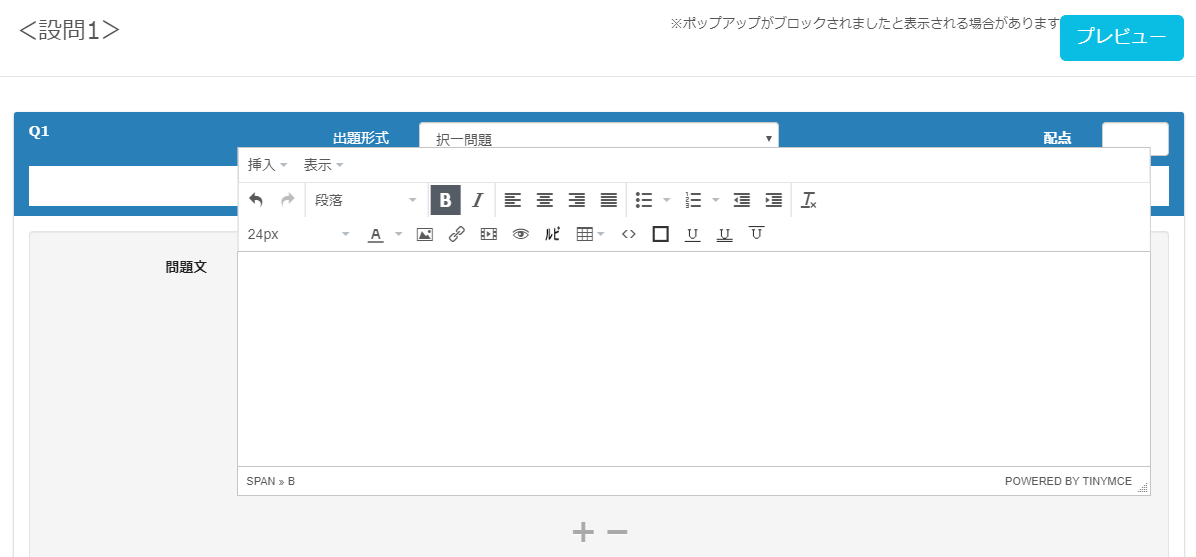
Create Free Online Surveys for Trade Shows! Hello! This is Mei from the Shanghai Development Branch! 🐼 In this article, I’ll show you how to use learningBOX to create online surveys that you can use at trade shows. To turn your trade show participation into tangible results, does your company conduct surveys for visitors? And are you struggling with the time and effort required to create, print, distribute, revise, and tabulate paper surveys? In this article, I’ll show you how to create web surveys that are easy to build and tabulate using our learningBOX. Our goal with this post is to encourage you to sign up for a free learningBOX account—starting with the survey creation feature—and to encourage you to expand its use to your company’s internal training, utilizing learningBOX as a way to transition your training to e-learning! Table of Contents: 1. Let’s create a free administrator account 2. Let’s Create a Web Survey for Trade Shows 3. Let’s Conduct the Survey 3. Let’s Tabulate the Survey Results 4. Summary Let’s Create a Free Administrator Account To create a web survey, you need a learningBOX administrator account. If you don’t have an account yet, you can sign up for a free learningBOX account here.   Let’s create a web survey for trade shows Step 1: First, click “Content Management” in the side menu. Step 2: Click the “+” button to create a survey. Step 3: In the survey creation form, enter the title, description, and questions.   *With the learningBOX survey feature, you can choose from the following question types: ● Single-choice ● Multiple choice ● List selection ● Single-line text ● Multi-line text. Once you’ve created, saved, and published your survey following these steps, the setup is complete. Published content can be answered from the learning screen.   Let’s conduct a survey. Surveys can be answered on tablet devices such as iPads. On an iPad, the display will look like this. *If you collect personal information through a survey, please ensure full compliance with the Personal Information Protection Act. Let’s compile the survey results. ① From the “By Question” screen in the Grade Management section, click on the “Exhibition Web Survey” you just created.   ② Click “Create Response Summary CSV” on the survey question details screen to download the survey results in CSV format. ③ The CSV will be output as shown below. Summary We have introduced a simple method for creating web surveys using learningBOX. Using our learningBOX, you can create a survey in just a few simple steps. By utilizing web surveys, there is no need to print, distribute, or collect paper response forms. You can also expect to reduce costs associated with printing paper forms. Survey data not only helps improve your company’s services and products but also serves as a catalyst for product development and improvements based on customer feedback, leading to better customer service. Of course, we also encourage you to experience the core features of our e-learning system, such as registering learning materials, setting up courses, distributing courses, and managing grades. We hope that creating a web survey will inspire you to sign up for a free trial and utilize learningBOX for your company’s internal training as well. If you are interested, please feel free to sign up for a free trial of learningBOX. Thank you for reading this article.
LMS Open Source

What is open source moodle for e-learning?

What Is Moodle, the Open-Source e-Learning Platform? Hello everyone! This is Ueda from CS. August is flying by, and September is just around the corner. I really hope this heat wave passes quickly! Now, I’d like to briefly discuss the open-source e-learning platform Moodle. Before I begin, I’d like to explain what “open source” means. Open source refers to the philosophy of making the source code—the computer program written in a human-readable programming language—widely available to the public, allowing anyone to use it freely. It also refers to the software released under this philosophy. ➡Quoted from the IT Glossary: Pros and Cons of Moodle There are several open-source LMS options available, but in this post, I’ll compare the pros and cons of Moodle, which has a relatively large user base. The biggest advantage is that it’s free to use. This allows you to reduce implementation costs. It also offers a high degree of flexibility, allowing you to customize it to your specific needs. Furthermore, under the GPL license, users are free to download, modify, and even redistribute it!! As for the disadvantages, when setting up Moodle, using a shared hosting server may not guarantee a stable operating environment, and if you set up and operate your own server, technical knowledge of servers is required. Additionally, since the support system is not fully established, maintenance costs may rise if issues such as bugs occur. Many people also find creating course materials and configuring the system to be difficult. ▼Click here for more details on Moodle▼ E-Learning - About the open-source Moodle About our service, the LMS learningBOX Our service, learningBOX, is a cloud-based LMS. Unlike open-source LMSs like Moodle, it does not require you to build the system in-house. learningBOX is designed for ease of use, and one of its key strengths is that even first-time e-learning users can operate it with ease! You can use it for free with up to 10 accounts with no time limit, allowing you to try out nearly all features before a full-scale implementation. Additionally, plans for 11 to 100 accounts start at just 30,000 yen per year! ➡ Learn more about pricing plans It’s packed with features, making it easy to create and manage content, organize members into groups, and track grades. You can create and upload 12 different types of content, including quizzes, tests, flashcards, PDFs, videos, surveys, and reports. If you’re considering implementing an LMS, we highly recommend giving our free plan a try! Our customer support team is fully committed to assisting you before and after implementation!! Summary What did you think? There are various types of e-learning formats, and within each, there are many different systems. Each has its own advantages and disadvantages, and the best system for you will depend on your specific operational needs. We hope this serves as a helpful reference for those considering implementation. Please find the system that’s best for you! ♪ ▼Exhibition Announcement!▼ [September 25 (Wed) – September 27 (Fri), 2019] We will be exhibiting at the 3rd [Kansai] Education IT Solutions EXPO at Intex Osaka!

About the video capacity of the Standard Plan

About Video Storage Capacity in the Standard Plan This is Kinoshita from the CS Implementation Support Team. The long-awaited Obon holiday is almost here! Have you made your plans yet? There are so many fun things to do, like going to the beach, having barbecues, and watching fireworks displays! My plan for Obon is to study for the Basic Information Technology Engineer Examination for a set amount of time every morning. I’m determined to pass this time… Let’s keep moving forward toward our goals every day!! Today’s Topic: In this article, I’ve compiled answers to questions we frequently receive from customers regarding the video content capacity of the Standard Plan. One of the benefits of video learning materials is their ability to convey content and nuances that simply can’t be fully expressed through text alone. We recommend our Standard Plan to customers who want to make full use of video materials and are primarily considering video-based learning. However, there is one important point to note here. You cannot upload video materials without restrictions. So, exactly how much video data can you upload? Table of Contents 1. Frequently Asked Questions: How many videos can I upload? 2. FAQ: What is the upload limit per video? 3. What if...?: The video exceeds 500MB 4. Summary FAQ: How many videos can I upload? With the Standard Plan, a 100-account subscription provides a total storage capacity of 100GB. For those who might be confused by the sudden mention of "100GB," here is an explanation of video file sizes. For the Standard Plan ▼Upload limit for 500MB video lessons 1GB = approx. 1,000MB 100GB = approx. 100,000MB (Total) 100,000 MB ÷ 500 MB (limit per video) = 200 videos *If you are uploading only video lessons, you can upload up to 200 videos with a 100-account subscription. (However, the total capacity also includes accumulated data such as grade data in addition to the materials.) Frequently Asked Questions: What is the upload limit per video? So, how many minutes of video can you upload with a 500MB limit? To put it simply, since it varies depending on the video source material, we cannot answer exactly how many minutes of video you can upload!! While it’s true that playback time affects video file size, there’s another factor that has an even greater impact. The quality of the video—such as its picture and sound quality (bitrate)—has a significant influence. (→ What is bitrate?) Simply put, a video with a high bitrate = a video with high picture and sound quality → which means it will have a large file size. *If you need to upload a video that might be large (within the 500MB limit), you’ll need to split the original video into segments and upload them with shorter playback times per clip. But don’t worry—there are solutions! We’ll explain the steps below. What to do if...: The video file size exceeds 500MB Some customers may have questions such as, “What should I do if a course contains a video that exceeds the 500MB upload limit per course?” ▼There are two solutions to this problem. 1. Consider breaking it down into microlearning modules (though there may be cases where the original video content cannot be converted into microlearning) Microlearning refers to a style of learning where users can easily study short, bite-sized lessons on mobile devices. For example, let’s take a large-scale course like “Math” and break it down into smaller modules or chapters such as “Addition,” “Subtraction,” “Multiplication,” and “Division.” If you have a video titled “Math,” this means breaking it down into smaller, shorter learning modules—such as “Addition,” “Subtraction,” “Multiplication,” and “Division”—each lasting about 3 to 10 minutes. This approach helps reduce the video file size. Additionally, adopting a microlearning format offers three key benefits. If you’re interested, please also check out this article: Learning in Your Spare Time [Microlearning] 2. Compressing Videos Even videos that are one or two hours long can be compressed to under 500MB if done properly. Compression refers to adjusting the video to an appropriate quality level, as excessive quality unnecessarily increases file size. That’s why we’ve prepared a tool that anyone can use to compress videos easily. It requires no special settings and is ready to use immediately after download. For more details, please see here. The Easiest Way to Pre-compress Video Content Summary In this article, we’ve provided a brief overview of the number of videos you can upload and the file size limits under the Standard Plan. When using video tutorials, factors such as video and audio quality significantly impact file size. Please keep this in mind when uploading your video tutorials. Thank you for reading this article.
microlearning

Learning in Skilled Time [Microlearning].

Learning in Your Spare Time: [Microlearning] Hello! I’m Kinoshita from the CS team, and lately I’ve started preferring fish over meat. The theme of this first, milestone post is “microlearning,” a current trend in education. Table of Contents 1. What is Microlearning? 2. Three Benefits of Microlearning 3. Summary 1. What is Microlearning? Microlearning refers to a style of learning where you use mobile devices to easily access short learning modules. Each session typically lasts between 3 and 10 minutes. Traditional learning typically involved sessions lasting 30 minutes to an hour or more, and the standard approach was to set aside a block of time to study at home on a PC. In contrast, microlearning allows you to study during your commute to work or school, in between household chores, or during spare moments before a part-time job. It’s a learning style well-suited for modern people who lead busy lives and can’t find long blocks of time. By the way, YouTube—which I love—is also a form of microlearning. It’s full of video content that plays in 5 to 15 minutes, making it the perfect entertainment for those spare moments (lol) Three Benefits of Microlearning: Learning by Utilizing Spare Moments Since microlearning consists of short learning modules (3–10 minutes), it allows you to study during spare moments such as commuting, breaks, or gaps in your schedule. Unlike learning that requires a significant block of time, its key feature is that it allows you to tackle learning easily. Combined with mobile devices (M-learning), this eliminates time and location constraints, which is a major advantage. Building a Learning Habit Since each lesson is short, the barrier to continuing your studies is low, making it easier to develop a consistent learning habit. By using our learning management system, learningBOX, you can divide each learning module into short units, allowing learners to repeatedly study specific units—such as those they find interesting or challenging. Additionally, by combining this with the performance management feature, you can analyze trends in each learner’s areas of difficulty. Easy Creation and Updates Creating a module that takes about an hour to complete requires significant effort, whereas creating a short module of about 10 minutes is much simpler. Furthermore, short modules are easier to update. For example, breaking down a large module like “Taxation” into smaller modules such as “Consumption Tax” allows for quicker updates when tax rates change. 3. Summary Microlearning can be considered a learning method well-suited to modern society. The reasons for this include “learning that utilizes spare moments,” "making learning a habit," and "easy creation and updating of materials." With the advent of 5G technology, we can expect microlearning utilizing mobile devices to advance even further. If you feel there are challenges in how you conduct employee training or distance learning, we recommend incorporating a microlearning system.

E-learning learning that can be used in schools [Part 1]

E-Learning for Schools [Part 1] Long time no see! This is Kitakoka from the Marketing Department 🍎. We’ve entered the final week of June. The weather has been unstable across the country, and with drastic temperature fluctuations in some regions, many of you may be feeling under the weather. The hot summer is just around the corner! Once again, I’ll do my best to share e-learning resources useful for school education with you all through learningBOX! If you’re interested in e-learning but aren’t sure how to apply it in practice, this article is for you! Let’s use this post as a guide to explore how to use and implement e-learning together. Table of Contents ------ [Part 1] Here’s what we’ll cover this time!------ 1. Unraveling the Concept Through Examples 2. Setting Goals 3. Let’s Create Learning Materials 4. Organizing by Subject ------[Part 2]----- - 5. Registering for a learningBOX Account 6. Group Settings 7. Grading Settings 8. Summary Unraveling the Mystery Through Example Scenarios In this installment, let’s use the hypothetical example of “Mr. Taro Tatsuno,” a social studies teacher at a junior high school, to explore how e-learning can be effectively utilized in educational settings. In this article, we’ll use teachers’ concerns and student instruction methods as practice exercises for e-learning! Basic Information Taro Tatsuno: Teaches social studies to third-year students Taro Tatsuno’s PC Skills: Basic computer skills—limited to gathering information online. No programming knowledge; computer skills are limited to creating materials using Word, Excel, and PowerPoint. Taro Tatsuno’s Concerns: ① Significant variation in test scores across classes ② It is practically difficult to provide personalized instruction for each student ③ Creating materials for lessons and tests consumes a great deal of effort, which consumes the majority of his work time. ④ There is significant pressure and high expectations from parents. ⑤ Students show little interest in social studies and have low motivation to learn. I believe many teachers in the field face these kinds of challenges. Teachers are expected to produce results (academic performance) within a limited timeframe, and the burden of “duties and responsibilities” placed on a single teacher is high. I believe many are carrying out their daily duties while enduring physical and mental strain. Beyond teaching students, teachers must handle non-curricular tasks, school events, and relationships with parents. Given their position, they often find themselves caught in the middle, forced to adopt a humble stance. Those who also oversee club activities or serve as homeroom or grade-level teachers likely lead even busier lives. Based on Taro Tatsuno’s concerns, let’s explore how to create a learning environment that reduces teachers’ workload through e-learning while boosting students’ motivation. Let’s get started with e-learning together using our learningBOX! Goal Setting Mission ① Improve students’ knowledge and motivation to learn ② Propose study methods tailored to each student’s level ③ Reduce the time spent creating materials ④ Gain the trust of the school and parents ⑤ Foster an interest in social studies through e-learning Let’s get started right away by designing a plan in learningBOX that meets all of the above conditions (①–⑤). Let’s Create Learning Materials When trying to create learning materials under the broad umbrella of “social studies,” the scope is so broad that it’s hard to know where to start. Narrow down the scope and genre when creating materials, then gradually expand the scope while improving the quality of the content. Recommended Procedure for Creating Questions: • Start by dividing the content into sub-topics, intermediate topics, and main topics. ・Once you have accumulated a number of sub-topic questions → Organize the information by medium-level topics (groups/categories). ・Once you have enough medium-level topics → Divide them into major topics to complete the structure. Conceptual diagram Let’s actually create teaching materials using learningBOX Major topic: Social Studies Medium topics: ① History, ② Geography, ③ Civics… etc. Subtopics: ①-1 Japanese History, ②-1 Japanese Geography, ③-1 Structure of Japanese Society... etc. Here are the quizzes we created: 10 questions on Japanese history → History Questions 10 questions on Japanese geography → Geography Questions 10 questions on Japanese society → Social Studies Questions Comprehensive Questions → Comprehensive Questions Test questions similar to actual exams → Test * Click here to see the difference between Normal Mode and Master Mode Features of learningBOX ① Easily create questions using Excel or text files. We recommend the "Question Creation Form" for first-time users. ② Versatile question formats. ③ You can insert images and videos. ④ You can embed URL links in explanations. ⑤ By utilizing optional features, you can conduct tests that closely resemble the actual exam. ▼ The quiz creation feature offers a wide variety of quiz types and robust functionality. ▼ You can also use the section feature and embed videos. Organize by subject Organize the learning materials you’ve created into folders. Learning control features to assist with course design You can set prerequisites using the content feature’s constraint bar. There are two types of prerequisites: either completing all questions and materials above the prerequisite, or passing all questions and materials above the prerequisite. *Using this prerequisite bar allows learners to proceed efficiently through the learning process step by step. Limiting the Number of Attempts to Suit Your Goals By setting a limit on the number of attempts, you can restrict learners to a specific number of tries. This significantly boosts focus and concentration—elements that are often hard to maintain in regular classroom settings! Assigning Materials by Group You can assign specific learning materials to each group based on the students’ skill levels! Summary of Part 1: Since this is getting rather long, I’ll wrap up here for now. In Part 1, based on Taro Tatsuno’s concerns, I used learningBOX as an example to explain how to propose learning methods, create materials, and categorize questions for use in e-learning. What did you think of the e-learning approach using learningBOX that I introduced today? Wasn’t it a fresh, new way of studying, different from the textbooks, notebooks, and worksheets currently used in schools and educational settings? Study methods will surely continue to evolve rapidly with the times. The “quality of education, flexibility in teaching methods, and education adapted to the times” that we seek and are expected to provide may have entered a turning point. In Part 2, I’d like to discuss in detail how to manage grades and register students based on the learning environment created with learningBOX. I’ll also delve deeper into operational methods and cost considerations—topics that often concern people when starting e-learning. If you’ve been interested in e-learning but haven’t been able to take that first step, or if you’ve been on the verge of giving up because the process seemed too complicated—let’s turn those worries into excitement with our learningBOX!! I look forward to seeing you again in the second part! Thank you for reading.
learningBOXver27

learningBOX has been upgraded to version 2.7

Thank you very much for your continued use of the learningBOX e-learning creation system. Today, learningBOX has been updated from Version 2.6 to 2.7. In this article, we will provide a detailed overview of Version 2.7.4 (released on June 12, 2019), which includes a variety of new features.   About This Update In addition to standout new features such as the "Student Profile" and "Tagging" functions, this update includes numerous improvements to existing features like "Fill-in-the-Blank Notes" and "Member Management." Let’s take a closer look at the updates in the 2.7 series. Tagging Function "Making learning more adaptive." By categorizing questions using the tagging feature, you can identify patterns in learners’ performance that are difficult to discern from scores alone. By pre-assigning tags to questions, you can analyze each individual’s areas of weakness and strength. The "Medical Record Feature" below displays performance analysis based on these "tags." Student Profile Feature “Check Learning Progress” The Student Profile feature allows you to see how much each user studies daily and how far they have progressed. This enables you to grasp each learner’s progress and provide more adaptive support. Other New Features and Improvements Enhanced Email Notification Features • You can send email notifications for "Announcements" displayed on the My Page. • You can send bulk emails to learners who meet specific criteria filtered from the performance management screen. Certificates ・You can customize certificates with your own design. ・You can view a list of certificates. Fill-in-the-Blank Notebooks ・You can mark items as "memorized." Member Management ・Reissue invitation email function ・Account expiration date function Content Management, Additions and Improvements to Various Features ・PDF printing restriction function ・Right-click copy function ・ Attached Learning Materials ・Enlarged input fields for web pages and fill-in-the-blank worksheets Dedicated Server While this new feature is primarily intended for customers with customization or optional service contracts, we have added and improved various e-commerce features. Additionally, to support companies with their own institutional systems, we now offer API integration for login and grade results. Other For detailed instructions or if you have any questions, please contact our CS Sales Team. ● Contact Form We will continue to listen to your feedback and work on improving features to make your experience even more enjoyable. We appreciate your continued support of learningBOX and QuizGenerator.
VR Education

VR Technology Advancing in the Field of Education [e-Learning in the World].

VR Technology Advancing in Education [Global e-Learning] Hello. This is Motoki from the Marketing Department—I’m a fan of hard-boiled eggs for breakfast. Thanks to your support, this marks the sixth installment of our [Global e-Learning] series. We’ve covered a variety of topics so far, including adaptive learning and MOOCs, but today I’d like to discuss “VR,” a cutting-edge technology in American EdTech and e-learning services. Table of Contents 1. What is VR? 2. Applications in Education 3. Service Examples in the U.S. 4. Summary What is VR? The term “VR” has already become very familiar, but to explain it again, VR stands for “Virtual Reality.” Generally speaking, it is a technology that allows users to experience a virtual reality world by using displays or VR goggles to expand their field of view to 360 degrees. While VR is often associated with games and entertainment, it is highly compatible with education and has become one of the cutting-edge fields of Edtech in the U.S. ▼Image: Applications in Education In the field of education, VR is beginning to spread as a tool for making learning easier to understand and more enjoyable in areas that are difficult to express in books or are better understood through three-dimensional representations (such as STEM education and such as the shapes of human organs) where understanding is enhanced and learning becomes more enjoyable. In the U.S., the government has launched the "VR Education Project" to promote VR-based education, and there is a system in place to provide grants for the development of technology products designed for educational purposes. → U.S. Government’s “Ed Tech Developer’s Guide” (← All in English) Examples of Services in the U.S. Now, let’s take a look at some specific, representative services. First up is “Nearpod.” ▼ VR Experience on a Tablet Nearpod offers over 100 VR courses suitable for students from kindergarten through high school. Teachers can use these as teaching materials, and the platform also allows teachers to collect student responses and feedback during lessons. Since it is frequently used in classrooms, tablets are the primary device, and it appears to be used for viewing VR content as well as serving as a substitute for textbooks and notebooks. Next is “Zspace.” ▼ Demo Video (Even the sound of a heartbeat is included) “Zspace” (also known as “G-Space”) also offers a wide range of VR educational materials for students from elementary school through high school. A key feature is that by using a display device similar to a laptop and wearing special glasses, objects appear to be right in front of the user’s eyes. Additionally, users can freely manipulate these objects by operating a dedicated pen tool. Like Nearpod, VR goggles are not the primary focus here; this style likely emerged from a commitment to ensuring learners can comfortably engage in VR learning. As shown in the demo video, VR-based educational materials are particularly appealing for subjects where three-dimensional representations facilitate understanding (such as STEM-related topics, for example, the shapes of human organs), making learning both easier to grasp and more enjoyable. Summary Furthermore, VR technology is also being utilized in corporate training. Walmart, a major U.S. retailer, reportedly offers VR-based training programs to replace in-store hands-on training led by instructors. ▼Utilizing VR for Training As we’ve seen, VR is not only making strides in the entertainment sector but is also seeing significant adoption and growth in the field of education. When we think of STEM education, programming education might come to mind first, but as VR technology continues to evolve, it looks like it will help optimize education in science, technology, engineering, and mathematics. Now, everyone, regarding this “Global e-Learning” series, we’ve focused primarily on the U.S. so far, but with this installment, the U.S. segment will come to a temporary close. Where will we go next—China? Europe? Asia? I’m a bit worried, but I’m also looking forward to it. Thank you for reading. *Reference: The Future Transformed by Edtech, Author: Masahiro Sato
evolutionofedtech

The Evolving Edtech Services of the United States [eLearning in the World]

Evolving Edtech Services in the U.S. [e-Learning Around the World] Hello. I'm Motoki, a breakfast person and in charge of marketing. Thanks to your support, this is the fifth installment of the "e-Learning Around the World" series. In the last issue, we introduced the impact of adaptive learning on the field of school education. This time, we would like to talk about the impact of Edtech on companies in the U.S. and its movement. Table of Contents 1. Diffusion and evolution of e-learning and Edtech in the U.S. 2. Examples of Edtech services in the business field 3. There are limits to what can be done in terms of employee education and human resource development through group training, and this has inevitably led to the spread of e-learning and edtech services. As a result, along with the spread of the Internet, e-learning and Edtech services have been evolving as a means of corporate human resource development. Recently, e-learning and Edtech services are increasingly being used not only for corporate human resource development, but also as a part of employee benefit programs to attract human resources. Let's take a look at some of the most popular Edtech services for business. First is LinkedIn, a social networking service for business people. LinkedIn has acquired Lynda.com, an online learning service. With this acquisition, the social networking service is now mixed with online learning history information. On LinkedIn, users disclose their business profiles, including where they work, job title, industry, skills, and education. Now, Lynda.com's learning information (user's course history and certificates of completion) can be mixed and matched with these profiles, making it possible to find users' talent and skill preferences through the social networking service. This allows users to make a better use of human resources within their companies, as well as to make a better decision when recruiting and collaborating with others. This service is unique to the United States, where human resources are highly mobile. The Emergence and Spread of e-Portfolio I would like to go into a little bit about the learning history information introduced in LinkedIn. In the U.S., IT has been used to store and accumulate learning history, and so-called "e-portfolios" seem to be utilized for employment and higher education. For example, the contents and results of students' research at university are compiled in an e-portfolio, and university students use the e-portfolio to promote themselves to companies for job hunting, which in turn is used by companies as material for internships and recruiting human resources. Portfolium" is one of the e-portfolio platform services. This one is being used by universities and is helping to improve the skill level of students. IT will change the way people find jobs, change careers, and enter higher education by converting more concrete information such as learning history into data, instead of formal information such as resume and academic history. In summary, e-learning and edtech services are evolving and spreading due to the large land area of the U.S. and the presence of numerous global companies. In addition, the base of Edtech services is expanding as online education and its learning history are connected to existing IT services such as SNS, and platform services focusing on learning history management are appearing. We have learned that the impact of Edtech services is significant, not only in learning, but also in changing the way people go on to higher education and find employment. From the next issue onward, I would like to touch on cutting-edge technologies in e-learning and edtech, such as VR. Thank you for reading to the end!

The Spread of Adaptive Learning [World eLearning]

The Spread of Adaptive Learning [e-Learning Around the World] Hello, my name is Motoki, and I am in charge of marketing. This is the third installment of the popular (in my opinion) "e-Learning Around the World" series. Continuing on from the story of flipped learning and MOOCs, this time I would like to talk about "adaptive learning," a keyword that is gaining more and more presence in e-learning every day. Table of Contents 1. What is adaptive learning? Typical services 3. Key words to keep in mind 4. Summary What is adaptive learning? What does adaptive learning mean? If you look up "adaptive" in a dictionary, it means "adaptable, adapting. Adaptive learning is a learning method that uses artificial intelligence (AI) to provide learners with learning materials optimized for their academic ability according to their proficiency level. Simply put, it is a learning method that matches the learner's level. With the emergence and evolution of AI (Artificial Intelligence) technology, it is becoming popular in the field of education as a learning method that analyzes learning history data and provides learning content optimized for each individual student. To use a school example, until now, it has been common practice to assign homework and problems of the same level and content to all students in a class. Adaptive learning allows students to focus on areas in which they are weak or stumbling blocks and learn from the basics, or to excel in areas in which they are strong. In online shopping, there is a recommendation function that displays a list of recommended products based on product search history and purchase history, such as "Here are the products we recommend for you" or "Here are the products you buy together". It is similar to the same kind of image, isn't it? Anyway, when I think back to my childhood, I remember that if I was not good at a subject or a unit, I would go on and on without understanding it, and I would think to myself, "I wish this unit would hurry up and pass by! I remember thinking, "I wish this unit would hurry up and pass! I remember thinking, "I wish this unit would hurry up and pass! Let's take a look at some typical services. First, let's look at KNEWTON. The representative of adaptive learning is Knewton, an American company that appeared in 2008. Knewton is a service that specializes in adaptive learning. As an example, the completion rate of one math course prepared at Arizona State University increased by 171 TP3T, the dropout rate decreased by 561 TP3T, and 451 TP3T students completed the course four weeks earlier than scheduled. One of the features of the system is the use of web-based tests to recommend the next best learning content and assignments to learners, allowing both administrators, learners, and parents to understand where they are stumbling and where they can move on. Other adaptive learning offerings include: ●DreamBox Learning, an adaptive online learning site focusing on math and arithmetic. DreamBox Learning is an adaptive online learning site that focuses on math and arithmetic. There is also information that the site is actually being used as homework at schools. The Japanese site also has actual problems to solve. Adaptive Learning is likely to become one of the methods that will revolutionize learning styles as AI evolves and spreads in the future. Now, I would like to introduce some terms related to adaptive learning that you should be aware of. I will provide more detailed information on each of these terms in a later article. Here is a quick introduction. As the digitization and ICT of education progresses, much of the learning data that used to be paper-based can now be obtained by converting it into data. Although the use of this data requires a sophisticated approach called data science, it is data that will change the nature of education as a whole, not only for children but also for adults. ● Learning Analytics (Learning Aanalytics) The data analysis approach to learning using educational big data mentioned above is also very important. The analysis and measurement using learning analytics to utilize learning data that can be obtained through the digitalization of education, such as various types of e-learning and MOOCs, is likely to attract even more attention in the future. This is a recommendation function to support learners by utilizing educational big data and learning analytics. This function is familiar from e-commerce (EC), but in the case of education, it is likely to be even more useful. For example, we can expect various things such as recommended learning contents to overcome individual weak points or learning contents recommendation utilizing learner's attribute data (age, gender, hobbies and preferences). Conclusion Just as big data is driving change in various industrial fields, the education field will be transformed in the same way: digitalization of education → big data → evolution and spread of adaptive learning. In this article, I have used the example of adaptive learning in the U.S. and introduced some related terms. In the next issue, I would like to take an even sharper look at e-learning around the world. In the next issue, I would like to take an even sharper look at e-learning around the world. Thank you for reading to the end! Reference: Edtech will change the future Author: Masahiro Sato
Find more about learningBOX